






How to Choose a Bing Ads Agency Account Provider in Europe
Compare the websites of any six bing ads agency account providers and you will find the same vocabulary. Verified accounts. No spending limits. Priority approvals. Fast top-ups. Dedicated support. The language is so consistent across the category that it conveys almost nothing about how the businesses actually differ.
They do differ, substantially, but the differences sit in operational details that rarely appear on a homepage. This article sets out the criteria worth asking about, and then applies them to the main options available to European advertisers, including our own.
We have an obvious interest in the outcome. What we can offer instead of neutrality is accuracy: everything stated below about another provider comes from their own published material, and where a competitor is stronger than us on a particular criterion, that is recorded as well.
Why Choose a Bing Ads Agency Account Provider?
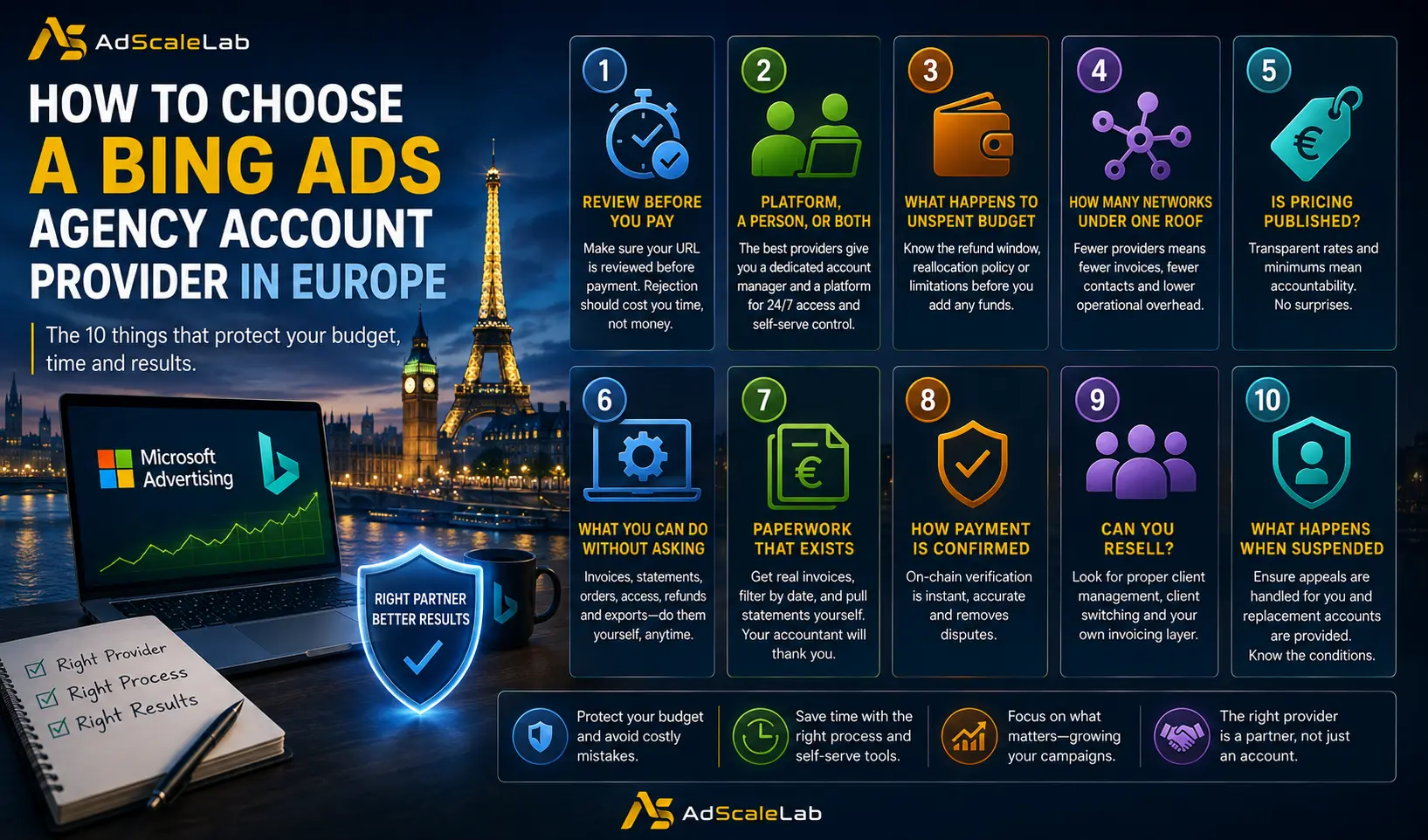
1. When your URL gets reviewed relative to when you pay
Every provider reviews your destination page before your ads can run. The commercially significant question is whether that review happens before or after money changes hands. Reviewed first, a rejection costs you an hour. Reviewed after, a rejection becomes a refund conversation with a business that already holds your money.
2. Whether you get a platform, a person, or both
Most of this market operates through account managers alone. You make contact, describe your requirements, receive a quote, agree terms, and an account is provisioned for you. That model works, and for an unusual vertical a person assessing your situation is genuinely valuable. What it does not give you is the ability to place an order at midnight, check a balance without asking, or pull your own statement.
The distinction worth drawing is therefore not platform against account manager. It is whether you get both. A named manager you can reach directly, and a platform that does not require you to reach them for routine work.
3. What happens to unspent budget
Funds sitting in a stopped account are the most common source of disputes in this industry. Some providers refund within a defined window. Some allow reallocation. Some do neither and say so only in their terms. Establish the answer before funding anything.
4. How many networks sit under one relationship
If you run Microsoft alongside Meta, native and other channels, the number of separate providers, invoices and points of contact you maintain is a real operational cost. A provider covering one or two networks means managing several relationships in parallel.
5. Whether pricing is published
Providers who publish commission rates and minimums are making themselves accountable to those numbers. Providers who quote privately retain flexibility, which sometimes benefits you and sometimes does not.
6. What you can do without asking anyone
Invoices, a running statement, order history, credential access, refund requests and data export are all routine tasks. Whether you can complete them yourself or must message someone determines how much of your week this relationship consumes.
7. Whether the paperwork exists at all
This sounds like a low bar and it is not. Several providers in this market have no invoicing system, which becomes a problem the first time an accountant asks for a quarter of records. Ask whether you get a per-order invoice, whether you can filter invoices by date, and whether there is a running statement you can pull yourself.
8. How payment is confirmed
Crypto payment is standard across this category. What varies is proof. Some providers ask you to send a screenshot and wait for a human to agree it looks right. Others verify the transaction hash on chain, which removes both the wait and the argument.
9. Whether you can resell
If you buy accounts on behalf of your own clients, ask whether the provider supports that properly, with a separate client list, client switching and your own invoicing layer, or whether you are expected to run everything through one login and keep track yourself.
10. What happens when an account is suspended
It will happen eventually. Ask specifically whether appeals are handled for you, whether replacement accounts are provided, and whether either is conditional on your spending tier.
The six providers
Everything below comes from each provider's own published material. Nothing is inferred, and where a competitor is stronger than us on a criterion, it is recorded as such.
1. AdScaleLab
Our own service, listed first because it is ours rather than because a neutral ranking put it there. Judge it against the criteria above like any other entry. The short version is that it runs both models at once. You get a named account manager, and you also get a platform that means you rarely need to message them even for Bing Ads Agency Accounts.
What you get:
- A named account manager, not a support queue. Every client is assigned a specific person, whose name, Telegram handle and email sit permanently in the dashboard sidebar. You are never working out who to contact, and you are not starting from scratch each time you explain your situation.
- URL review before you pay, in about thirty minutes. You submit the destination URL with its country, timezone, company and industry, and it goes to the supplier for a decision before any money moves. Their reasoning comes back to you either way. A rejection costs you half an hour instead of becoming a refund argument with a business that already holds your funds. Every URL you have ever submitted stays in a searchable history, so you know what has passed and what has not.
- A reserve wallet that sits between your accounts. This is the feature most worth understanding, because it changes how funding works. Reserve is a balance you hold with us rather than inside any single ad account. You can top it up, move funds out to a specific advertiser ID, pull them back, or buy your next account straight from it with no new transfer at all. When an account closes, whatever is left returns to reserve rather than evaporating, and it does not expire. In practice it means unspent Microsoft budget can become Meta budget the same afternoon.
- Payment verified on chain, not by screenshot. Top-ups are USDT on TRC20. You paste the transaction hash and the blockchain confirms it. There is no sending a screenshot to someone and waiting for them to agree it looks genuine, and the same transaction cannot be claimed twice.
- Buying several accounts without them becoming one blur. The purchase wizard takes you through network, supplier and quantity, then asks for the details of each account separately. Five accounts means five destination URLs, five nicknames and five timezones, not one set copied across all of them. Each also gets its own order number, which matters the day one of the five needs chasing and the other four are running fine.
- Real invoicing and a running statement. Every order generates an invoice. The invoice list filters by date, so pulling a full quarter for an accountant takes a moment rather than an email thread. A running account statement is available whenever you want it. This sounds like a low bar until you discover how much of this market has no invoicing at all.
- Credentials delivered in the dashboard. Whatever the network requires arrives in your account rather than in a chat message: account ID, login details, recovery email. Each field copies individually. Requesting platform access for a team member is a logged, auditable action rather than an informal favour, so there is always a record of who was given what and when.
- A reseller layer if you buy for clients. You get your own client list, the ability to switch between clients without logging out, your own invoicing on top of ours, and a branded portal. If your business is buying accounts on behalf of other people, this removes the spreadsheet you would otherwise be maintaining.
- Eleven networks under one login. Microsoft, Google, Meta, TikTok, Snapchat, Pinterest, Taboola, Outbrain, MediaGo, Twitter and AWS. One relationship, one balance, one set of records, rather than five providers and five invoices to reconcile.
- Self-serve signup with no sales call. Email and password, verified by a one-time code. You can be inside looking at what is actually available before speaking to anyone.
- Account closure you can request yourself. If you are finished with an account, request closure directly and any remaining balance moves to reserve rather than being written off.
- KYC handled in the dashboard. Entity type, name, identification and address are submitted through the platform rather than emailed around as attachments.
- Telegram notifications for things that actually matter. Link your Telegram once and fulfilments, top-ups, account changes and reserve movements arrive as they happen, so you are not refreshing a page to find out whether something went through.
- The Microsoft audience network handled for you. Search campaigns on Microsoft serve display ads by default and there is no simple switch to stop it. We deal with the opt-out through our rep relationship rather than sending you to argue with support. Given this quietly absorbs anywhere from a tenth to half of a search budget, it is worth more than it sounds.
What it is not. This is a platform for provisioning accounts, funding them and keeping the financial record. It is not cross-platform campaign management. You still build your Microsoft campaigns inside Microsoft Advertising, and your Meta campaigns inside Meta. Any provider implying otherwise is describing something that does not exist, and the mismatch between that promise and the reality is the most common source of disappointment in this market.
2. Zmatic
Operating from Sofia, Bulgaria, Zmatic is the most established European option in this comparison. They are an IAB Europe member and a Google Partner, and they publish their full commission structure openly, starting at five percent of spend with no setup fee and a minimum starting budget of five hundred euros or dollars. Accounts are typically live within two to three days, occasionally the same day, and they offer a thirty day refund guarantee on unspent budget along with appeal and replacement support.
Delivery runs through an account manager, primarily over Telegram, with a contact form for those who prefer email. On published pricing and on the refund guarantee specifically, they set a standard the rest of the category does not consistently meet.
3. Uproas
Uproas offers a choice between European and United States based accounts, which is useful if regional billing or compliance matters for your campaigns. They cover roughly seven networks including Microsoft, Meta, Google, TikTok, Taboola and Outbrain, and quote twenty four to forty eight hours to a live account.
Support runs through Telegram and WhatsApp. They are direct about accepting some grey area verticals while noting the boundary is not always clear, which is a more candid position than most of the category takes.
4. Tech4You
Tech4You works on a brief basis. You submit your requirements, terms are agreed, and accounts are issued within twenty four hours of the balance being funded. Their payment coverage is the broadest here, including bank transfer, SWIFT, SEPA, card and USDT, which suits businesses that need a conventional invoice rather than a crypto transaction. They cover Microsoft alongside Meta, TikTok, Snapchat and Google.
5. KayoAds
KayoAds covers the Microsoft ecosystem in unusual depth, including search across Bing, Yahoo, DuckDuckGo and Ecosia, plus display, native, retail media, connected TV and video placements. If your interest extends beyond search into Microsoft's wider inventory, their coverage is worth examining. Delivery is contact based.
6. Capital Media Hub
Capital Media Hub provides warmed Microsoft accounts with a managed support model, positioning around campaign guidance rather than self-service. Delivery and support are contact based.
A note on where we are based
We should be straightforward about one thing. AdScaleLab is registered in Orlando, Florida, not in Europe. We serve European advertisers and provide accounts for European campaigns, but if a European corporate entity is a procurement requirement for you, Zmatic in Bulgaria is the option in this list that meets it.
Side by side
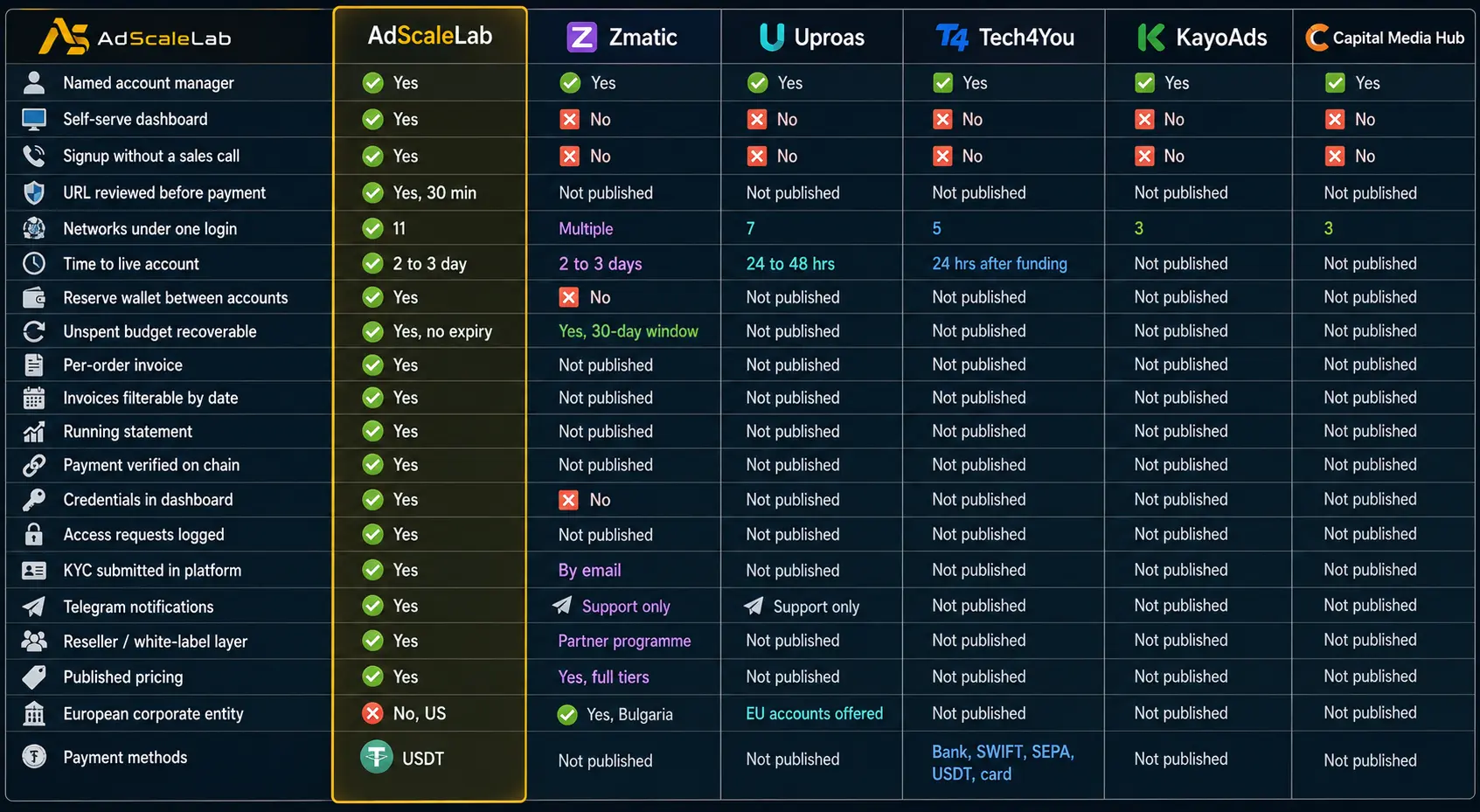
Features down the left, providers across the top. Everything in the competitor columns comes from their own published material.
Not published means exactly that: the provider does not state it publicly, so you would need to ask. It is not a claim that they lack the feature.
The self-serve dashboard row is the one that separates this category into two groups. Every provider here will assign you a helpful person. Only one of them lets you pull an invoice, check a balance or place an order without messaging that person first.
The European corporate entity row runs against us, and it is the reason to read the note above rather than skip it. If procurement requires a European counterparty, Zmatic is the answer in this table and no feature elsewhere in the column compensates for it.
How to decide
The honest answer is that the right provider depends on how you work rather than on which is objectively best.
If you order accounts frequently, run several networks at once, or work outside European hours, the amount of your week spent waiting for replies becomes the deciding factor. Every provider here will assign you someone helpful. The question is how much you need them for work that should not require a person at all, such as pulling an invoice or checking what you spent last month. That is the gap our platform closes, and it is the main reason clients move to us from providers who are otherwise perfectly good.
If your requirement is a European corporate entity for procurement, or published tier pricing you can take to a finance team, Zmatic is the straightforward answer and we would point you there ourselves.
If broad Microsoft inventory beyond search is your interest, KayoAds have covered that ground more thoroughly than most.
Whichever direction you go, get four answers in writing before funding anything. When is my URL reviewed relative to payment. What happens to unspent budget if I stop. What happens if the account is suspended, and does that depend on my tier. What am I not permitted to run.
Providers who answer all four without hesitation have thought about them. Vagueness on any of the four is the clearest signal available in a market where everyone's marketing copy reads the same.
If you want the underlying case for using an agency account at all, rather than which provider to use, we have covered that separately in our guide to the Bing Ads agency account.
Agency ad accounts, without the wait.
Buy and top up Google, Meta, native, and more from one dashboard.
Get started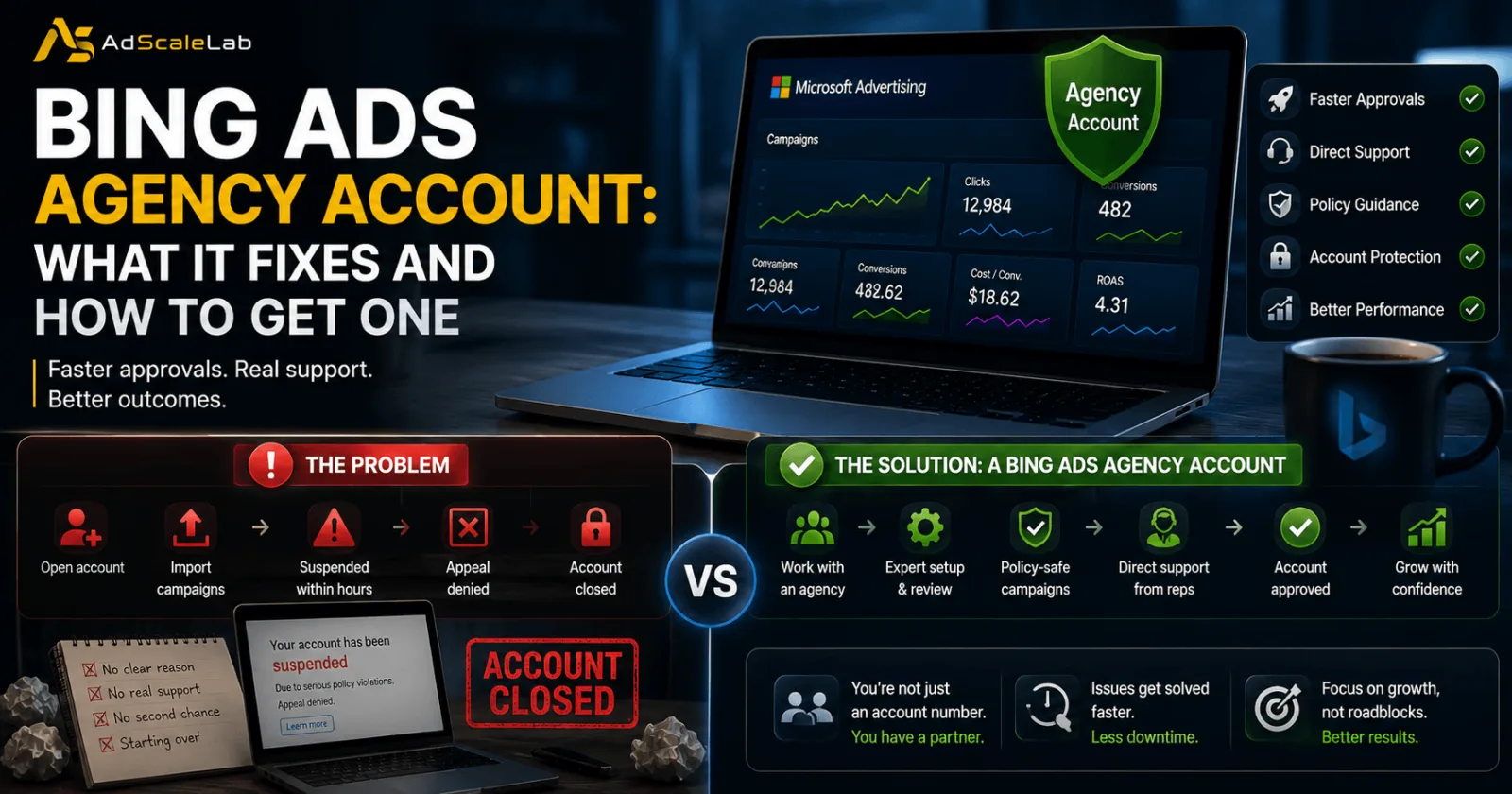
No comments yet. Be the first to comment.
Comments are open to registered AdScaleLab clients.
Sign in to comment