






How to Turn Off Bing Ads Audience Network
An advertiser recently worked out that £38,000 of a £60,000 Bing budget had gone on display ads they never asked for. They only spotted it because of an unrelated error in their spend tracking. Otherwise it would have carried on more funds.
That is not an unusual story, it is just an unusually large one. The Bing Ads audience network quietly absorbs a chunk of most search budgets, and the people running those accounts often have no idea it is happening until someone goes looking.
Here is what is going on, how to check whether it is happening to you, and how to actually stop it.
What the Bing Ads Audience Network Actually Does
When you build a search campaign in Microsoft Advertising, you are not only buying search. Your search ads are automatically eligible to be converted into audience ads and served across MSN, Outlook, Microsoft Edge and a spread of partner sites.
This is not a bug or a dark pattern hidden in the terms. Microsoft is fairly open about it. What catches people out is that it is on by default, it is not obvious in the campaign builder, and there is no single switch that turns it off.
Microsoft's own documentation on preventing your ads from showing to certain people sets out the rule plainly. For search campaigns you cannot block Bing, Yahoo or AOL search traffic, which is fine because that is what you are buying. But you can block audience traffic, and it names MSN, Microsoft Edge and Outlook.com specifically.
That sentence is the whole game. The block is possible, it is just not where anyone would think to look.
The scale varies wildly. One agency reported roughly half of one client's budget landing on audience placements, and about a quarter for another. Another advertiser watched $2,600 of a $2,800 spend disappear into Microsoft select sites. Someone else measured it at around 10% and decided that was tolerable, which is a reasonable position, but they only knew the number because they checked.
The pattern worth noticing is that it tends to grow. The agency that ended up at 50% said it started much lower and crept up over time.
Why The Traffic Performs Badly
Display inventory on MSN is not search intent. Somebody reading the news is not looking for a plumber, and an ad that appears beside an article gets clicked for very different reasons than an ad that appears above search results.
There is a placement problem on top of that. Several buyers report that the ad slots on Microsoft's casual games and MSN play pages are positioned where people misclick. You are paying for accidents.
And there is a lead quality issue that is worse than a wasted click. One agency running lead gen campaigns found bots filling in multi-step forms on Bing, which then registered as conversions. That is genuinely dangerous, because it does not just waste money, it teaches your bidding algorithm to chase the wrong thing. If you are asking for a credit card the problem mostly filters itself out. If you are collecting leads, it does not.
How to Check Whether This is Happening to You
Do not guess at this. The number is available and most people never look at it.
Run the Website URL (publisher) report. In the interface it sits under Reporting, then Templates, then the targeting and placements group. Microsoft documents the reporting process if you cannot find it.
Filter it to your search campaigns and look at where impressions and spend actually landed. If a meaningful share sits on msn.com, outlook.com or names you do not recognise, you have found your answer. Export it to CSV, because that list becomes your exclusion list in the next step.
While you are in there, add the Mobile Bundle column. That surfaces app placements, which are their own category of waste and get excluded the same way.
How to Shut it Down Step by Step
Three layers, and you want all three. Any one on its own leaves gaps.
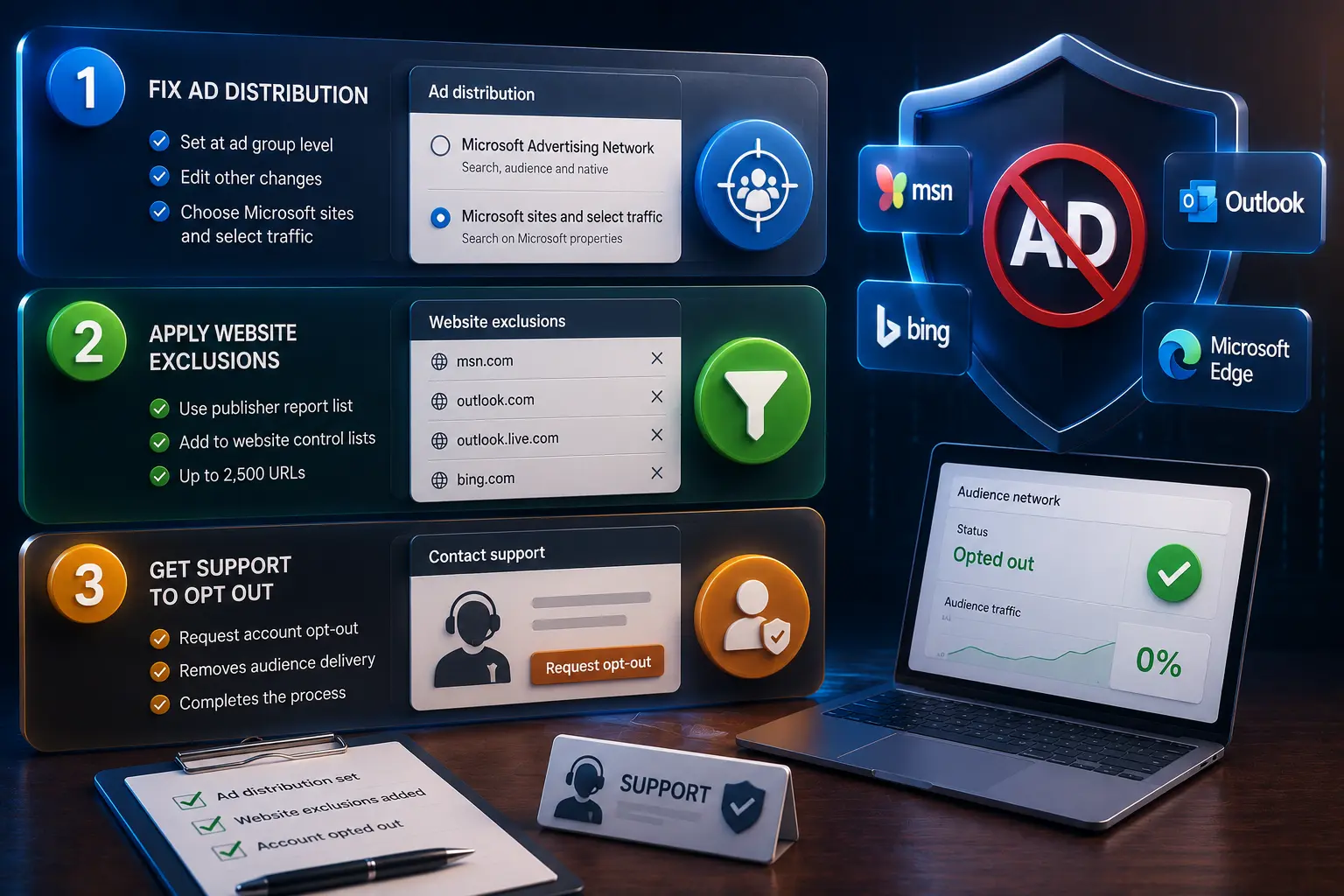
First, fix ad distribution. This is set at the ad group level, not the campaign or account level, which is one reason people miss it. Select your ad groups, edit other changes, and switch ad distribution from the full Microsoft Advertising Network to Microsoft sites and select traffic. Microsoft covers this under ad distribution settings. If you have a lot of ad groups, the offline editor does it in bulk far faster than the web interface.
Second, apply website exclusions. Take the list from your publisher report and add it to your website control lists. The domains that come up most often are msn.com, outlook.com, outlook.live.com and bing.com.
That last one alarms people, so worth being clear about it. Excluding bing.com does not stop your search ads appearing on Bing. Per Microsoft's own rule, search campaigns cannot be blocked from Bing search traffic at all. What the exclusion removes is the audience component. Your search ads keep running exactly where you want them.
A couple of limits to know. You can exclude up to 2,500 URLs, which is plenty. And ad group level exclusions override campaign level ones, so be consistent about where you apply them or you will confuse yourself later.
Third, get support to opt the account out properly. This is the step people skip, and it is the one that finishes the job. Buyers who have done all three report audience spend dropping to zero.
The Part That Annoys Everyone
Step three is where the process stops being a checklist and starts being a negotiation.
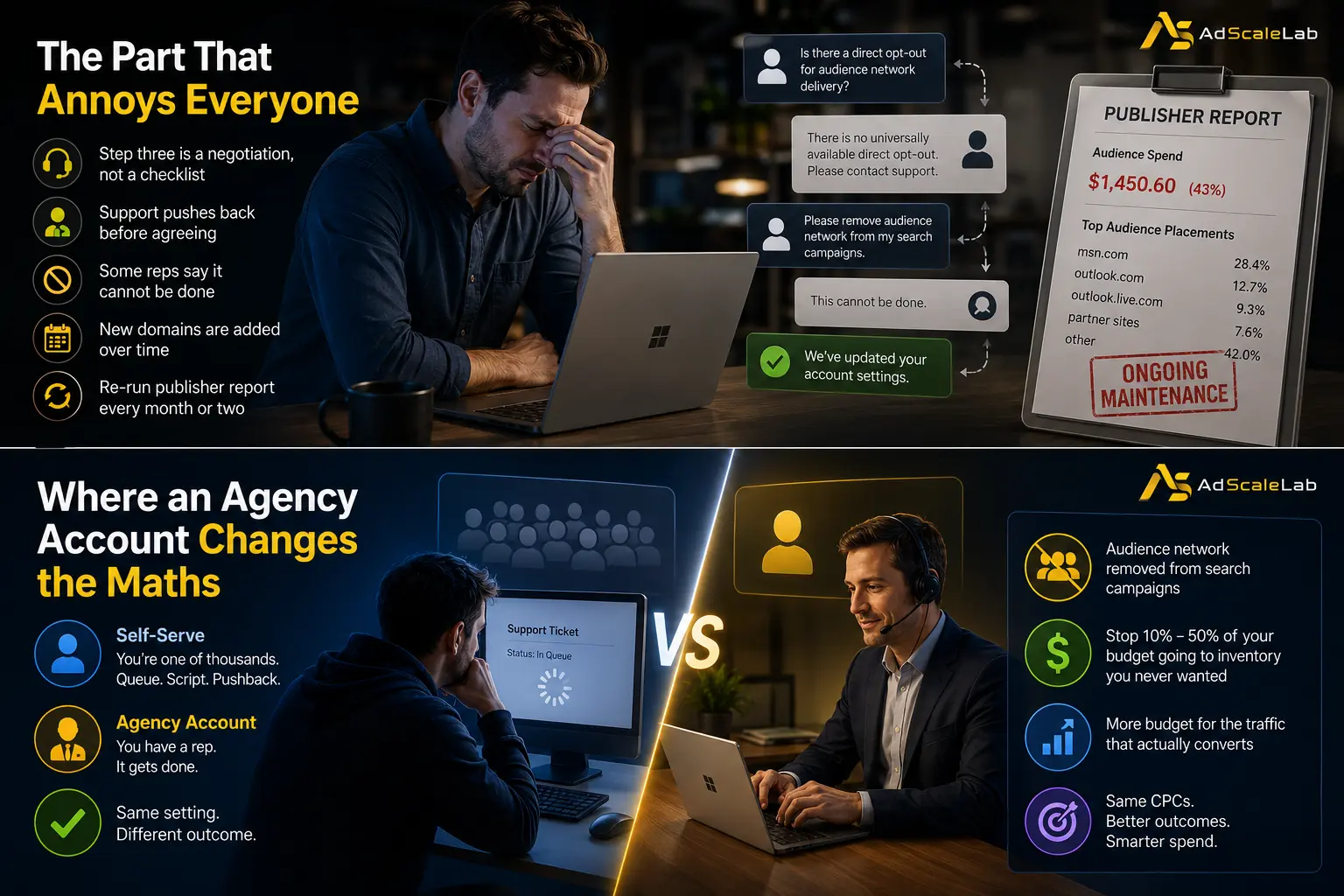
Microsoft's own support forums say there is no universally available direct opt-out for audience network delivery and that you need to contact support. Advertisers who have done it describe roughly fifteen minutes of back and forth, with support pushing back before agreeing. Some report reps telling them it cannot be done at all, which is not accurate, but it is what they were told.
It is winnable. It is just tedious, and you have to know it is winnable to keep pushing.
There is also a maintenance problem nobody mentions. Microsoft's support documentation notes that new domains get added to the audience network over time, and existing exclusion lists will not catch them automatically. So this is not a one-off fix. Re-run the publisher report every month or two and add whatever is new.
Where an Agency Account Changes the Maths
This is the honest case for running Bing through an agency rather than self-serve, and it has nothing to do with cheaper clicks.
A self-serve advertiser opening a support ticket about the audience network is one of thousands. You get the queue, the script, and the pushback. An account running inside an established agency relationship has a rep, and the rep gets it done. It is the same setting either way, the difference is entirely in who is asking.
At AdScaleLab we handle this through our rep relationship rather than sending clients to argue with support. If the audience network needs splitting out of your search campaigns, it gets done.
That is worth what it is worth. It will not make your ads better and it will not lower your CPCs. What it does is stop somewhere between 10% and 50% of your budget going to inventory you never wanted, which for most advertisers is a larger number than any optimisation they will make this quarter.
The short version
Run the publisher report before you do anything else, because you cannot fix a number you have not measured. Switch ad distribution to Microsoft sites and select traffic at the ad group level. Exclude the domains eating your spend, and do not panic about excluding bing.com. Then get the account properly opted out, and re-check every couple of months because the list goes stale.
Bing genuinely works for a lot of advertisers. Most of the people who say it does not were paying for display and calling it search.
Agency ad accounts, without the wait.
Buy and top up Google, Meta, native, and more from one dashboard.
Get started
No comments yet. Be the first to comment.
Comments are open to registered AdScaleLab clients.
Sign in to comment