






Media Buyers: How to Work With Agency Account Suppliers
Most media buyers meet the same wall eventually. The campaign works, the numbers make sense, and then the platform decides it has seen enough. Spend limits appear from nowhere, a review takes four days, an account gets restricted with a message that explains nothing. The offer did not change. The platform's tolerance did.
That wall is where agency accounts come in. This guide explains what they actually are, how buying one works, what to ask a supplier before you pay, and the mistakes that cost people money in their first month.
What an agency account actually is
Every major ad network runs a partner programme. Agencies that hit a certain spend threshold get a managed relationship: a rep, higher limits, faster reviews, and the ability to open advertiser accounts under their umbrella. That umbrella is usually called an MCC on Google, a Business Manager on Meta, or simply an agency account elsewhere.
When you buy an agency account, you are not buying a hacked or duplicated login. You are being given an advertiser account opened under an established agency's partnership with the network. The agency carries the relationship and the spend history. You get the account.
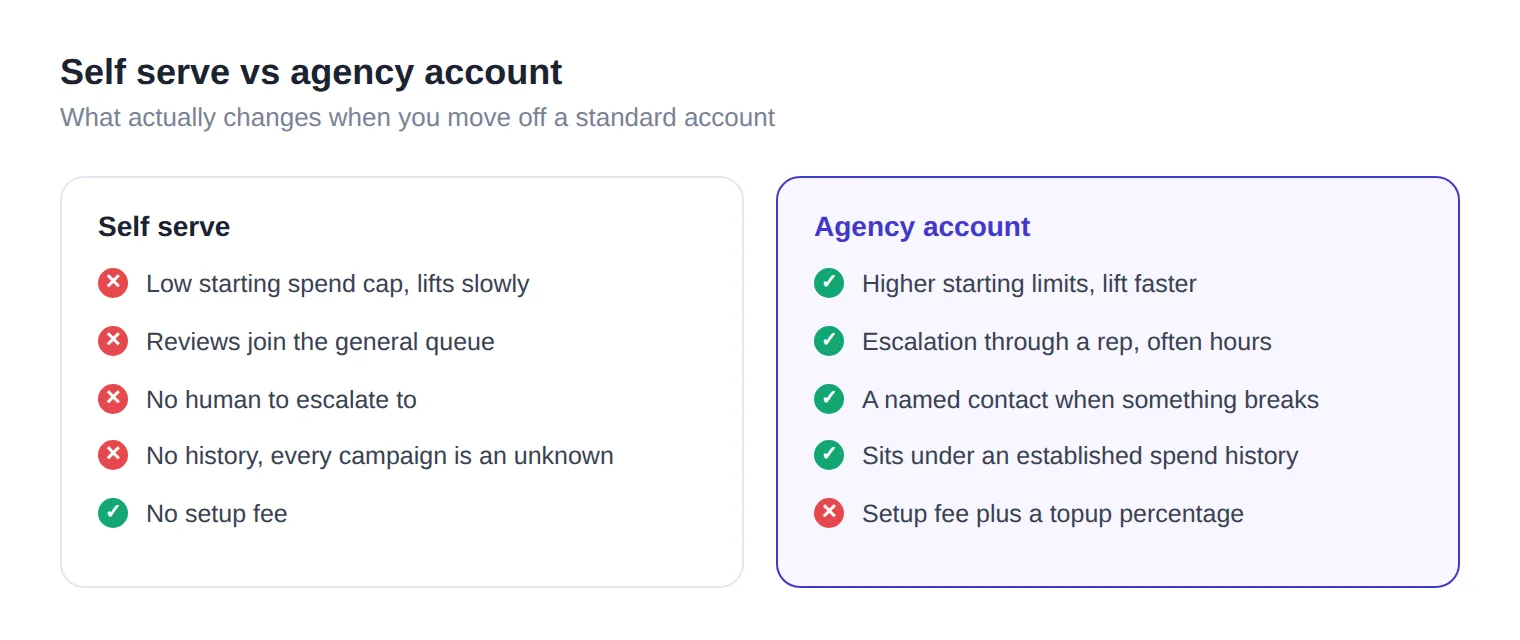
The practical difference is trust. A brand new self serve account has no history, so the platform treats every campaign as an unknown risk. An account under an agency with millions in spend behind it starts from a different position entirely.
What actually changes for you
Three things, and it is worth being precise about them because suppliers often oversell.
Spend limits. A fresh self serve account typically starts with a low daily cap that lifts slowly as you build billing history. Agency accounts usually start higher and lift faster, because the account sits under a spender the platform already knows.
Review speed. A rejected ad on self serve means joining a queue with everyone else. Under an agency, escalation goes through a rep, and something that would sit for days often moves in hours.
Tolerance. This is the one people misunderstand most. An agency account does not make prohibited content allowed. What it does is give you a human to talk to when something is wrongly flagged, and slightly more room before the platform reaches for a ban rather than a warning.
What it will not do is rescue a bad offer. If your landing page breaks the network's policies, an agency account changes nothing except how quickly someone tells you so. Every network publishes those rules openly, and reading them is free: Taboola's landing page policies and Meta's Advertising Standards are the two most buyers trip over.
How buying actually works
The process is more standardised than most people expect. Almost every legitimate supplier follows some version of this.
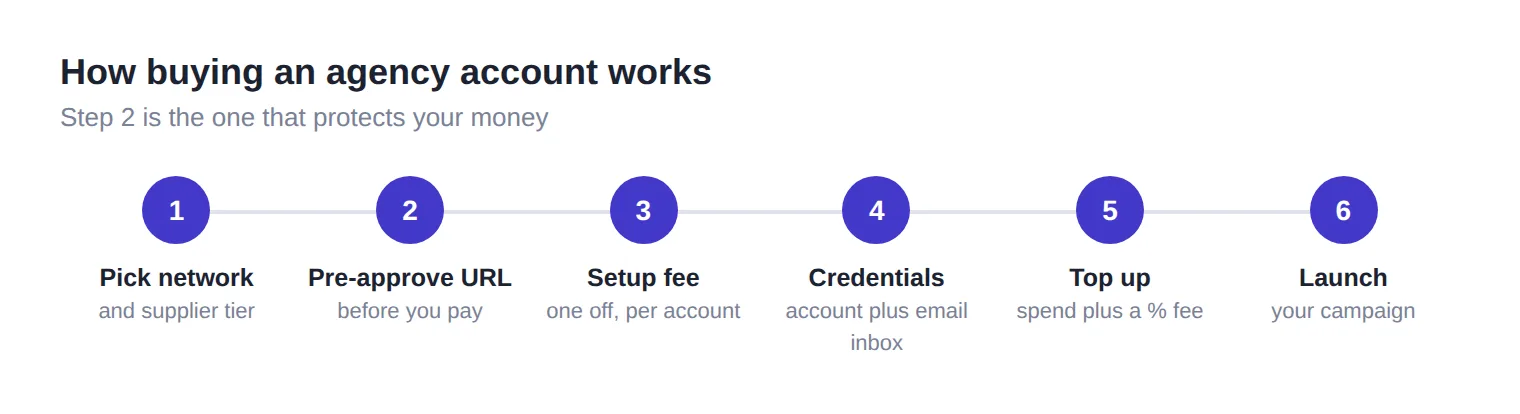
1. Pick the network and the supplier tier. Different networks have different suppliers behind them, and the same network can have several. Prices and fee structures vary between them, so compare more than the headline account price.
2. Submit your destination URL for pre-approval. This is the step that separates a good supplier from a bad one. Your landing page gets checked against the network's rules before anything is delivered. A supplier who skips this is happy to sell you an account you cannot use.
3. Pay the setup fee. Usually a flat amount per account, typically in USDT for cross border work. This buys the account itself, not ad spend.
4. Receive credentials. Account ID, login details, and access to the email inbox tied to the account for verification codes. You should get the inbox too, otherwise you cannot handle two factor prompts yourself.
5. Top up. Ad spend is separate from the setup fee. You send money, the supplier credits it to the account, and a percentage fee is added on top. More on that below.
6. Launch. From here it is your campaign, your creatives, your optimisation.
How the money works, plainly
Two costs, and mixing them up is the most common source of confusion.
The setup fee is one off per account. A few hundred dollars is normal, varying by network. Some networks are simply harder to supply than others.
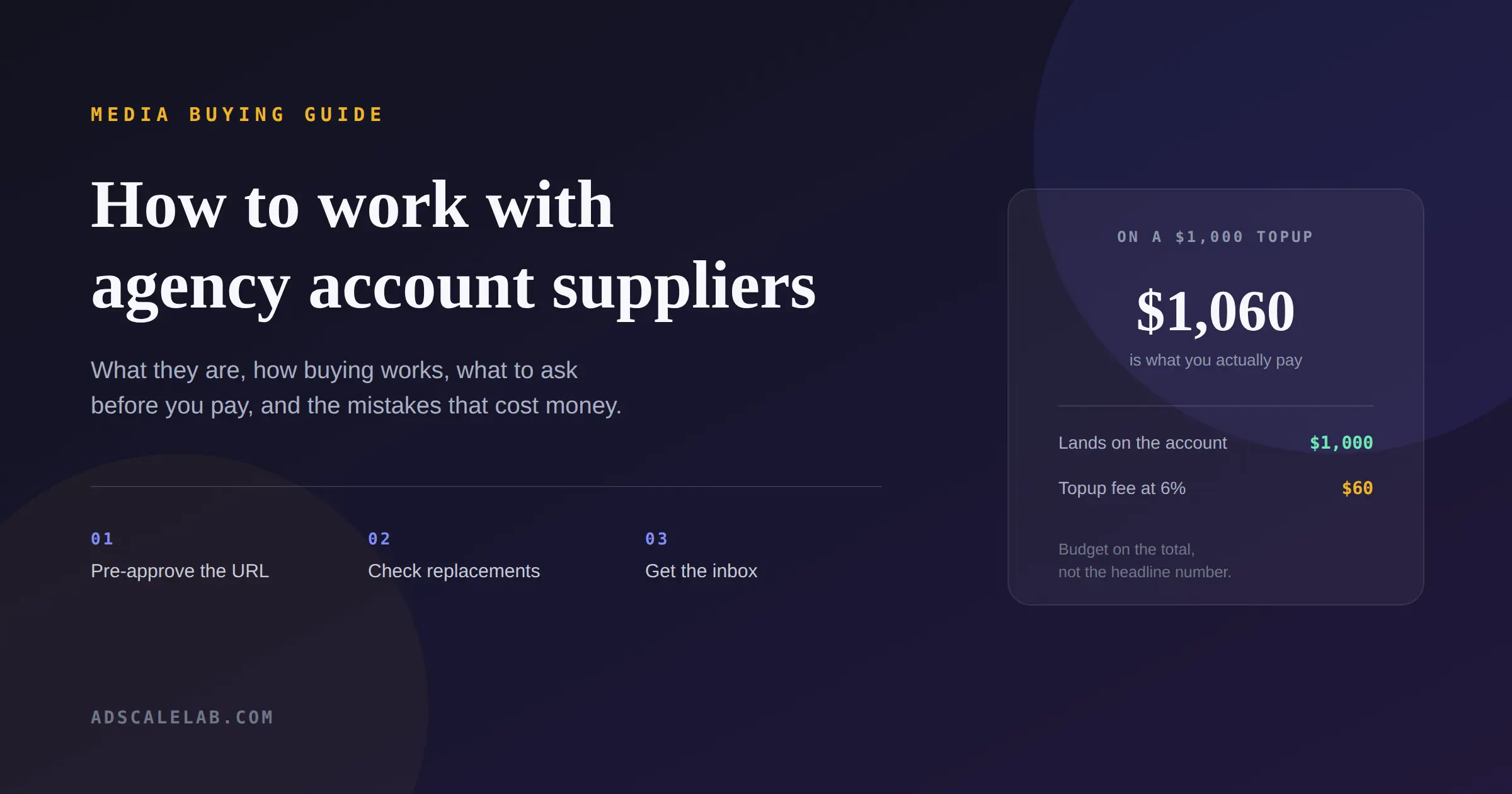
The topup fee is a percentage on every dollar of ad spend you load. Six percent is common, though it ranges by network. On a $1,000 topup at six percent you pay $1,060, and $1,000 lands on the account.
That percentage is not arbitrary. The supplier is fronting money into a platform account, carrying the transfer costs and the risk of the balance sitting there. Part of the fee goes to the agency holding the relationship, part to the reseller you are dealing with.
Budget on the total, not the headline. If you plan to spend $20,000 in a month, at six percent your real outlay is $21,200 plus the setup fees. Buyers who model on the base number get an unpleasant surprise in week three.
Not every supplier charges the same way
Two suppliers can quote a similar setup fee and still cost very different amounts over a month. The differences show up in three places: the topup percentage, whether there is a recurring fee on top, and how long you wait for the account.
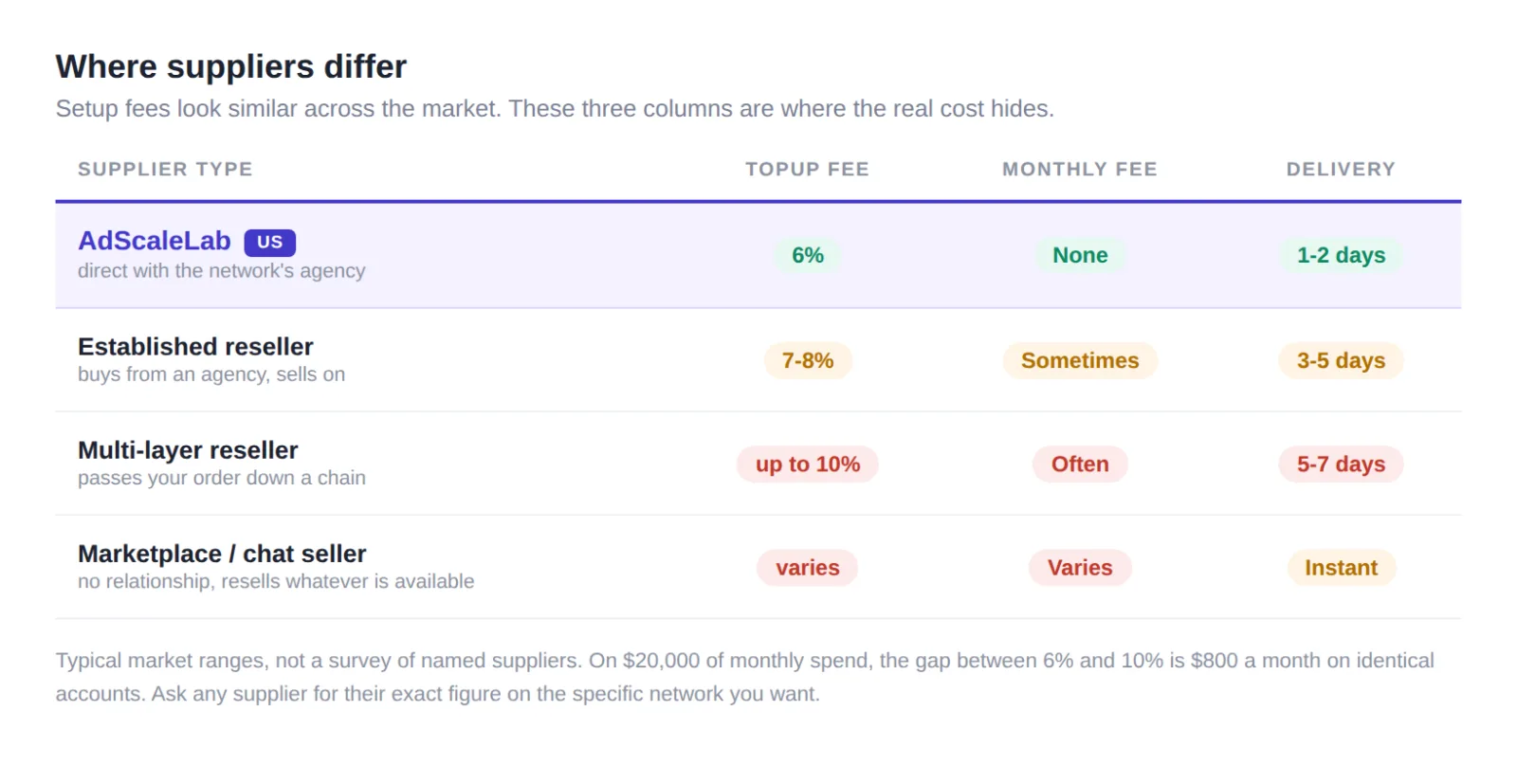
The topup percentage is the one that compounds. Rates in the market run from around six percent up to ten. On $20,000 of monthly spend that gap is $800 a month, every month, on identical accounts. It is worth more than any discount on the setup fee.
Watch for a monthly subscription. Some suppliers add a fixed platform or membership fee on top of the per account and per topup charges. That can be reasonable if it buys you something specific, but you should know it is there before you commit, and you should know what it buys. A subscription that only gives you the right to keep buying is not a service.
Delivery time tells you how the supply chain is built. A supplier working directly with the agency can usually turn an account around in a couple of days. Waits of five to seven days, which are common on networks like Taboola, generally mean your request is being passed along a chain: reseller to reseller to agency. Every link adds delay, and it adds margin, which is usually why the percentage is higher too.
We have put ourselves in that table rather than leave it abstract. AdScaleLab works directly with the agencies, charges six percent, has no monthly fee, and delivers in one to two days. You are welcome to hold any supplier, including us, to the same three columns.
None of this makes a slower or pricier supplier dishonest. There are good reasons a supplier might sit further down that table, and a reseller with excellent support can be worth more than a cheaper one without it. But if you are paying ten percent, a monthly fee, and waiting a week, it is fair to ask what those three things are buying you.
What to ask before you pay
The questions below separate a supplier who will still be answering messages in month three from one who disappears after the transfer clears.
Do you pre-approve my URL before delivery? If the answer is anything other than a clear yes, walk. Paying for an account and then discovering your page is rejected is the single most common way money is lost in this market.
What is your replacement policy? Accounts do get banned, sometimes for reasons that have nothing to do with you. A supplier confident in their supply will replace an account that dies early. Get the terms in writing before you pay.
Do I get the email inbox? Without it you cannot receive verification codes, and you are dependent on the supplier for every login prompt.
How do I reach you when something breaks? Ad accounts have problems at inconvenient hours. A supplier reachable only by email on business days is a supplier who will cost you campaign days.
What is the topup fee, exactly, on this network? Get the number for the specific network you are buying, not a general figure. They differ.
Mistakes that cost people money
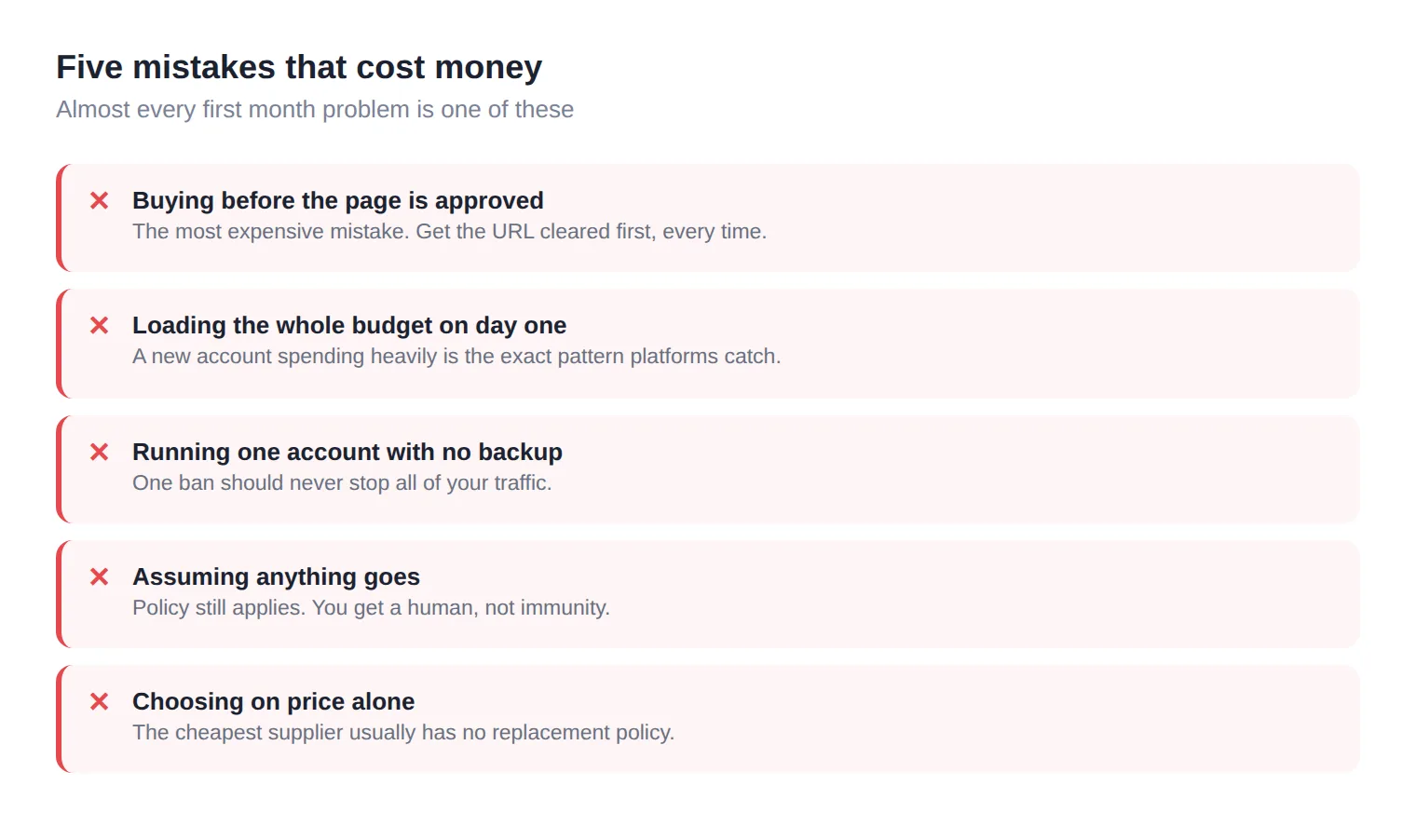
Buying before the page is approved. It bears repeating because it is the expensive one. Get the URL cleared first, always.
Loading the whole budget on day one. A brand new account that immediately spends heavily looks exactly like the pattern platforms are built to catch. Warm up gradually, even when the limit allows more.
Running one account with no backup. If a single ban stops all of your traffic, that is a structural problem, not bad luck. Buyers running serious volume keep spare accounts ready.
Assuming an agency account means anything goes. It does not. Policy still applies. What changes is your access to a human when the platform gets it wrong.
Choosing on price alone. The cheapest supplier is frequently the one with no replacement policy, no pre-approval, and no support. An account that dies in week one at a discount is not a saving.
Going deeper: how to think about it once you are running
Buyers who scale successfully treat agency accounts as infrastructure rather than a purchase.
Spread across networks. Native platforms behave differently. A creative dying on one often still performs on another, and running two or three means no single policy change stops your business.
Track performance per account, not just per campaign. Accounts age differently. Some run clean for months, some get twitchy. Knowing which of yours is stable tells you where to put budget when you want to scale fast.
Keep your landing pages clean even when nobody is checking. Compliance is not a hurdle to clear once. Networks re-scan, and a page edited after approval is a common reason for a sudden restriction.
Keep records. Which account, which offer, which geo, what happened. Six months in, that history is what tells you which supplier and which network is actually worth your budget.
The short version
An agency account buys you higher limits, faster reviews and a route to a human being. It does not buy immunity, and it does not fix a weak offer. The suppliers worth using check your landing page before they take your money, replace accounts that die early, hand over the email inbox, and answer when something breaks.
If you are moving off self serve for the first time, start with one account on one network, warm it up properly, and learn how that supplier behaves when there is a problem. Scale after that, not before.
Further reading
Straight from the platforms, not from a reseller. Worth an hour before you spend anything:
- About Google Ads manager accounts - how the MCC structure actually works, in Google's own words.
- Meta Advertising Standards - what is prohibited, what is restricted, and how to request a review when something is wrongly rejected.
- Taboola landing page policies - the clearest published guide to what a compliant native landing page looks like.
- Taboola advertising policies overview - prohibited and restricted categories, listed plainly.
If a supplier tells you something that contradicts those pages, believe the platform.
At AdScaleLab we run URL pre-approval before any account is delivered, publish the topup fee for every network up front, and keep support reachable on Telegram rather than a ticket queue. If you want to see the networks and pricing, it is all on the pricing page. If you would rather ask questions first, that is fine too.
Agency ad accounts, without the wait.
Buy and top up Google, Meta, native, and more from one dashboard.
Get started
No comments yet. Be the first to comment.
Comments are open to registered AdScaleLab clients.
Sign in to comment