






Meta Ad Agency Account: The Full Process, Step by Step
There is a moment most media buyers hit eventually. You have a funnel that works. You know your numbers. And then Meta takes your ad account away on a Tuesday afternoon for reasons it declines to explain, and you sit there refreshing the appeal page like it owes you money.
That moment is usually when people start googling "Meta ad agency account" at two in the morning. So let us walk through the whole thing properly. What they are, what they genuinely do, what they absolutely do not do despite what some sellers imply, and then the actual process from picking a provider through to running the thing at scale without setting it on fire in week one.
What a Meta ad agency account actually is?
An agency ad account is an ad account that lives inside a Business Manager belonging to an established Meta partner, rather than one you created yourself on a profile you made last Thursday, just an example. That is the whole trick. Same Ads Manager, same buttons, same campaign objectives. The difference is whose house it sits in.
Meta scores ad accounts and business managers on internal trust signals. Buyers in the space usually refer to it as trust score or tier, and a fresh personal BM starts near the bottom of it. A partner BM that has been processing serious monthly spend for years starts somewhere else entirely. When your ad account sits inside that BM, it inherits some of that standing.
Practically, that tends to mean three things. Daily spend limits stop being a daily irritation. Approval tolerance goes up, so things that would get auto-flagged on a fresh personal account get through on this. And when something breaks, there are actual humans at the provider end who can escalate to actual humans at Meta, which is a very different experience from shouting into the appeal form.
The most useful description I have heard came from someone who sells these things for a living, which is what made it credible. He said plainly that agency accounts are not a magic CPM discount, that any provider claiming 50% lower CPMs is selling you a story, and that if your ads are not performing, an agency account will not fix that. Improve the creative and the funnel first. Write that on a sticky note. Half the people who buy agency accounts are trying to solve a creative problem with a billing solution.
The other thing worth knowing, mostly to inoculate you against sales pitches: the reputation these accounts have for letting you run "aggressive" stuff comes from an earlier era, when a handful of players held enormous BMs with huge credit lines that could absorb risky advertisers. That is much less true now. A legitimate white hat agency will not let you run political content or celebrity angles, and anyone who says they will is almost certainly not running a real agency relationship at all. They are running a bought farmed BM and charging you a premium for something you could have sourced yourself.
Meta's rules on ads about social issues, elections or politics require a separate authorisation process, and its unacceptable business practices policy covers most of what people mean by a celebrity endorsement angle.
Step 1: Be Honest About Whether You Need One
Not everyone does. If you are spending a few hundred dollars a day on genuinely compliant white hat ecommerce and your account is stable, you may not need to pay anyone anything. Plenty of people build their own business managers, verify them, spend on them consistently, and watch their limits climb on their own. One buyer reported a brand new BM going past a $2,300 daily spend limit within roughly a week and a half, just by verifying it and spending consistently. The ceiling kept moving as he spent more.
Where the calculation flips is when instability starts costing you more than the fee. If you have lost four accounts in two months and gone from six figures of monthly spend to zero, you are not paying for convenience anymore. You are paying to stay in business. The other honest case is speed. Building trust on your own assets takes weeks of patient spending. Renting it takes an afternoon.
Step 2: Pick a provider, and ask the awkward questions
This is where most of the money gets wasted, so slow down here.
There was a very good public rant from a buyer who had rented accounts and felt misled. His complaint was not that the agency monitored his ads or that they could suspend his access. It was that none of it was disclosed before he paid. The agency still owns the asset, so their compliance team watches what runs on it, and if they decide you are too aggressive they can warn you or cut you off. No refund.
An agency owner replied, and his answer was better than the complaint. He agreed completely that it should be disclosed upfront, and said his own first question to any new client is simply: what do you run?
That is the question you should be answering before you pay anyone. If you do not volunteer what you actually run and get a clear yes or no, you are both setting yourselves up for an argument later.
So, the questions to put to any provider before money moves:
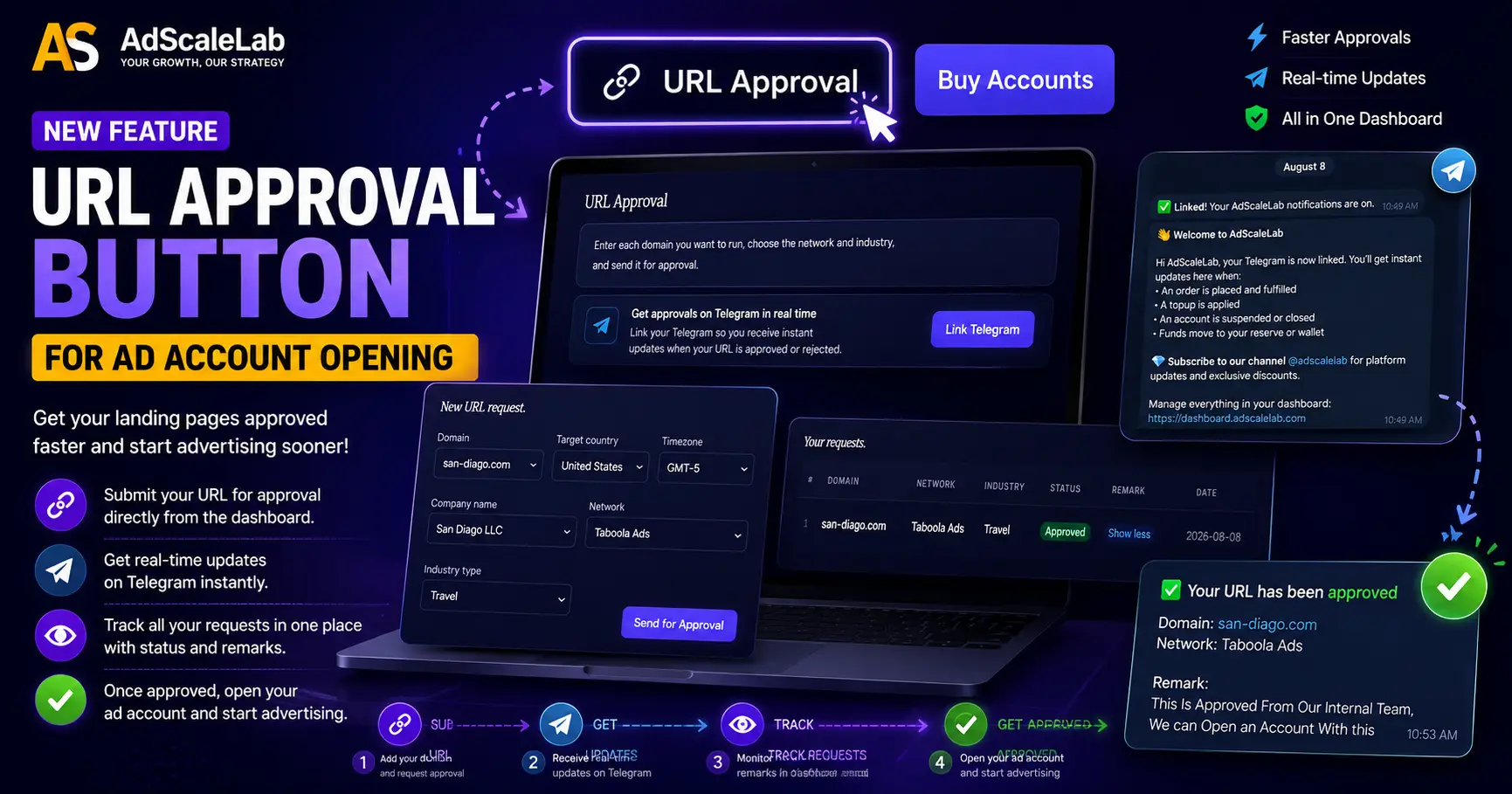
Do you check my URL before I pay, or after? The correct answer is before. Site review is the most common reason a purchase turns into a refund request. Anyone who takes payment first and reviews second has moved the risk onto you.
What can I not run? Get the list. Not vibes, the list. If they will not give you one, that means the answer is "whatever we decide later, when it is your money on the line."
Do you monitor the account, and what happens if you do not like something? Warning first, or instant suspension? Refund, or not?
Flat fee or percentage of spend? Both models exist. Percentage of spend gets expensive fast at volume, and at scale a flat monthly fee is usually the better deal. Some well-regarded providers have moved to flat monthly for exactly this reason.
Can I get the actual platform login, or only a managed account? Some providers will run things for you but never let you see inside. That is a legitimate model, but you should know which one you are buying.
What happens to unspent budget? Can you pull it back out, or does it quietly become theirs?
Do you replace an account if it goes down, and how fast? The good ones replace quickly. That is most of what you are paying for.
One more thing worth knowing about how this market works: most agency account providers do not sell you profiles and business managers as well. They will usually refer you to a separate seller for that. So if you need both, expect to deal with two vendors, and expect neither of them to take responsibility for the other's part when something breaks.
Step 3: Getting your website approved
This is the step people underestimate, and it is the one the question "how do I show my website" is really about.
Before an account gets issued, your destination URL goes through review. The provider looks at it, and depending on the setup Meta may look at it too. This is a genuine gate, not a formality.
What gets checked, roughly in order of how often it causes problems:
The redirect chain. This is the number one silent killer. Meta reacts badly to multiple hops, to shared or low-reputation tracking domains, to a mismatch between the display URL and where the click actually lands, and to affiliate redirect chains sitting behind the landing page. If you are running a link shortener into a tracker into a lander into an offer, you have four chances to get flagged and you will probably take at least one of them. Flatten it. Use your own tracking domain, not a shared one.
Domain history. A domain that has been in trouble before carries that with it. If you are relaunching after a serious ban, particularly anything involving a DMCA complaint, understand that a fresh domain alone may not save you. One buyer rebuilt everything after a DMCA takedown, new profiles, new pages, new pixel, new domain, new agency account, and was still getting instant automated rejections. Something at a system level had him tagged. That is rare, but when it happens, new assets do not clear it.
Claims on the page. Income claims, health claims, before and after imagery, anything implying personal attributes. The page gets read, not just the ad.
Whether the page matches the ad. Ad says one thing, lander says another, review fails. This sounds obvious and it catches people constantly, usually when someone swaps the lander after approval and forgets the ad copy still describes the old one.
Basic trust furniture. Privacy policy, terms, contact details, a real looking business presence. Cheap to add, and its absence is an easy reason to reject you.
If your main domain already carries something restricted, do not try to smuggle it through on the same site and hope. Use a separate domain for the separate thing.
And a practical note on the review itself: submit the final URL, in the exact form your ad will use, with tracking parameters attached. Not a staging link, not a shortened one, not "it will look like this but with the real offer." Reviewers approve what they see. If what runs is different from what they saw, that is your problem, not theirs.
Step 4: Attach the account to a structure that can survive
You get the account. Do not just launch into it and hope.
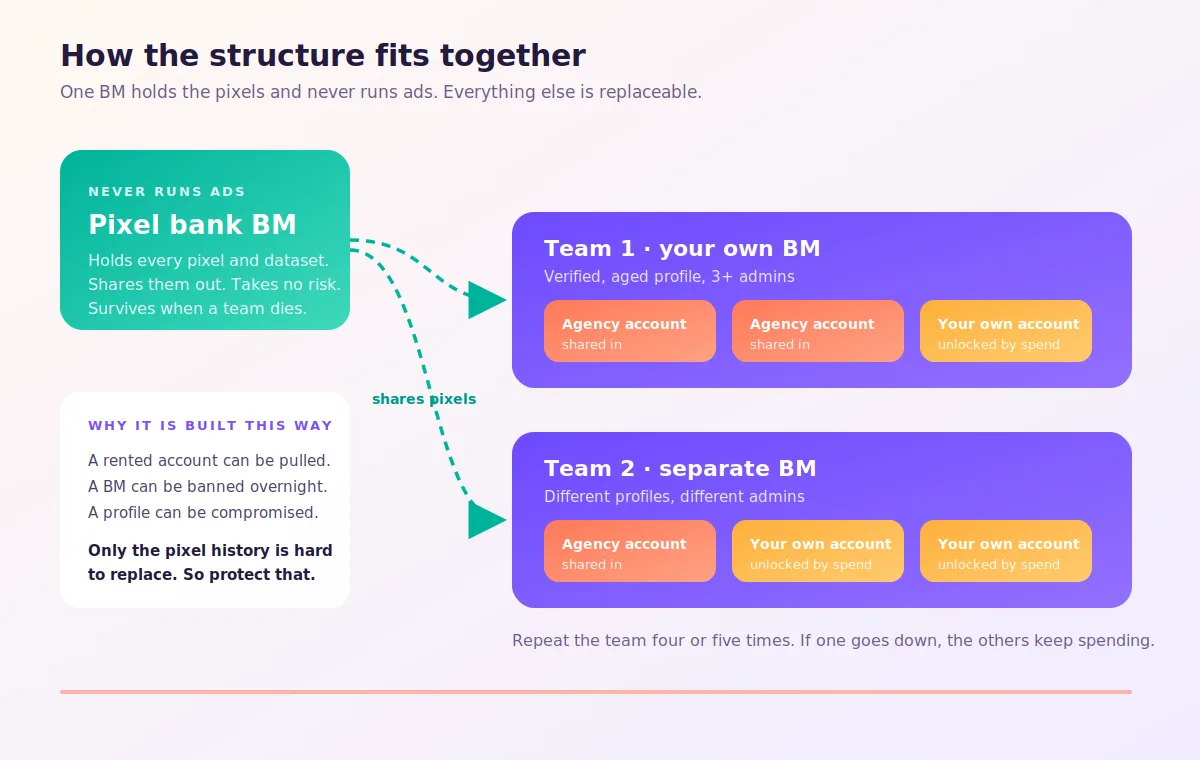
The standard approach is to have your own business manager and have the agency ad account shared into it, rather than living exclusively inside the provider's BM. One provider recommended the setup as an aged profile, a verified BM, an aged page, with the agency account attached to that. The reason is portability. If a BM goes down, you can move the ad account across to another one quickly instead of losing everything at once.
The structure that experienced operators run at volume looks roughly like this. Multiple separate "teams", each with its own business manager and three or more admins. Into each team you share either agency ad accounts, your own unlocked ones, or a mix of both. Then you repeat that whole unit four or five times.
Separately, you keep one stable business manager that does nothing but hold your pixels and datasets, and you share those out into the working BMs. That BM never runs ads, never takes risks, and never gets touched. Buyers call it a pixel bank, and it exists so that when a working BM dies you do not lose your conversion history along with it.
Two practical warnings on this. When you share a pixel from one BM to another, it sometimes shows as correctly attached at the ad account level but refuses to appear in the ad set dropdown. This is a known, maddening bug. And if you use system users for automation, note that a newly created admin system user cannot create other admin system users for seven days, which will absolutely surprise you at the worst possible moment.
Also, on automation generally: Meta wants tool access going through apps and system users rather than personal tokens, and buyers have reported that heavy mass uploads or long bursts of consecutive API calls in one day correlate with profile bans. Spread it out.
Step 5: Warm It Up Before You Scale It
Here is the single most valuable thing in this article, and it is counterintuitive enough that most people learn it the expensive way.
Rejected ads spike your CPMs on a new account.
One buyer launched around twenty ads on a fresh account. Five got rejected. His CPMs went from roughly $70 to roughly $370 the following day. Not the campaign, the account.
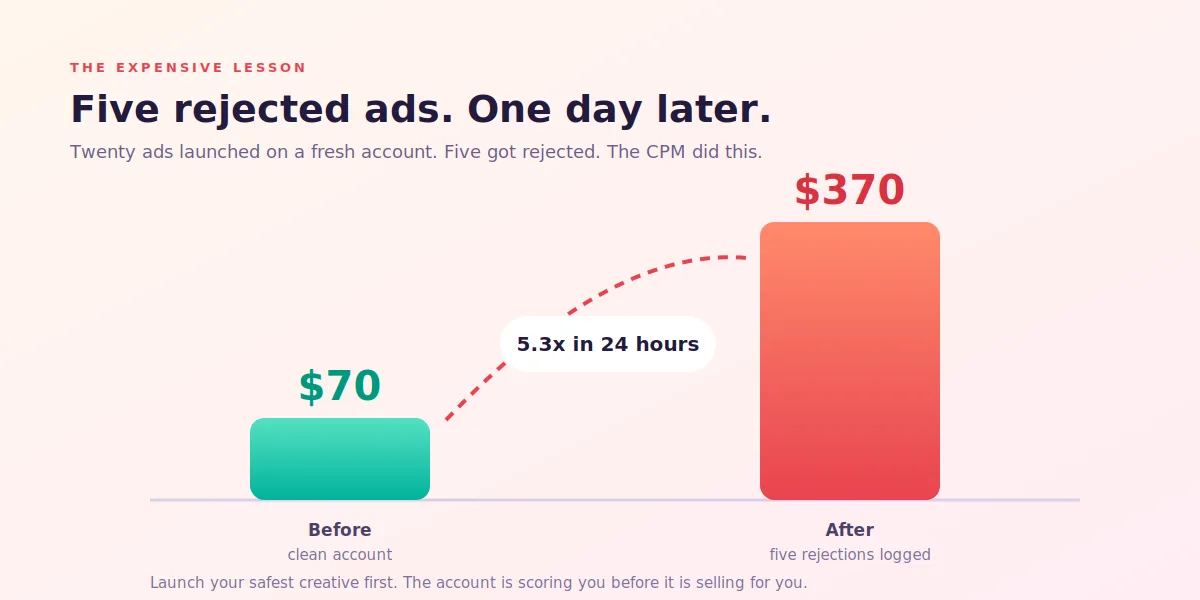
That is the mechanism behind most "my new agency account has insane CPMs" complaints. People treat a fresh account as a blank slate, throw their most aggressive creative at it on day one to see what sticks, collect a handful of rejections, and then wonder why the account behaves like it hates them. Another buyer was seeing $300 to $500 CPMs on anything he launched, and his eventual solution was to keep testing accounts until he found one that behaved.
So do the opposite. Start with your softest, safest, most obviously compliant creative. The stuff you are certain will not get flagged. You are not trying to win with these ads. You are establishing that this account is not a problem account.
Other things that help. Some buyers run an engagement or landing page view campaign at a modest daily budget for a couple of days before anything else, on broad audiences, purely to put activity into the account. Conversions into the account improve its standing, and so does a clean approval record.
And clear rejected ads out promptly rather than letting them sit. Do not leave a graveyard of flagged creative in an account you are trying to build up. There is also an irritating variant where the account quality section shows a rejection that never appears in Ads Manager at all, in which case you may have to edit the live ad to force it to surface.
One more counterweight, because I do not want to oversell the warmup ritual. A buyer who spent a month chasing high CPMs, swapping domains, pages, ads and landers, concluded that most of it was wasted effort and the thing that actually moved his numbers was simply more ads, better ads, and more aggressive ads. Both things are true. Do not burn the account with rejections in week one, and also do not spend a month performing rituals when the real problem is that your creative is not good enough.
Step 6: Running It Day To Day
A few things change once you are inside a proper agency account.
The interface may genuinely be different. One buyer's first reaction to logging into his was surprise that campaign folders existed. Partner accounts sometimes have organisational features you have never seen.
Billing gets easier. Credit lines remove most of the payment failure nonsense that plagues personal accounts. Which is a relief, because payment method errors are one of the most common ways to lose an ordinary account. The general rule from experienced buyers is worth repeating even here: when adding a new payment method, add it at the business manager level first, never directly to the ad account. A bad card on a BM throws a harmless error. A bad card on an ad account can get the account disabled almost instantly.
Appeals may be handled for you. Some providers automatically appeal every rejected ad on your behalf. Sometimes the appeal works, sometimes it gets rejected again, and appealing everything does appear to be a reasonable default. Ask whether yours does this, because if they do not, you should be doing it yourself.
Rejections will still be inconsistent. The same script with two different actors, one approved and one flagged. Something approved last month rejected today. There is no stable rule to reverse engineer, and buyers who go looking for one lose weeks. Keep several concepts ready, edit and resubmit, move on.
One tactic that has been working for people: take the rejected ad copy, and the lander if you think that is the trigger, put it into an AI model along with the exact violation reason Meta gave, and ask it to construct a clear argument for why the ad does not violate that specific policy. Use that in the appeal. Buyers report meaningfully better approval rates doing this, presumably because the thing reading your appeal is also a model.
Spend limits and pacing. With daily spend limits out of the way, budget pacing becomes your constraint instead. Some buyers deliberately set very large campaign budgets to stop Meta pacing spend evenly across the day, then control actual delivery with bids and with spending limits at the campaign, ad set and account level as a safety net. If you try this, set those limits before you launch, not after. An inflated budget with no cap is a genuinely expensive way to learn a lesson.
Have spare concepts ready, always. Meta's Advertising Standards are enforced by a mix of automated systems and human reviewers, and Meta says outright that it can reject or remove any ad at its discretion. Which is a polite way of saying enforcement is not consistent, and pretending otherwise will make you crazy. The same script with two different actors can produce one approval and one rejection. Something approved last month gets flagged this month. Most maddening of all, an ad can run happily for weeks and then get rejected the moment you scale it. Do not argue with it. Edit, resubmit, move on.
Step 7: Security, because this one hurts
Your agency account sits in someone else's business manager, which means someone else's admins can see it.
One buyer had an agency ad account added to an attacker's business manager with full access, while his own access to it was only partial. He lost $800 in twenty minutes and spent months waiting on a resolution that never satisfactorily arrived. He was never able to establish with certainty whether the breach came from the account provider or the profile seller.
The lessons are unglamorous. Two factor everything. Know exactly who has admin on the BM your account sits in. Do not leave large balances sitting in accounts you are not actively spending from. And keep enough separation between your assets that one compromise does not take the lot.
Step 8: Moving, Replacing, And What to do When it Suspend?
Eventually you will move an account, either because it went down or because you changed providers. This is a genuinely underdiscussed problem, especially when you have evergreen campaigns that have been performing for months.
There is no clean answer. You cannot transfer learning between accounts. What you can do is keep your pixel and dataset stable, which is exactly what the pixel bank structure is for. New account, same pixel, same conversion history feeding it.
The practical approach most people land on is to duplicate winning campaigns into the new account and gradually shift budget rather than switching everything overnight, accepting that the new account will need its own learning period and its own soft launch first. Buyers do report running the same store, same domain and even the same pixel through a completely different BM after a ban without issue, so the assets themselves are not usually the problem. The account was.
And keep more than one account alive at any given time. Running your entire business through one rented asset is the same mistake as running it through one personal ad account, just with a monthly invoice attached.
The Short Version
An agency account buys you stability, spend headroom, approval tolerance, and someone to call. It does not buy you cheaper CPMs, and it will not rescue a funnel that does not work.
Pick a provider who tells you the rules before taking your money. Get your URL reviewed before you pay. Flatten your redirect chain. Attach the account to your own BM so you can move it. Launch soft, because rejections early will wreck your delivery costs. Keep your pixels somewhere safe and boring. And never let your whole operation depend on a single account, however good it is.
Do that, and the Tuesday afternoon account ban stops being a business ending event and becomes what it should be. An annoyance, handled by Thursday.
Agency ad accounts, without the wait.
Buy and top up Google, Meta, native, and more from one dashboard.
Get started
No comments yet. Be the first to comment.
Comments are open to registered AdScaleLab clients.
Sign in to comment