






How To Build A Native Advertising Whitelist And Blacklist Strategy
Running a native advertising campaign is not just about creating good advertisements and setting a daily budget. Another important part is understanding where those advertisements appear. A campaign can receive thousands of clicks, but if most visitors come from websites that do not bring useful traffic or conversions, the advertiser may end up wasting a large part of the budget. This is where a native advertising whitelist and blacklist strategy becomes useful. It helps advertisers identify the publisher websites and placements that bring valuable visitors while reducing spending on sources that consistently perform poorly.
In simple terms, a whitelist contains the websites or placements that an advertiser wants to continue using or give more opportunities to. A blacklist contains the websites or placements that the advertiser wants to exclude from campaign delivery. Some advertising platforms use terms such as allowlist and blocklist instead. Get Native ads agency account here

However, building these lists requires more than checking which website has the highest click-through rate. Advertisers need to consider conversion rates, cost per acquisition, lead quality, traffic volume and other campaign signals before deciding whether a publisher deserves to stay or should be excluded. In this guide, we will explain how to build a native advertising whitelist and blacklist strategy, how to evaluate publisher performance and how to use these lists without unnecessarily reducing campaign reach.
What Is A Native Advertising Whitelist And Blacklist Strategy?
A native advertising whitelist and blacklist strategy is a method of controlling which publisher websites and placements can deliver advertisements in a campaign. A whitelist is a collection of websites, publisher IDs or placements that have shown useful performance or meet the advertiser's requirements. For example, if a native advertising campaign receives valuable leads from five publisher websites, the advertiser may add those sources to a whitelist for future testing or campaign targeting.
A blacklist works in the opposite way. It contains websites or placements that the advertiser wants to prevent from receiving campaign traffic. These sources may have high costs, poor conversion rates, irrelevant audiences or other problems that make them unsuitable for the campaign. Both lists serve different purposes, but they work towards the same goal: improving control over advertising inventory.
For example, imagine an advertiser spending $1,000 on a native advertising campaign. After reviewing the publisher report, the advertiser finds that a few websites are generating most of the valuable conversions, while several others are spending money without producing useful results. A whitelist can help the advertiser focus on promising sources, while a blacklist can help prevent repeated spending on confirmed poor performers. It is important to understand that a whitelist does not automatically guarantee conversions, and a blacklist does not mean a website is bad for every advertiser. A placement that performs poorly for one campaign may work well for another because the audience, offer and landing page are different.
Why Do Advertisers Need Publisher Whitelists And Blacklists?
Native advertising networks can distribute advertisements across many publisher websites and placements. This gives advertisers access to a wider audience, but it also makes traffic quality management important. Not every publisher will deliver the same results. One website may generate visitors who spend time reading the landing page and completing a form. Another may generate a large number of clicks but very few meaningful actions.
Without proper placement management, advertisers may continue spending on sources that are not helping them achieve their campaign goals. A whitelist and blacklist strategy also helps advertisers maintain more control over campaign delivery. It makes it easier to identify valuable publisher relationships, reduce repeated testing of known poor sources and understand how traffic quality changes over time. This process is closely connected to campaign scaling. Before increasing the budget, advertisers should understand which sources are producing useful results. Our guide on how to scale native ad campaigns without increasing CPA explains why campaign growth should be supported by careful performance analysis rather than simply increasing spending.
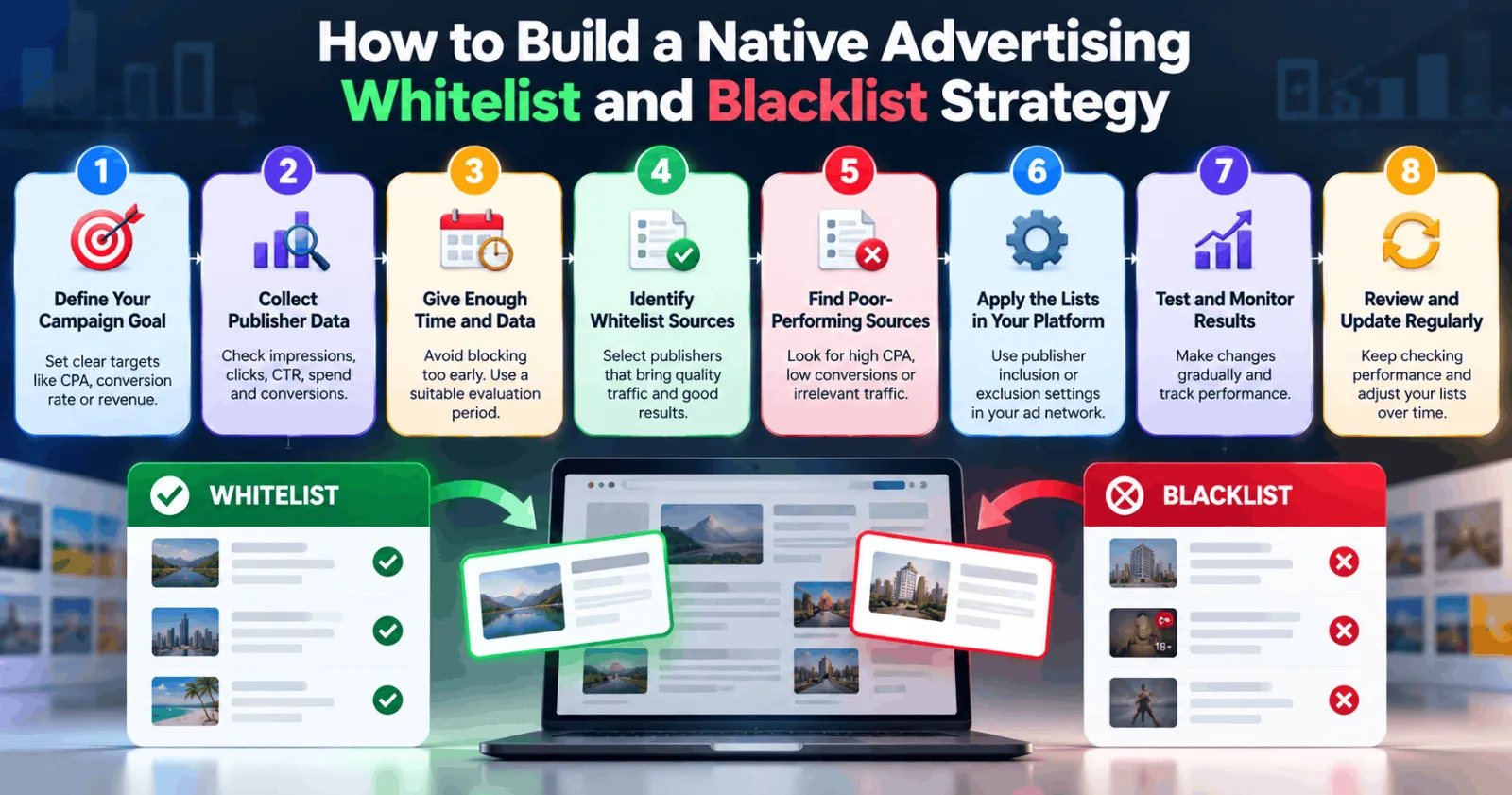
How To Build A Native Advertising Whitelist And Blacklist Strategy
Building these lists is not a one-time activity. Publisher performance can change as audiences, creatives, bidding conditions and campaign settings change. The following eight steps can help advertisers create a more organised approach.
Step 1: Define Your Campaign Goal Before Creating Any List
The first step is to understand what you want your native advertising campaign to achieve. Different campaign goals require different ways of evaluating publisher performance. For example, an advertiser running a lead generation campaign may focus on completed forms, qualified leads and cost per lead. An e-commerce advertiser may be more interested in purchases, revenue and return on ad spend. A brand awareness campaign may focus more on reach, impressions and engagement.
This matters because a publisher should not be added to a whitelist simply because it generates a large number of clicks. If your main goal is lead generation, a website that generates many visitors but very few qualified leads may not be a suitable source. Set your main performance targets before reviewing publisher reports. These may include a target CPA, minimum conversion rate, acceptable cost per lead or revenue target. Having clear goals makes it easier to decide which placements deserve more attention.
Step 2: Collect Publisher-Level Campaign Data
Once your campaign has collected enough data, start reviewing its publisher and placement reports. These reports help you understand where your advertisements are appearing and how each source is performing. Important metrics include impressions, clicks, CTR, spend, conversions, conversion rate and CPA. If your tracking setup supports deeper conversion events, you should also review lead quality, purchases or other valuable actions.
Do not make decisions using only one metric. For example, a publisher with a high CTR may appear attractive, but that does not necessarily mean its visitors are converting. Similarly, a website with a lower CTR may still generate more valuable customers. It is also important to check whether your tracking is working correctly. If conversions are missing or attribution is delayed, you could accidentally blacklist a publisher that is actually producing results. Our guide on how to analyze Taboola tracking parameters to find which sites convert explains how tracking information can help advertisers understand which sources are bringing conversions.
Step 3: Give Publishers Enough Time And Data Before Judging Them
One common mistake is blocking a publisher after receiving only a few clicks without a conversion. This can lead to poor decisions because the sample may be too small to show how that source actually performs. For example, suppose a publisher has delivered 20 clicks without generating a conversion. That result may look disappointing, but it does not always prove that the website is unsuitable. Your campaign may need more traffic before you can make a reliable decision.
Instead, establish a reasonable evaluation period and minimum data requirement. Consider the campaign's average conversion rate, target CPA, spending level and typical conversion delay. There is no universal number of clicks or spending amount that works for every campaign. A high-ticket product and a low-cost lead generation offer may require very different evaluation rules. Also consider whether users normally convert immediately or return after several days. If conversions take time, blocking a placement too early may remove a source before its results become visible.
Step 4: Identify Publishers That Deserve A Place On Your Whitelist
After reviewing the data, identify the websites and placements that consistently contribute to your campaign goals. A publisher may be a good whitelist candidate if it generates qualified leads, maintains an acceptable CPA, produces meaningful conversions or consistently attracts relevant visitors.
For example, imagine that your campaign is receiving traffic from ten publisher websites. Three of them are generating most of your qualified leads at a cost that meets your target. Those three sources may deserve further testing or inclusion in a whitelist.
However, do not judge a publisher only by its past performance. Check whether it is still delivering results, whether its traffic volume is stable and whether its performance is consistent across different reporting periods. You should also consider whether a publisher performs well for one campaign but poorly for another. A website that works for a financial services offer may not necessarily work for an e-commerce product.
Step 5: Find Poor-Performing Placements For Your Blacklist
The next step is to identify publisher sources that are consuming budget without contributing meaningful results. Look for placements that repeatedly generate poor conversion rates, unusually high CPA, irrelevant visitors or suspicious traffic patterns. You should also investigate sources with unusual click activity or significant differences between clicks and recorded landing-page sessions.
However, one poor reporting period should not automatically lead to permanent exclusion. First, check whether the problem comes from the publisher, your advertisement, the landing page, tracking setup or campaign targeting.
For example, if a particular publisher receives many clicks but almost no landing-page engagement, it may be worth investigating the traffic quality. But if the same problem appears across every publisher, the landing page or tracking setup could be responsible. Once you have enough evidence that a placement is unsuitable, add it to the relevant blacklist. This helps reduce the chance of spending repeatedly on a source that is not meeting your campaign requirements.
Step 6: Apply Whitelist And Blacklist Settings Carefully
After creating your lists, the next step is to apply them through the advertising platform. The exact process depends on the network you are using. Advertisers should not assume that Taboola, Teads and other native advertising platforms offer identical targeting controls.
For example, Taboola's Backstage API documentation describes publisher exclusions at the campaign level and also provides account-level blocking options. Its publisher targeting documentation explains how publisher IDs can be excluded from campaigns. Some network-level blocking requests may require assistance from an account manager. You can review the official documentation here: Taboola Publisher Targeting.
Outbrain DSP provides publisher and placement list management through its Inventory Management section. Advertisers can upload publisher and placement lists and use them for inclusion or exclusion at the relevant campaign levels. Its documentation also explains the CSV format used for these lists. Read the official instructions here: Outbrain DSP Publishers and Placements Configuration.
Outbrain's advertiser help documentation also explains how publishers and sections can be excluded from campaigns. It recommends reviewing individual sections first and using account-level exclusions carefully because blocking too many sources can reduce traffic volume and affect campaign performance. You can read more here: Outbrain Publisher Filtering and Exclusions.
These examples show why advertisers should check the current controls available in their own account before applying a list. The platform interface, available features and account permissions may differ.
Step 7: Test Your Whitelist And Blacklist Changes Gradually
Once your lists are applied, avoid making too many changes at the same time. If you block a large number of publishers and change your bids, budget and creatives together, it becomes difficult to understand which change affected performance.
A better approach is to make controlled adjustments. Start with the most clearly underperforming sources and monitor what happens after excluding them. Then review the performance of your remaining publisher inventory. If you are testing a whitelist, check whether the selected sources can provide enough traffic to support your campaign budget. A small group of strong publishers may perform well but may not have enough available volume to support aggressive scaling.
Watch your impressions, spend, conversion volume and CPA after each change. If the campaign loses too much traffic or its results become unstable, review the list and consider whether some exclusions were too restrictive. The aim is not to block as many websites as possible. It is to create a balanced group of sources that supports both traffic quality and campaign growth.
Step 8: Review And Update Your Lists Regularly
A publisher that performs well today may not deliver the same results next month. Traffic quality can change because of audience behaviour, seasonality, content changes, bidding competition and other factors. This is why a native advertising whitelist and blacklist strategy needs regular maintenance. Set a review schedule that suits your campaign volume. For example, you could review active publisher reports weekly and conduct a more detailed analysis each month. High-spending campaigns may require more frequent checks.
When reviewing your lists, look for publishers that have improved, sources that have started consuming more budget without producing results and placements that have become inactive. Do not keep a website on your blacklist forever without a reason. If its earlier problem has been resolved or the campaign objective has changed, you may want to test it again under controlled conditions. Similarly, do not assume that a publisher on your whitelist will always remain profitable. Continue checking its performance instead of allowing its previous results to influence every future decision.
Common Mistakes To Avoid When Managing Publisher Lists
One of the biggest mistakes is blocking publishers too quickly. A small amount of data may not be enough to judge whether a placement is useful. Advertisers should consider conversion delays, campaign objectives and spending before making exclusions. Another mistake is using the same whitelist and blacklist for every campaign. Different offers, audiences and landing pages can produce different results. A publisher that works well for one campaign may not perform well for another.
Some advertisers also focus too heavily on CTR. A high click-through rate may look positive, but it does not automatically mean that the traffic is valuable. Conversion quality and actual business results should play an important role in publisher evaluation. Finally, avoid creating an extremely restrictive whitelist without checking available traffic volume. If too many sources are excluded, your campaign may struggle to spend its budget or reach enough people.
Final Thoughts
Building a successful native advertising whitelist and blacklist strategy takes regular monitoring, careful testing and a clear understanding of campaign performance. The purpose is not simply to keep a list of good and bad websites. It is to understand which publisher sources are helping your business and which ones are using advertising budget without delivering enough value. Start by defining your campaign goals, collecting publisher-level data and giving each source enough time to produce meaningful results. Then identify promising placements, exclude confirmed poor performers and monitor the impact of every major change.
Most importantly, remember that publisher performance is not permanent. Keep your lists updated and make decisions based on recent campaign data rather than old assumptions. With a balanced approach, advertisers can improve traffic quality, control wasted spending and make better decisions when scaling native advertising campaigns.
Agency ad accounts, without the wait.
Buy and top up Google, Meta, native, and more from one dashboard.
Get started

No comments yet. Be the first to comment.
Comments are open to registered AdScaleLab clients.
Sign in to comment