






How to Make an AI Voiceover That Does Not Sound Like AI
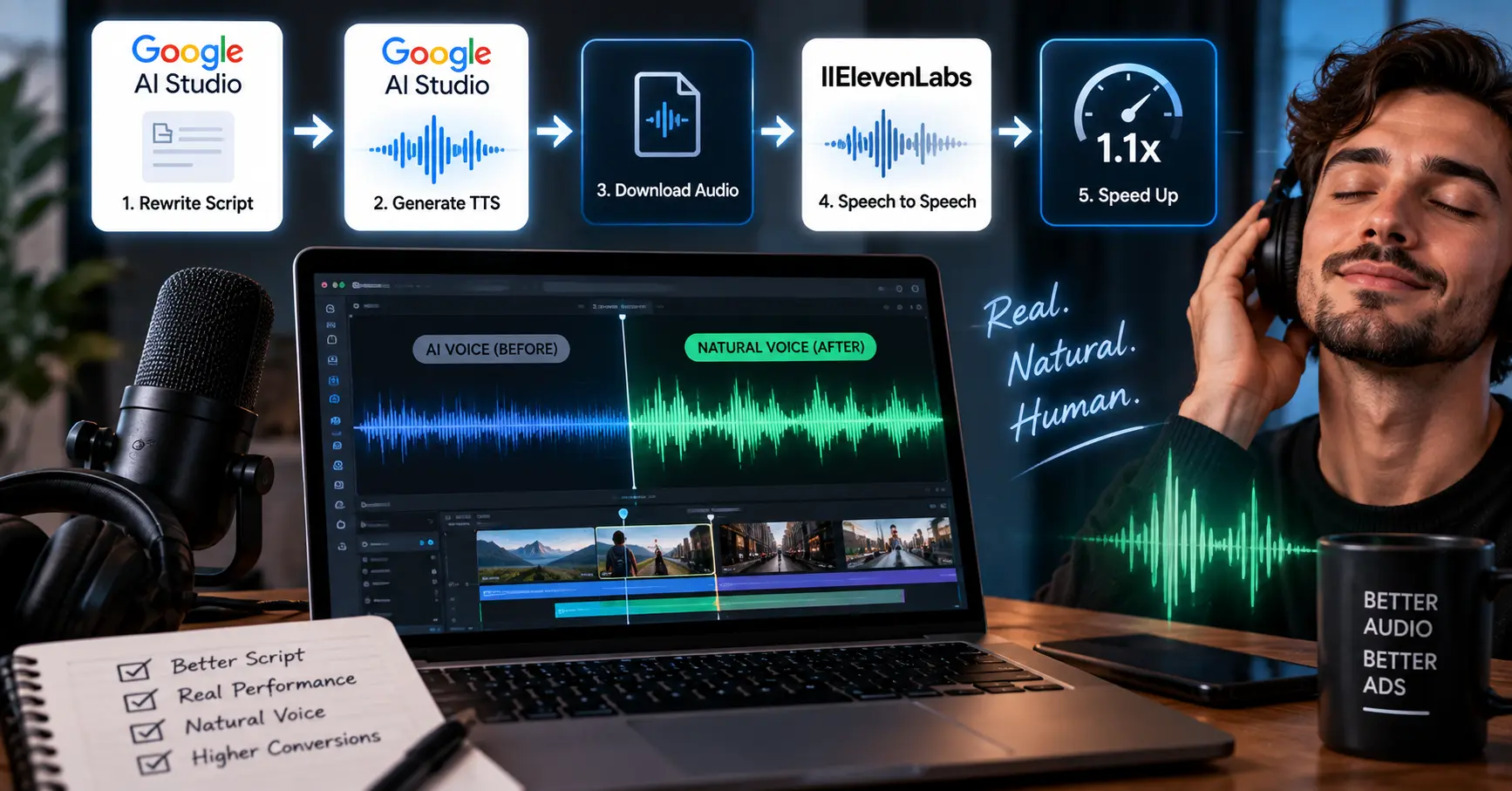
You can hear a bad AI voiceover in about two seconds. The voice is clear, the words are right, and something is off. It sits slightly too even. It never hesitates. Every sentence lands at the same pace as the one before it.
Most people try to fix their AI voiceover by paying for a better tool. They move from a free generator to ElevenLabs, get a nicer voice, and discover the read is still flat. The problem was never the voice quality. It is that one tool is being asked to do two different jobs, and no single tool is good at both.
The method below comes from media buyers who produce ad voiceovers at volume, where a voice that sounds synthetic costs real money. It uses two tools instead of one, in a specific order, with specific settings. It takes about five minutes per clip once you have done it twice.
Why a single tool cannot do this
An AI voiceover has two separate parts, and the tools are good at different ones.
The first part is performance. Pacing, where the emphasis falls, whether the speaker pauses before the important word, whether the delivery carries any emotion. Google's AI Studio text to speech is unusually good at this and it is free, but its voice library is generic and every clip sounds like a demo.
The second part is timbre. The actual character of the voice, the warmth, the sense that a body produced the sound. ElevenLabs is excellent here, and its voice library is the reason people pay for it. But its text to speech takes your script and reads it, which gives you a beautiful voice delivering a flat performance.
So the usual choice is a good read in a generic voice, or a great voice giving a mediocre read. The chain below gets both, by generating the performance in one tool and then carrying it across into the other.
The five step AI voiceover chain
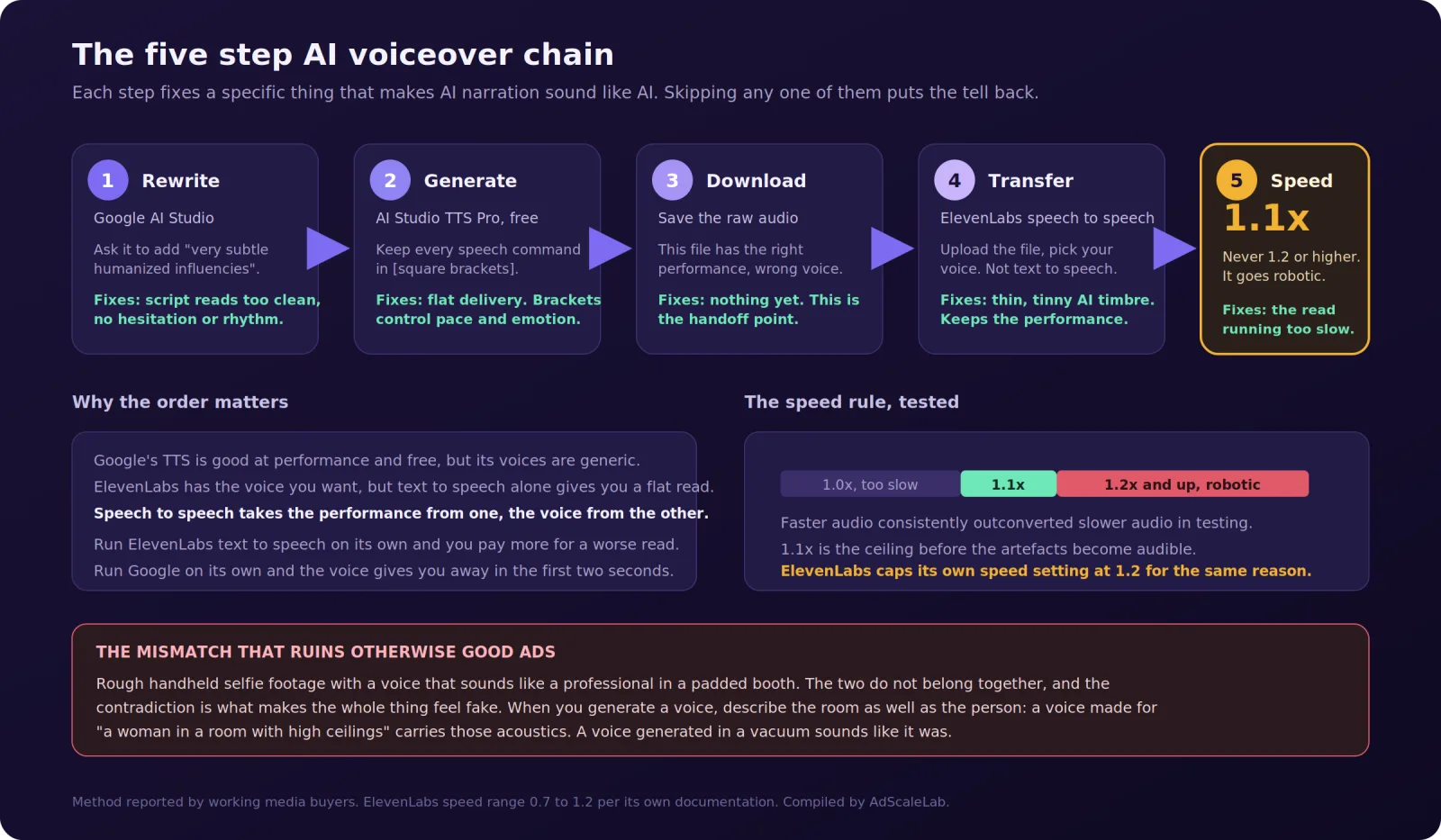
Step 1: Rewrite the script so it sounds spoken
Open Google AI Studio and paste in your script. Ask it to rewrite the text adding, in these words, "very subtle humanized influencies".
That phrasing matters more than it looks. Asking a model to "make this sound natural" usually produces something more polished, which is the opposite of what you want. Asking for subtle human influences produces the small imperfections real speech has: a sentence that starts and restarts, a filler word in the right place, a clause that trails off instead of landing cleanly, uneven sentence lengths.
Written copy is built to be read. Spoken copy is built to be heard, and the two are not the same document. This step converts one into the other before any audio exists.
Read the output aloud yourself before you go further. If you stumble on a sentence, the voice model will too.
Step 2: Generate the audio on Google AI Studio TTS Pro
Stay in AI Studio and switch to the Pro text to speech model. It is free with rate limits, which matters if you are producing dozens of clips a week.
The important part of this step is speech commands, written in square brackets inside your script. These tell the model how to deliver a line, not what to say. Things like a pause, a shift in tone, a change of pace, an emphasis. Every one you include is a piece of direction the model will act on, and every one you leave out is a decision the model makes for you, usually toward the middle.
Keep all of them in. People strip the brackets out because they look untidy in the script, and then wonder why the delivery went flat. The brackets are the performance.
If you are working with more than one speaker, AI Studio supports multi-speaker dialogue with speaker tags, which is useful for a two-person ad read without recording twice.
Step 3: Download the raw file
Save the audio. At this point you have a clip with the right performance and the wrong voice.
Listen to it once, checking only the timing and the emphasis. Ignore how the voice sounds, because you are about to replace it. If the pacing is wrong here, fix it here. Nothing downstream will repair a bad read.
Step 4: Run it through ElevenLabs speech to speech
This is the step almost nobody does, and it is the one that makes the method work.
Go to ElevenLabs and use speech to speech, not text to speech. Speech to speech takes an existing audio file and re-performs it in a different voice, keeping the timing, the emphasis and the emotional shape of the original. Text to speech would throw all of that away and start from the words again.
Upload your Google file, pick the voice you want, and generate. What comes out has ElevenLabs' voice quality carrying Google's performance.
This is also the fix for the thin, slightly tinny quality that people recognise as synthetic even when they cannot name it. If you have generated a voice elsewhere and it sounds close but not right, stripping the audio out and passing it through speech to speech is the cheapest repair available.
One detail worth adding at generation time: describe the room, not just the person. A voice generated for someone in a room with high ceilings, or outdoors in a field, carries the acoustics of that space. A voice generated with no environment sounds like it was made in a vacuum, because it was.
Step 5: Speed it up to exactly 1.1x
Take the finished file into your editor and raise the speed to 1.1x.
AI narration runs slow. Not dramatically, but enough that it reads as unhurried in a way real ad delivery is not. Buyers who have tested this report faster audio consistently outperforming slower audio.
The ceiling is 1.1x. Past that the artefacts become audible and the voice starts sounding processed, which puts back the exact tell you spent four steps removing. ElevenLabs caps its own speed control at 1.2 for the same reason, with its documentation noting that extreme values affect quality.
So: 1.1x, every time, and never 1.2.
The mismatch that ruins otherwise good ads
One thing undoes all of this, and it is a judgement problem, not a technical one.
A polished voice on rough footage does not work. If your video is handheld selfie-style, shot to look like a real person filmed it on their phone, and the voice sounds like a professional in a padded studio, the two halves contradict each other. Viewers may not consciously notice the audio, but they register that something is staged, and the whole ad reads as fake.
Match the voice to the picture. A rough video wants a voice with some room in it, some imperfection, a little background presence. A polished video can carry a polished read. The chain above gives you control over this, so use it.
Where this fits in a full ad
If you are producing a complete video ad and not only a voiceover, the audio step sits at the end.
The usual order is: write the script, break it into scenes sized to what your video model can handle, generate a start frame for each scene, generate the video, assemble in an editor, then handle the audio last. Generated video comes with its own audio, and the move is to strip that out, run the chain above, and lay the clean version back over the picture. You keep the timing and the lip sync and lose the artificial edge.
One number worth carrying over from video generation: for a ten second clip, keep the spoken script to roughly 120 to 140 characters. Push past about 160 and the model either rushes the delivery or cuts the line off before your call to action lands. Count the characters before you generate.
What each step actually fixes
Worth being explicit about this, because it tells you what to do when only part of the result is wrong.
If the writing sounds like a brochure being read out, step 1 is missing. If the delivery is even and emotionless, your brackets are missing in step 2. If the voice sounds thin or slightly metallic, you skipped step 4 and are hearing raw TTS. If it sounds fine but slightly sleepy, you skipped step 5. And if every part sounds good but the ad still feels off, the problem is the mismatch between voice and footage, which is a creative decision and not a settings problem.
Cost and time
Google AI Studio's TTS is free with rate limits, so steps 1 through 3 cost nothing. ElevenLabs is the only paid part, and speech to speech consumes credits like any other generation, so your cost is roughly what an ElevenLabs text to speech clip would have cost. You are not paying extra for the better result, you are paying the same and routing differently.
Time is about five minutes a clip once the process is familiar, most of it waiting for generations. The rewrite takes seconds, the TTS generation under a minute, the speech to speech pass under a minute, and the speed change is one setting in your editor.
The short version
An AI voiceover fails because one tool is doing two jobs. Split them. Rewrite the script in Google AI Studio asking for very subtle humanized influencies. Generate on the free AI Studio TTS Pro model with every speech command kept in square brackets. Download it. Pass that file through ElevenLabs speech to speech, not text to speech, to put your chosen voice on top of the performance. Speed the result to 1.1x and never further.
Then check the voice against the footage. The most common reason a technically good AI voiceover still fails is that it is too polished for the picture it sits on.
Agency ad accounts, without the wait.
Buy and top up Google, Meta, native, and more from one dashboard.
Get started


No comments yet. Be the first to comment.
Comments are open to registered AdScaleLab clients.
Sign in to comment