



How to Optimize MediaGo Campaigns With MediaGo SmartBid 3.0

MediaGo SmartBid 3.0 is becoming an important part of MediaGo's approach to performance advertising on the Open Internet. The system is designed to use deep learning and real-time bidding signals to help advertisers manage campaign delivery, find valuable traffic and improve the way budgets are used. MediaGo says SmartBid 3.0 was upgraded to address two common problems: getting a new campaign through its early learning stage and keeping spending and performance more stable as the campaign grows.
This matters because launching an advertising campaign is not only about choosing an audience and uploading creatives. A campaign also needs enough useful conversion data for the bidding system to understand which traffic is more valuable. If the campaign gets too little data, has unrealistic targets or is changed too often, optimization can become difficult.
MediaGo launched SmartBid 3.0 in April 2025. According to MediaGo, testing showed that campaigns using the upgraded system could reduce cold-start time by more than 50%. The company also reported an average 58% improvement in spend completion in Max CV mode and said its tCPA mode could keep CPA overflow within 1.15 times the target. These are MediaGo-reported results, not guarantees for every advertiser or campaign.
So, how should an advertiser actually use MediaGo SmartBid 3.0? The answer is not simply to turn on automated bidding and leave everything untouched. The better approach is to give the system a clean campaign structure, clear conversion goals and enough room to learn before making major changes.
What Is MediaGo SmartBid 3.0?
MediaGo describes SmartBid as its in-house intelligent bidding system. Its advertising platform uses deep learning to predict conversion behavior and evaluate the value of advertising opportunities in real time. The system can consider signals from the bidding environment, such as auction conditions, competing bids and the competitiveness of available inventory, when developing bidding strategies.
SmartBid 3.0 is an upgraded version of that system. One of its main goals is to make campaign scaling more stable.
The important idea here is that automated bidding is not simply about bidding higher or lower. The system is trying to estimate which impressions have a better chance of helping the campaign reach its objective and then adjust bidding accordingly. That is why advertisers should focus on giving the system good information instead of trying to manually control every individual bid.
MediaGo's recent recognition also puts SmartBid 3.0 into a wider context. In September 2026, MediaGo announced that it had received the Excellence Award in the AdTech category at the 2026 Global Tech Awards for the third consecutive year. The award recognized an integrated product approach combining SmartBid 3.0 with AD Learning and Approval Copilot.
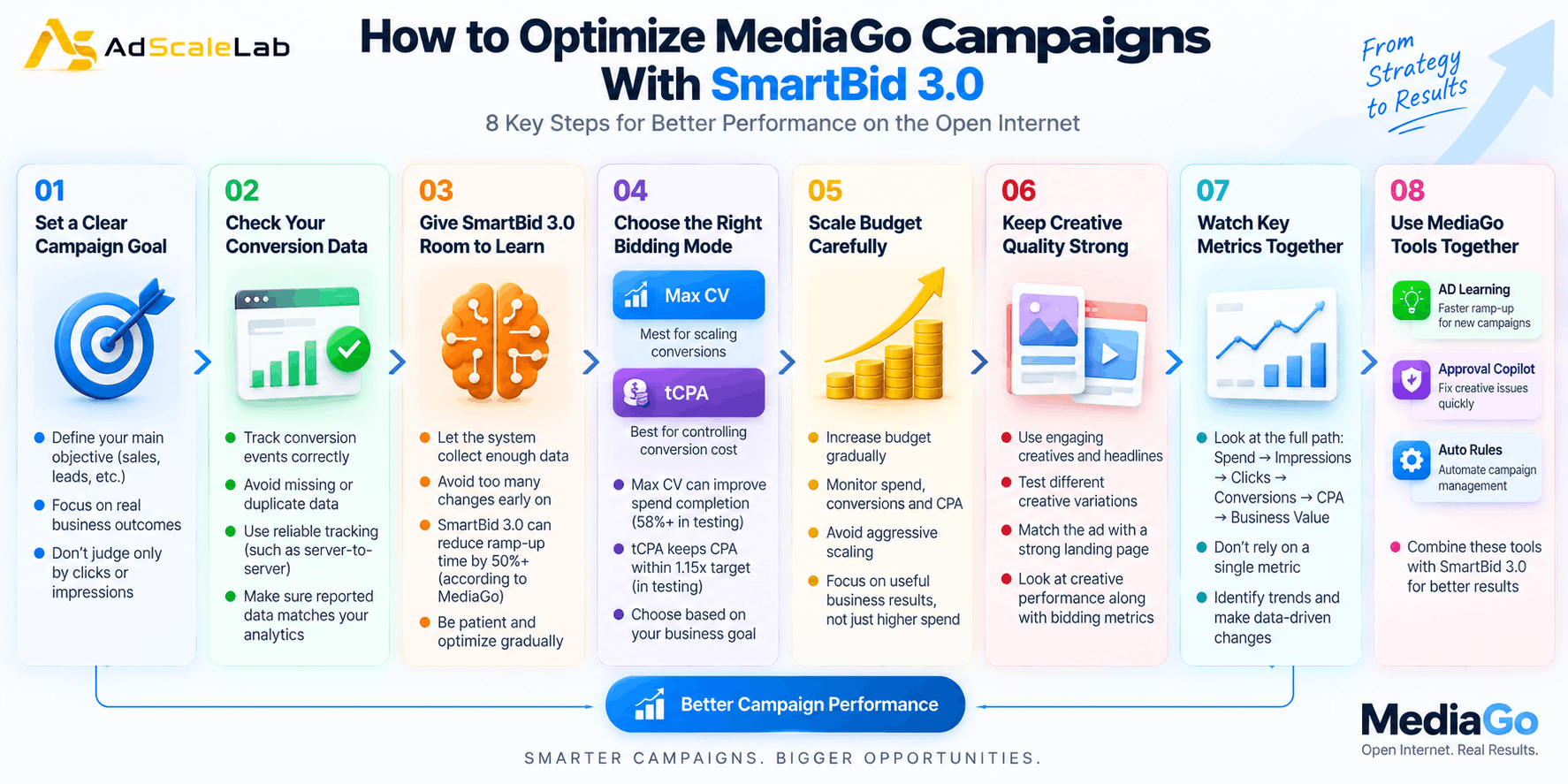
Step 1: Start With A Clear Campaign Goal
The first step to optimize a MediaGo campaign is to decide what the campaign is actually trying to achieve.
For example, an ecommerce advertiser may care about purchases, while a lead-generation company may care about completed forms or qualified leads. These are not the same objective, so the campaign should not be judged only by clicks or impressions.
Before making changes to bidding, look at the final business action you want the campaign to generate. If the campaign is designed to generate leads, for example, make sure the conversion event being measured represents a useful lead rather than just a page visit.
This becomes especially important when using automated bidding because SmartBid is designed around conversion-focused optimization. MediaGo says its platform uses real-time prediction of conversion rates and advertising business value when developing bidding strategies.
In simple terms, the better the campaign goal is defined, the more useful the optimization process can become.
Step 2: Make Sure Your Conversion Data Is Working
The next step is to check the conversion data before expecting MediaGo SmartBid 3.0 to optimize performance.
An advertiser should make sure the important conversion events are being recorded correctly. If conversions are missing, duplicated or incorrectly defined, the bidding system can receive a poor picture of what a successful user looks like.
This is one of the easiest things to overlook because the campaign may still receive impressions and clicks even when conversion measurement is not working properly. Before judging SmartBid performance, check whether conversions are appearing consistently and whether the reported numbers match what you can see in your own analytics or business systems.
For advertisers using deeper conversion information, this can become even more important. MediaGo's current platform materials highlight real-time conversion prediction and describe conversion-data integrations such as server-to-server tracking for some campaign setups.
The simple rule is: do not ask an automated bidding system to optimize toward data that you do not trust.
Step 3: Give MediaGo SmartBid 3.0 Enough Room To Learn
One of the main reasons MediaGo developed SmartBid 3.0 was to address the cold-start problem.
A new campaign does not have the same amount of historical information as an established campaign. The system has to learn which users, placements, creative combinations and traffic conditions are more useful.
MediaGo says SmartBid 3.0 reduced campaign ramp-up time by more than 50% in its testing. The company also says that Max CV mode gives the system greater exploration capacity during the early stage of a campaign. That does not mean advertisers should make large changes every few hours.
If you constantly change budgets, targeting, creatives and bidding objectives at the same time, it becomes harder to understand what actually caused performance to change.
A better approach is to launch with a clear setup, watch the early data and make changes based on meaningful performance trends rather than reacting to every small movement. This is particularly important when the campaign has only generated a small number of conversions.
Step 4: Understand The Difference Between Max CV And TCPA
Another important part of optimizing MediaGo campaigns is understanding which bidding approach fits the campaign objective.
MediaGo's SmartBid 3.0 announcement specifically discusses Max CV and tCPA modes.
In Max CV mode, MediaGo says the system uses historical spending information and dynamic adjustments to help campaigns explore scaling opportunities. The company reported an average improvement of more than 58% in spend completion in its testing.
For advertisers, the important point is that Max CV is positioned around conversion-focused scaling rather than simply trying to keep every individual bid at the same level. The tCPA approach is more focused on conversion cost. MediaGo says SmartBid 3.0 dynamically adjusts bidding based on real-time auction conditions and user behavior, while its testing showed CPA overflow within 1.15 times the target.
These numbers should be treated as MediaGo's reported testing results rather than expected results for every account. When deciding between approaches, advertisers should start with the actual business objective. If controlling acquisition cost is the main priority, a target-CPA approach may make more sense. If the goal is to give the system more room to find conversion opportunities and scale delivery, a conversion-focused scaling approach may be more appropriate.
Step 5: Do Not Scale The Budget Too Aggressively
Getting a campaign to spend is not the same as getting a campaign to perform well.
This is one of the biggest mistakes advertisers can make when working with automated bidding. If a campaign starts producing conversions at an acceptable cost, it can be tempting to increase the budget quickly. But a large budget change can alter the amount and type of inventory the system needs to explore.
MediaGo SmartBid 3.0 is designed to help with scaling, but advertisers still need to watch the relationship between spend, conversions, CPA and conversion quality.
Instead of asking, "How quickly can I spend this budget?" ask, "Is the additional spend producing useful business results?"
MediaGo's own materials position SmartBid around balancing campaign goals with the business value of available ad inventory. That makes gradual scaling and regular measurement more useful than simply pushing the budget higher.
Step 6: Keep Your Creative Quality Strong
Smart bidding cannot completely solve a creative problem.
Even if the bidding system finds a potentially valuable user, the user still has to notice the advertisement and decide to interact with it. MediaGo's platform supports native and display advertising and describes AI-generated and dynamically matched creative materials as part of its advertising technology.
For advertisers, this means bidding and creative should be looked at together.
If clicks are falling, the problem may not always be the bid. The creative could have become less attractive, the headline may no longer match the audience, or the landing page may not continue the message shown in the advertisement. A useful optimization routine is therefore to compare creative performance alongside bidding metrics instead of treating SmartBid as the only factor responsible for campaign results.
Step 7: Watch CPA, Conversion Rate And Spend Together
Do not optimize a MediaGo campaign by looking at one number.
A low CPC can look attractive, but it does not automatically mean the campaign is producing good customers. The same applies to CTR. A high click-through rate can still produce weak results if the users do not complete the desired action.
Instead, look at the full path:
Spend → Impressions → Clicks → Conversions → CPA → Business Value
This gives you a better picture of what is happening.
For example, if spend increases while conversions remain flat, the campaign may need attention. If conversions increase while CPA remains close to the target, the additional spending may be more useful. If clicks increase but conversion rate drops sharply, the issue may be traffic quality, creative relevance or the landing-page experience.
MediaGo's current advertiser materials also show campaign case studies using combinations such as Max CV, tCPA, creative optimization and deeper conversion integrations. Those examples show why campaign optimization should be viewed as a complete system rather than a bidding setting alone.
Step 8: Use New MediaGo Tools Alongside MediaGo SmartBid 3.0
SmartBid 3.0 is not the only part of MediaGo's current optimization strategy.
In 2026, MediaGo introduced AD Learning, which is designed to allow new campaigns to use model features from high-performing existing campaigns. The company says this is intended to reduce the difficulty of the cold-start period. MediaGo has also introduced Approval Copilot, which provides diagnostics for creative disapprovals and alerts advertisers about potential high-loss risks.
More recently, MediaGo introduced Auto Rules, which allow advertisers to define conditions and actions for automated campaign management, such as pausing underperforming ads or changing budgets when specified data conditions are met. These tools are important because campaign optimization is not only about bidding.
A campaign can have good bidding technology and still struggle because of a poor creative, a long cold start, weak conversion data or slow manual management. MediaGo's current product direction is increasingly focused on connecting these different parts of campaign management.
What Should Advertisers Avoid When Using MediaGo SmartBid 3.0?
The biggest mistake is treating automation as a replacement for campaign strategy.
SmartBid can automate bidding decisions, but advertisers still need to decide what success means, what conversion events matter, how much they are willing to pay and whether the traffic is producing real business value.
Another mistake is making too many changes at once. If you change the budget, bidding method, landing page, creative and targeting at the same time, you may not know which change helped or hurt the campaign. Advertisers should also avoid judging the system only from the first few hours of delivery. A new campaign needs time to gather useful information, even though SmartBid 3.0 is designed to shorten the cold-start period.
Finally, do not treat MediaGo's published performance numbers as guarantees. The more than 50% cold-start reduction, 58% spend-completion improvement and 1.15x CPA-overflow figure come from MediaGo's reported testing and should be understood in that context.
The Bigger Picture for MediaGo SmartBid 3.0
The bigger story behind MediaGo SmartBid 3.0 is the growing role of automated optimization in Open Internet advertising.
MediaGo's recent Global Tech Awards recognition shows that SmartBid 3.0 is now being presented as part of a larger deep-learning advertising system. The company is combining automated bidding with campaign learning, creative diagnostics and automated campaign management.
For advertisers, that means the job is gradually changing. Instead of manually controlling every bid, the more important work is likely to be setting good campaign goals, feeding reliable conversion data into the platform, choosing an appropriate optimization approach, creating strong advertisements and knowing when to make changes. Smart bidding works best when the advertiser and the system have different jobs. The advertiser provides the strategy and business goal. The technology handles much of the repetitive bidding and optimization work.
That is ultimately how advertisers should approach MediaGo SmartBid 3.0: not as a magic button for better results, but as an automated bidding system that becomes more useful when the campaign is built around clean data, clear goals and disciplined optimization.
Agency ad accounts, without the wait.
Buy and top up Google, Meta, native, and more from one dashboard.
Get started

No comments yet. Be the first to comment.
Comments are open to registered AdScaleLab clients.
Sign in to comment