






How To Optimize Taboola Campaigns By Day Of The Week
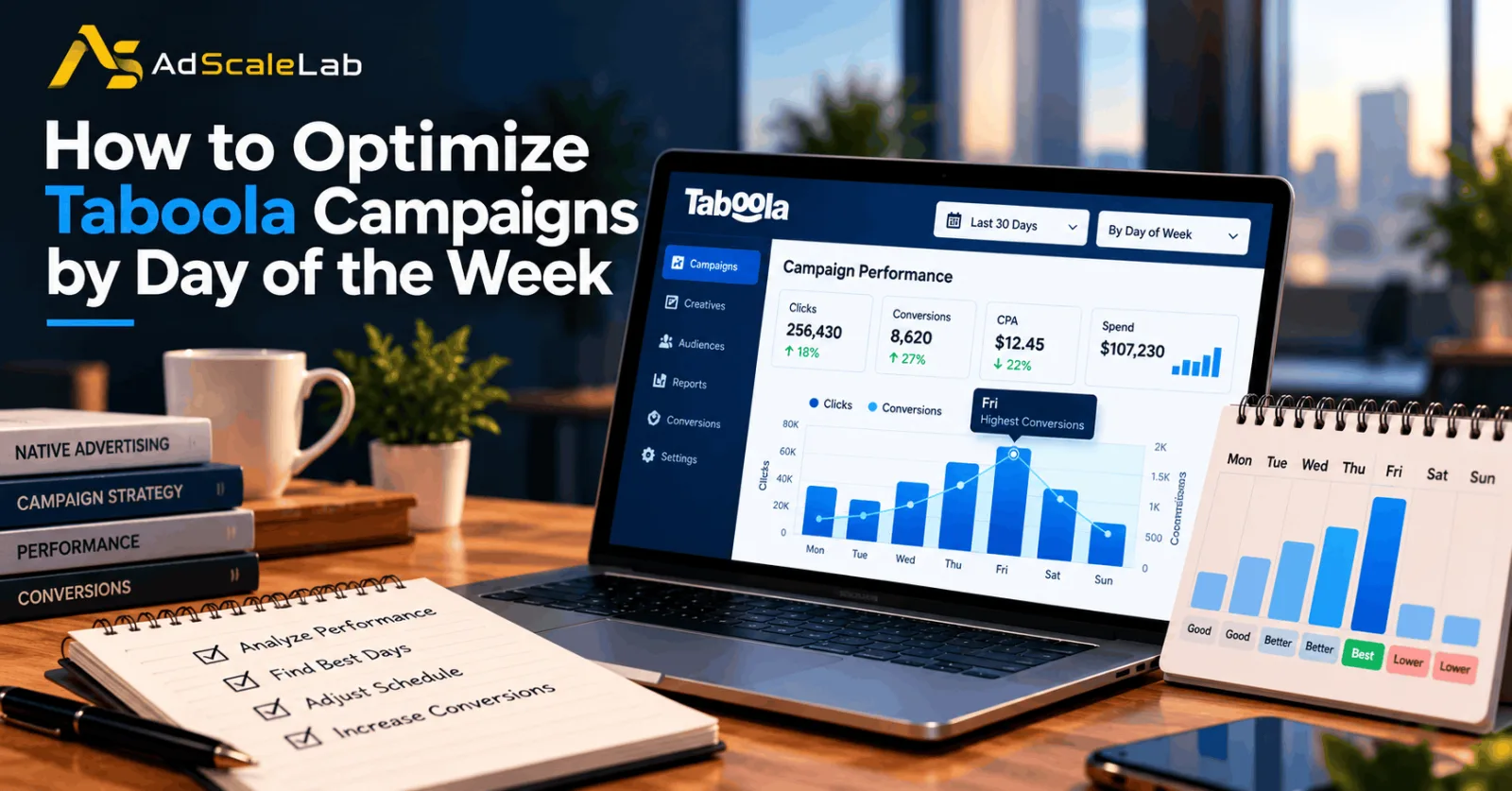
Running a Taboola campaign every day does not mean every day will bring the same results. You might receive plenty of clicks on Monday but generate more sales on Saturday. Another campaign could perform well during the working week and struggle over the weekend. These differences are worth investigating because they can affect how efficiently you spend your advertising budget.
Learning how to optimize Taboola campaigns by day of the week helps you understand when your audience is most likely to take action. Instead of guessing which days are best, you can use campaign reports to compare traffic, conversions, and costs before deciding whether to change your schedule.
Taboola provides reporting options that let advertisers review performance by day or day of the week. Its campaign management tools have also supported scheduling campaigns for specific days and hours. These features give advertisers a way to investigate audience behavior and adjust campaign delivery based on what they learn. Taboola Ads Console documentation explains the reporting options available in its advertising interface. The important thing to remember is that there is no single weekday that works best for every advertiser. A campaign promoting business software may attract a different audience from one selling clothing or collecting insurance leads. Your results depend on your offer, audience, landing page, bidding strategy, and conversion goals.
Why Day-Of-Week Optimization Matters For Taboola Campaigns
Imagine that you run a campaign promoting a subscription-based software product. On Monday, the campaign receives 500 clicks, but only a few visitors sign up for a trial. On Saturday, it receives fewer clicks, yet a larger share of visitors register. If you judge the campaign only by traffic volume, Monday might appear to be the better day. Once you look at conversions, the picture could be different. This is why day-of-week optimization matters. It helps you look beyond the number of people who click your ads and understand what those visitors do afterward.
The same idea applies to ecommerce, lead generation, and content campaigns. An online store may care about purchases and revenue, while a business offering professional services may focus on qualified leads. The right metric depends on what the campaign is supposed to achieve.
Taboola's conversion tracking documentation explains how advertisers can measure website actions using its pixel or server-to-server tracking methods. With conversion tracking configured correctly, you can compare the business results generated by different days rather than relying on clicks alone.
Step 1: How to Optimize Taboola Campaigns by Reviewing Campaign Reports
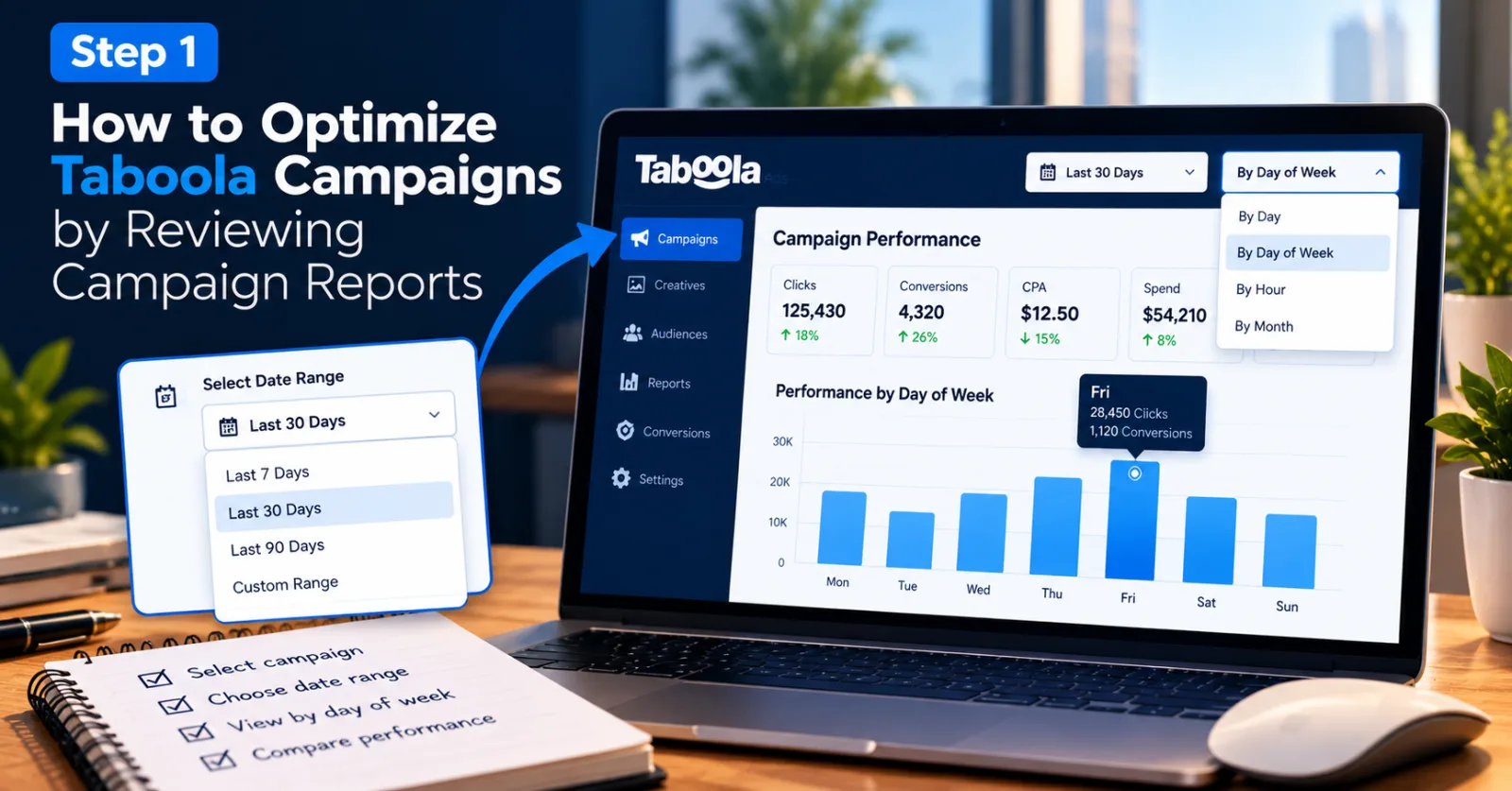
Start by signing in to your Taboola advertising account and opening the campaign reporting dashboard. Select the campaign you want to review. If your account uses the newer Ads Console, you can consult the official Taboola Ads Console guide to understand its reporting layout and campaign selection options. Look for the reporting view that displays performance by day of the week. Taboola's documentation describes dashboards that can show data by individual day or by weekday, with additional performance metrics available for analysis. The exact labels and available controls may differ depending on the interface and account access you have.
Choose a reporting period that gives you enough information to make a useful comparison. Looking at only the previous two or three days can be misleading because traffic and conversions naturally fluctuate. A longer period can help you see whether a particular weekday repeatedly performs well or whether a recent result was simply an exception. If you have several campaigns, start with one that has a clear objective and enough activity to evaluate. A lead-generation campaign and a product-sales campaign should not automatically be combined into the same analysis because their success measures may be different.
Step 2: Compare All Seven Days Using The Right Metrics
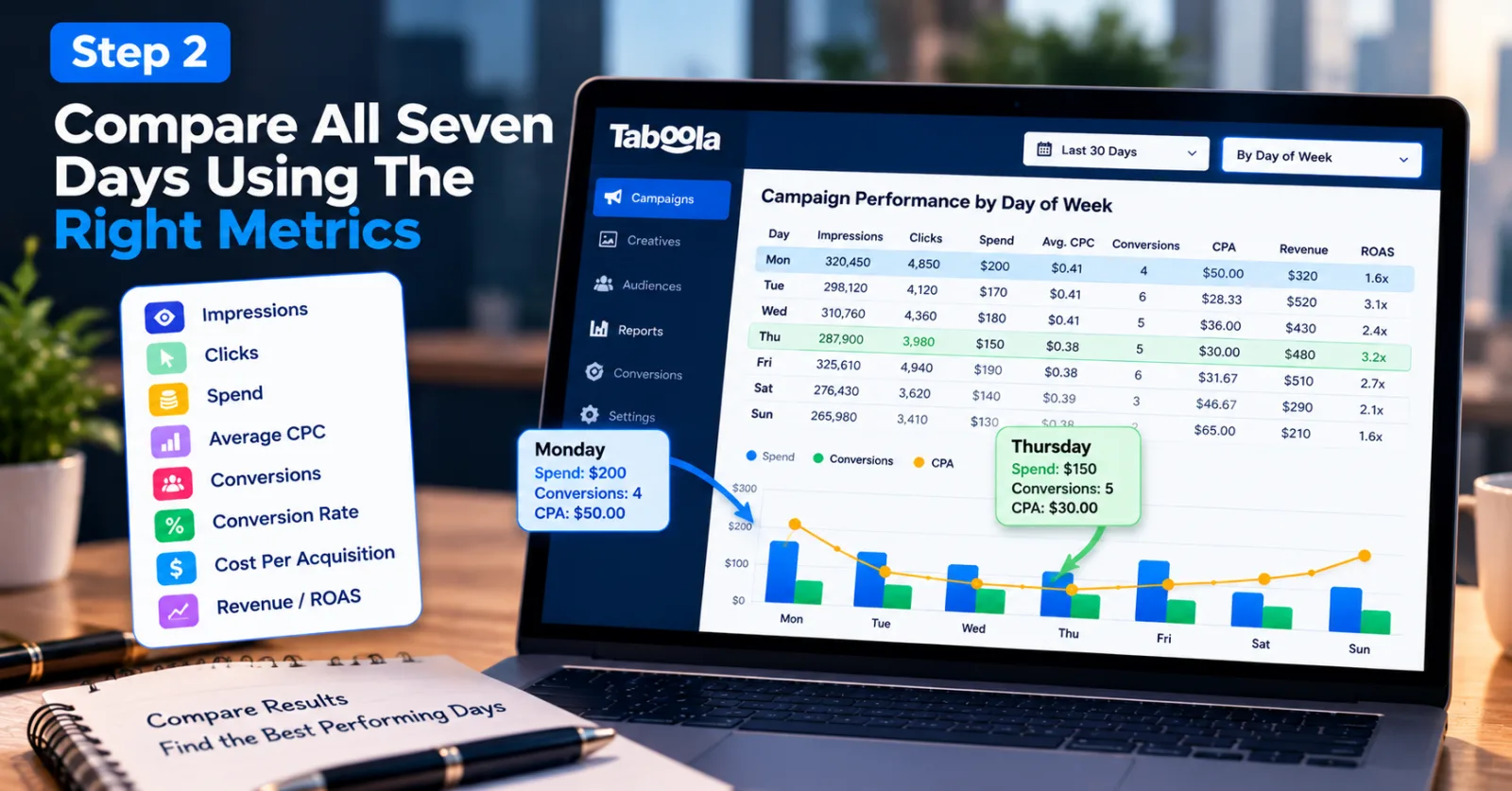
Once you have opened the report, compare Monday through Sunday. Begin with impressions, clicks, spend, and average CPC. Then look at conversions, conversion rate, cost per acquisition, and revenue or return on ad spend where those measurements are available.
For example, suppose your campaign spends $200 on Monday and generates four leads. On Thursday, it spends $150 and generates five leads. Monday has more spending, but Thursday has a lower cost per lead. If those leads are similarly valuable, Thursday may be the more efficient day.
These figures are an illustration of how to compare results, not a claim about typical Taboola performance. Your actual results will depend on your campaign and audience. Also, do not assume that a low CPC automatically means a day is profitable. Cheap clicks are useful only when they bring visitors who are likely to complete the action you want. A day that produces fewer clicks can still be valuable if those visitors are more likely to buy, register, or submit a qualified enquiry.
Keep the comparison consistent. Use the same reporting period and conversion definition when evaluating each day. If you changed the budget or creative halfway through the period, make a note of that change before deciding that the weekday itself caused the difference.
Step 3: Check Which Days Generate Actual Conversions
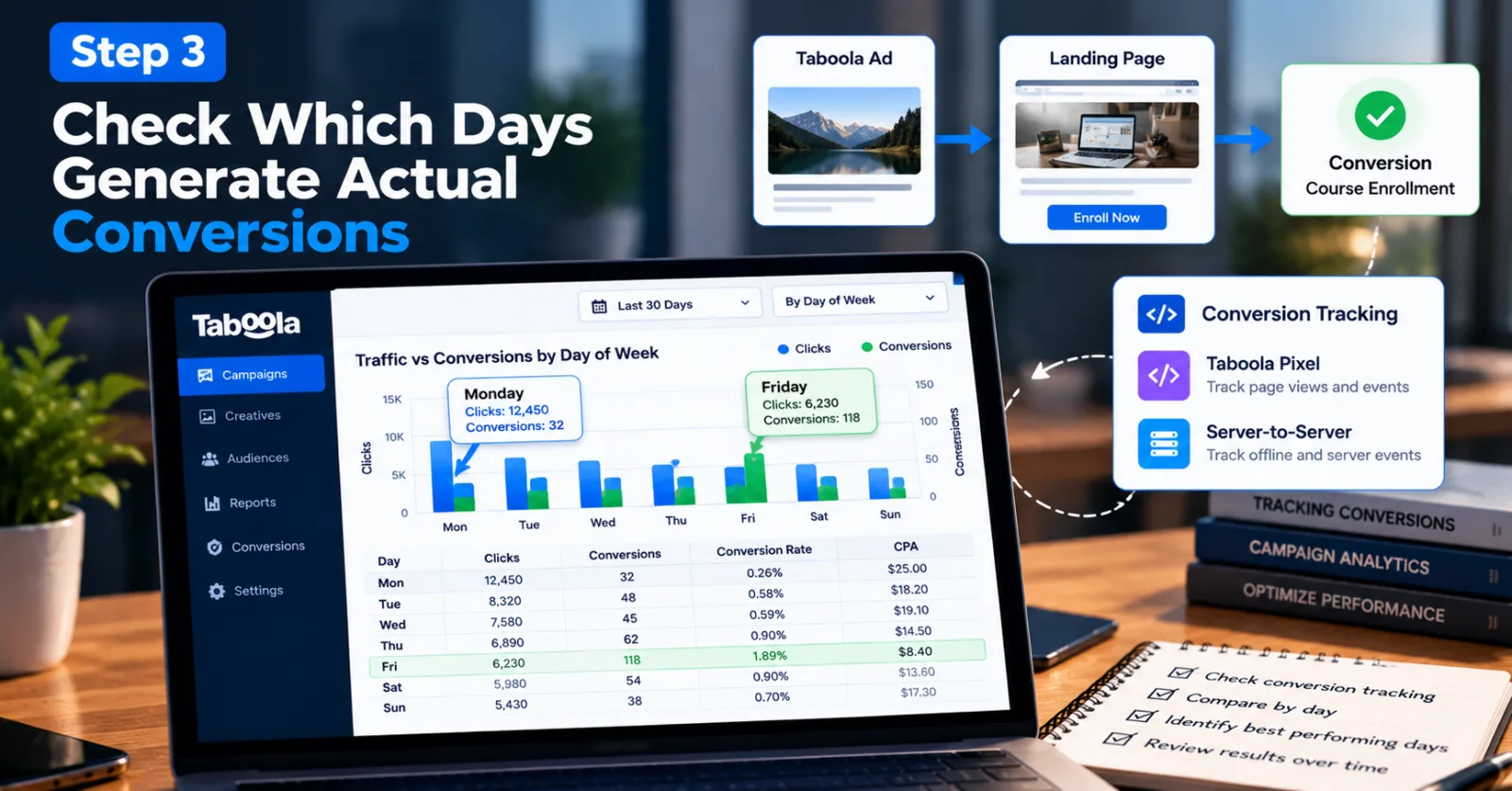
After reviewing traffic, pay closer attention to conversions. This is where you can begin to understand whether a day is bringing visitors who matter to your business. Suppose you advertise an online course through Taboola. Monday might generate a large number of article clicks, but relatively few visitors reach the enrollment page. Friday might produce less traffic but more completed registrations. In that situation, the Friday traffic deserves a closer look, even if its click volume is lower.
Before drawing conclusions, make sure your conversion tracking is working. Taboola supports pixel-based and server-to-server tracking, and its documentation explains how advertisers can define conversions based on a page visit or a specific event. You can review the official guide to defining conversions to understand the available options.
Check that the conversion being measured matches your actual goal. If you want completed purchases, tracking only visits to a product page will not tell you whether people bought anything. Similarly, a lead-generation campaign should distinguish between a form visit and a completed submission when that distinction matters to the business. You should also account for the time it takes people to convert. Some visitors buy immediately, while others return later. A day that looks weak in a recent report might still generate conversions after more time has passed. Make sure your comparison allows for the conversion delay relevant to your campaign.
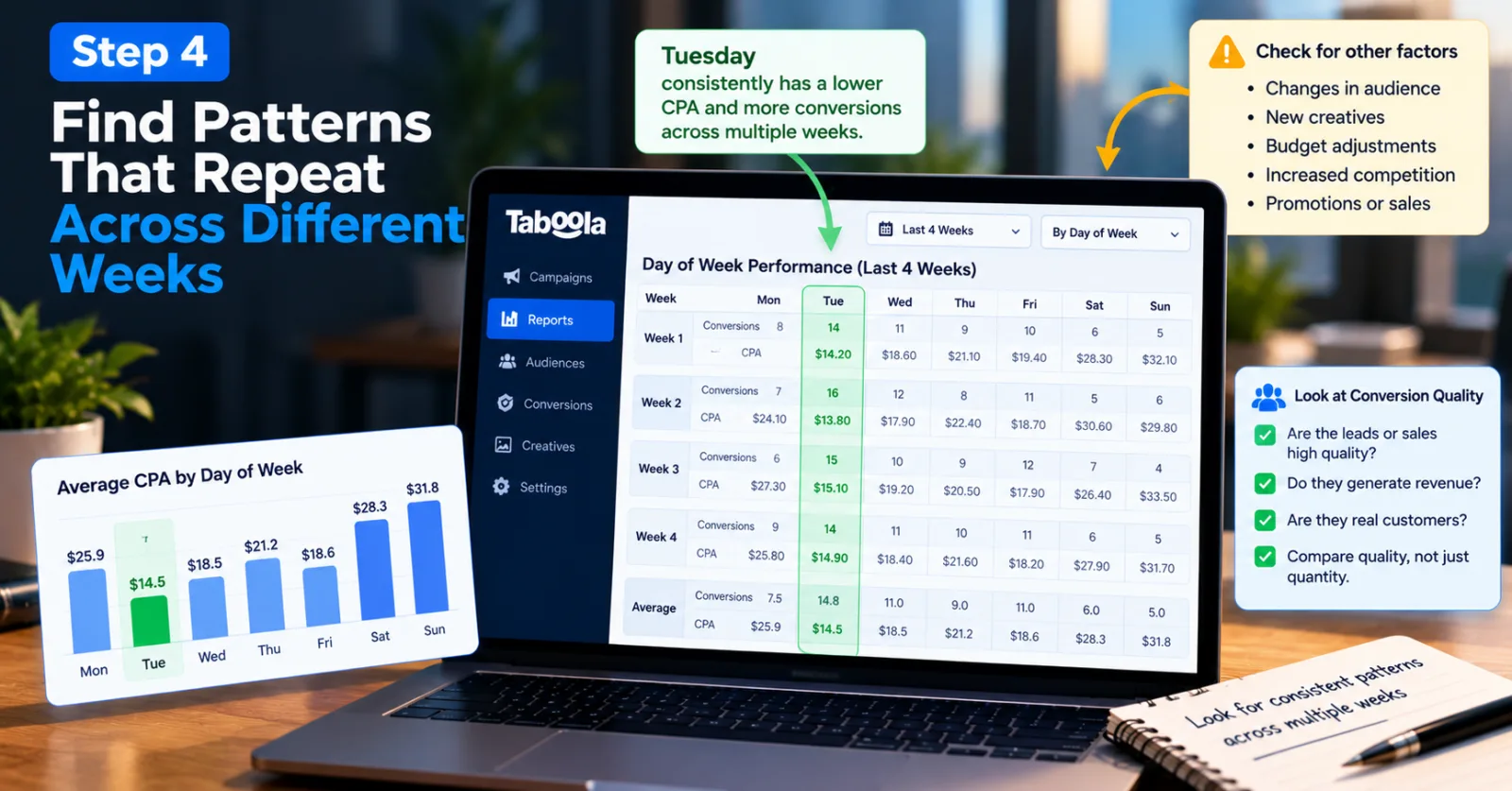
Step 4: Find Patterns That Repeat Across Different Weeks
One strong day does not necessarily mean you have discovered the best schedule. Look for patterns that appear more than once. For example, suppose Tuesday produces a lower cost per lead than Monday in several comparable weeks. That may be a useful sign that Tuesday deserves more attention. However, check whether the same audience, offer, creative, and campaign settings were running during those periods.
A sale, a new creative, a sudden increase in competition, or a budget change can affect performance. If you ignore these factors, you might incorrectly attribute the result to the day of the week. Be especially careful with campaigns that generate only a small number of conversions. If Monday produces two sales and Tuesday produces three, the difference may not be strong enough to justify pausing Monday. More data may change the picture.
It is also worth comparing the quality of the conversions. For a lead-generation campaign, five qualified enquiries may be more useful than ten enquiries from people who are unlikely to become customers. If your business tracks lead quality or revenue, include those measures in your analysis. The goal is to find a pattern you can explain with evidence, not to create a schedule based on one unusually good or bad day.
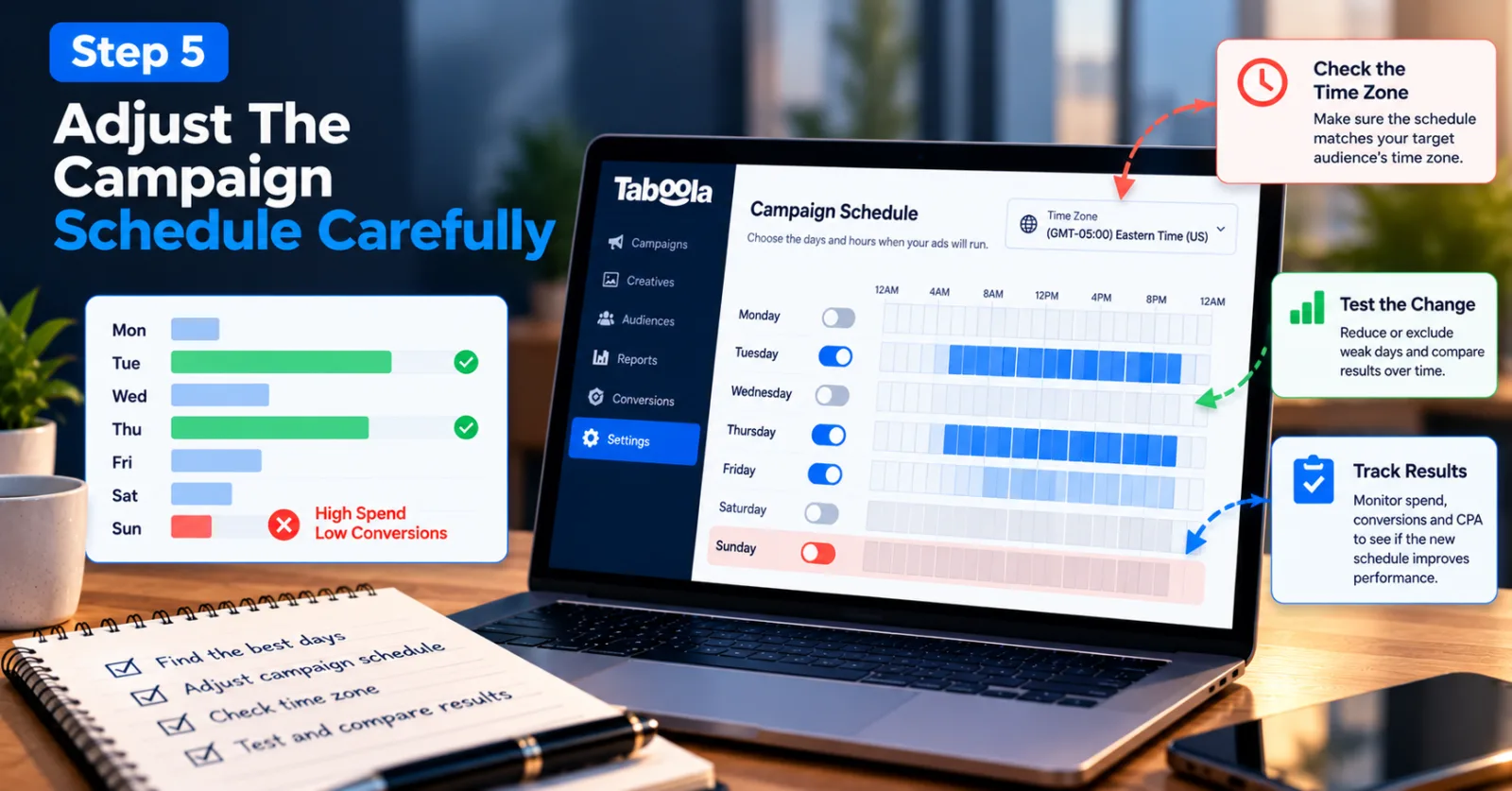
Step 5: Adjust The Campaign Schedule Carefully
Once you have found a repeated pattern, consider whether changing the schedule could improve results. Taboola has published guidance on campaign scheduling that describes selecting specific days or hours for campaign delivery. Its Campaign Scheduler article explains how advertisers can use schedule settings to test when their audiences are most likely to engage.
Imagine that your campaign repeatedly spends money on Sunday but produces few qualified leads, while Tuesday and Thursday deliver leads at an acceptable cost. You could test reducing or excluding Sunday delivery, provided the data is strong enough and the campaign's objective supports that decision. Do not automatically switch off every day that looks slightly weaker. A day with fewer immediate conversions may still help people discover your business before they convert later. You should also consider whether lower traffic on a particular day is normal for your industry.
Check the account's time zone before changing the schedule. If your campaign targets people in the United States but your team manages the account from another country, the account's time settings can affect when your ads appear. Make sure the schedule matches the audience you intend to reach. If you decide to test a new schedule, record the change and compare the results over a suitable period. That will help you understand whether the adjustment actually improved campaign efficiency.
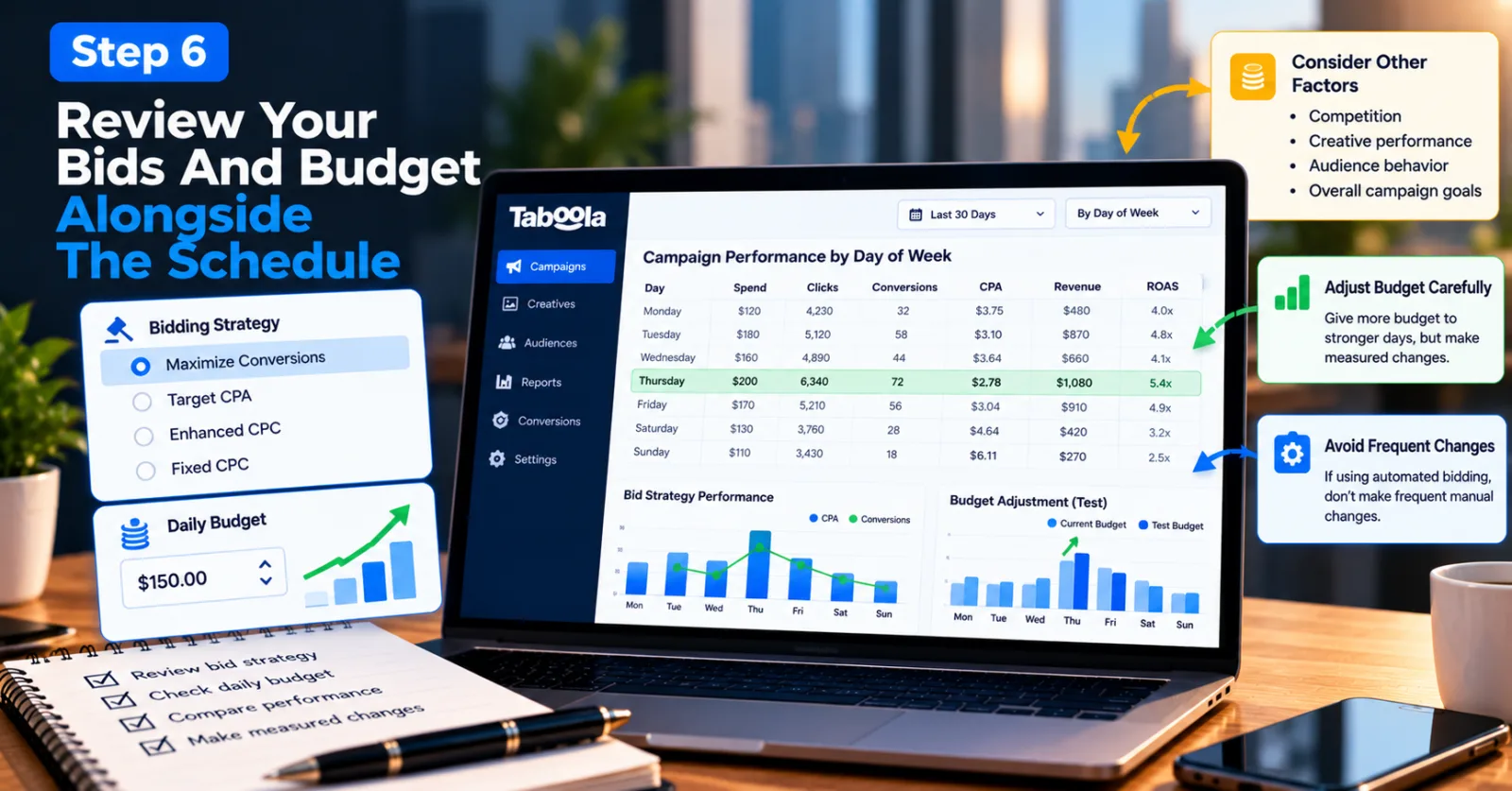
Step 6: Review Your Bids And Budget Alongside The Schedule
Day-of-week performance is only one part of campaign optimization. Bids, budgets, competition, creative performance, and audience behavior can all influence your results. Taboola's official bidding strategies documentation describes several campaign strategies, including Maximize Conversions, Target CPA, Enhanced CPC, and Fixed CPC. The options available to you may depend on the current campaign setup and platform capabilities.
If your campaign uses automated bidding, avoid making frequent changes simply because one weekday has a few more conversions than another. Automated bidding uses campaign information to adjust bids, and repeated manual changes can make it harder to understand which factor is affecting performance. For a campaign using fixed CPC bidding, you can review whether the cost of traffic on different days fits your target acquisition cost. However, a lower CPC should not be your only reason for increasing spend. The traffic must still deliver results that justify the cost.
Budget changes also need care. If Thursday is consistently more efficient, you could test giving that day more opportunity to generate conversions. But do not increase spending sharply based on one good report. Make a measured change and watch whether the additional traffic maintains its quality.
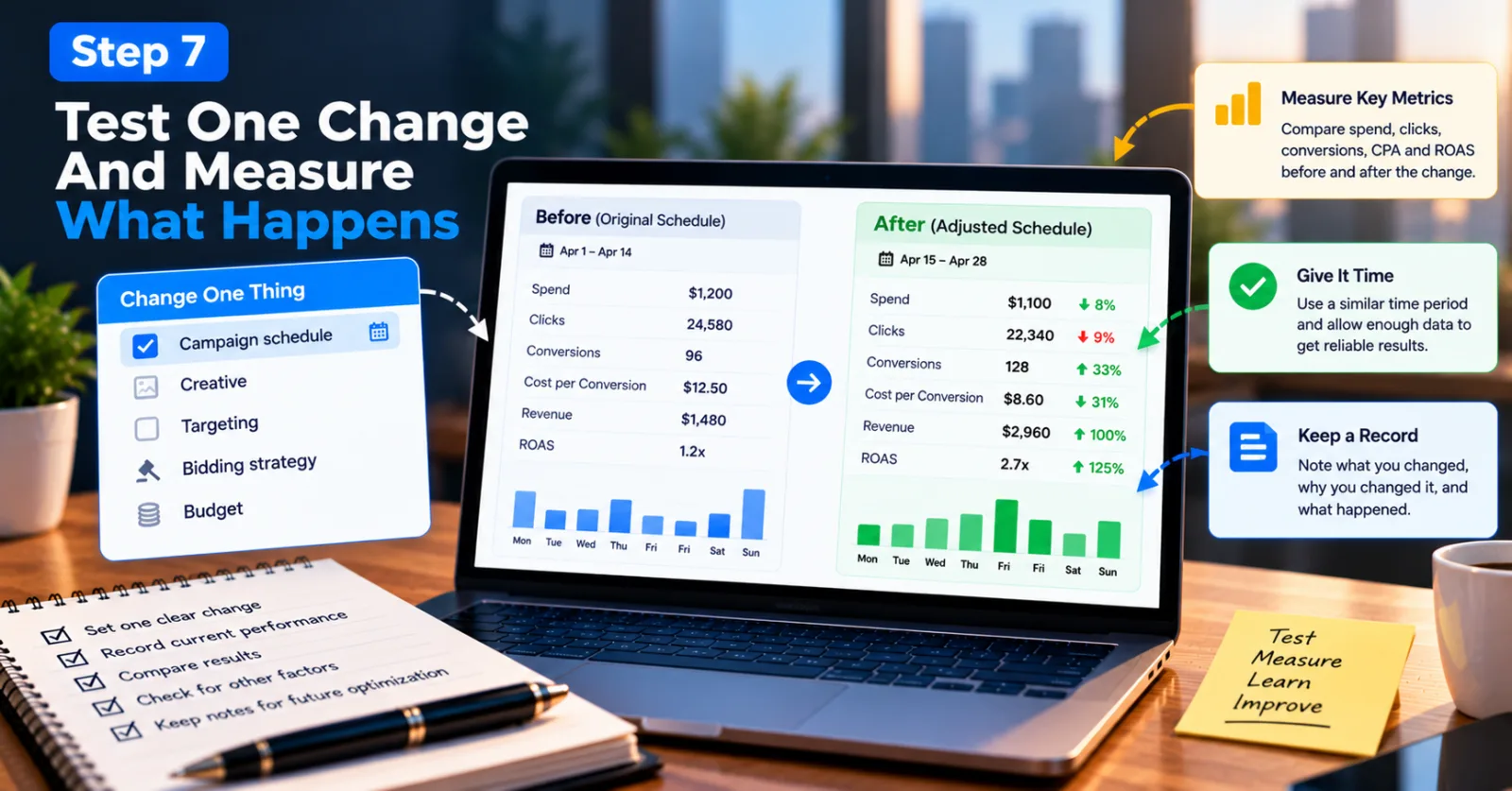
Step 7: Test One Change And Measure What Happens
Once you have decided what to change, keep the test as clear as possible. If you adjust the campaign schedule, avoid changing the creative, targeting, bidding strategy, and budget at the same time unless there is a specific reason to do so. Changing several things together makes it difficult to understand why performance improved or declined. A more controlled test gives you better information for the next decision.
Before making the change, record your current performance. Include spend, clicks, conversions, cost per conversion, and revenue or ROAS where available. After the change, compare those same metrics over a reasonably similar period. For example, if you reduce delivery on a consistently weak day, check whether overall conversion costs improve without causing an unacceptable drop in total conversions. A lower cost per conversion is useful, but not if the campaign loses too much volume to meet the business goal.
Keep in mind that results can change for reasons unrelated to scheduling. Seasonality, promotions, creative fatigue, competition, and changes in audience behavior can all influence campaign performance. Treat the test as evidence, not absolute proof that a single adjustment caused every change. Keep a simple record of what you changed, why you changed it, and what happened afterward. Those notes will make future optimization easier and help you avoid repeating experiments that did not work.
Common Mistakes To Avoid When Optimizing Taboola Campaigns
One mistake is assuming that weekdays are always better than weekends. That may be true for some campaigns, but it is not a rule that applies to every product or audience. Use your own results to decide.
Another mistake is making a major scheduling decision after only a few clicks or conversions. Small samples can produce misleading results, so allow enough time and traffic to identify a meaningful pattern. Advertisers can also make the mistake of focusing entirely on CPC. Cheap traffic may look attractive, but the real goal is to generate conversions or other valuable actions at a sustainable cost.
Finally, do not forget to check tracking before changing campaign settings. If conversions are missing or incorrectly configured, the report may make a good day look bad. Verify the measurement setup before treating the numbers as reliable.
Agency ad accounts, without the wait.
Buy and top up Google, Meta, native, and more from one dashboard.
Get started

No comments yet. Be the first to comment.
Comments are open to registered AdScaleLab clients.
Sign in to comment