






Bing Ads Account Setup: What to Do Before You Spend
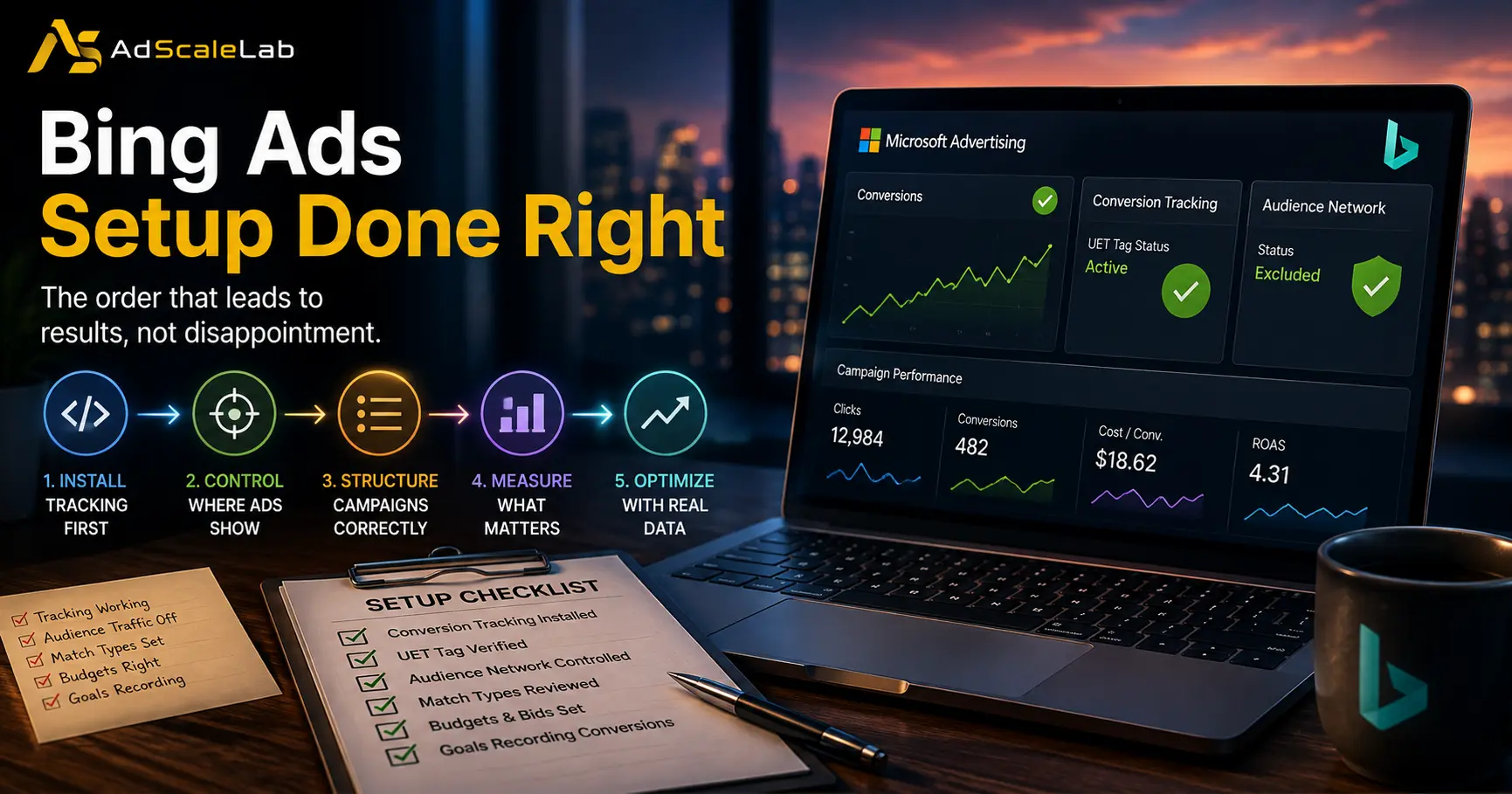
A great many negative verdicts on Microsoft Advertising trace back to the same sequence of events. An account is created, campaigns are imported from Google, everything is switched on, and the results over the following fortnight are poor enough to justify abandoning the channel. The conclusion drawn is that Bing does not work.
In a reasonable number of these cases the campaigns were never given a fair test. The traffic was going somewhere other than search, the conversions were occurring but never recorded, and the match types were behaving differently from what the advertiser assumed. None of that is visible from the dashboard unless you know to look for it.
What follows is the order of operations that avoids most of it. The sequence matters, because several of these steps are considerably harder to correct once budget has already been spent against them.
Install Conversion Tracking Before Anything Else
Microsoft operates its own tracking system, and nothing carries across from Google. Advertisers who import campaigns often assume tracking came with them, which it did not. Until Microsoft's tag is installed and firing, the interface will report no conversions at all, regardless of how many actually occurred.
This produces a specific and avoidable failure. The advertiser reviews a fortnight of data, sees spend with nothing against it, and concludes the campaigns failed. The campaigns may have performed perfectly well.
Microsoft's guide to setting up UET covers creating the tag, installing it, and verifying it. Verification is the step to insist on. Microsoft provides a tag helper extension for exactly this purpose, and confirming the tag fires before any budget is committed means your first week of data can be trusted.
One detail in that documentation deserves particular attention, because it catches people out later rather than immediately. When creating the tag you are asked to select an industry, and if you select health and wellness, Microsoft applies privacy filtering to the traffic collected. Events from those pages may then be ineligible for audience targeting, which quietly disables any remarketing strategy that depends on them.
Microsoft's own recommendation is to run two separate tags where a site has both healthcare and non-healthcare pages, so that audience building continues to function on the pages where it is permitted. This is worth deciding at setup, since discovering it after building audiences means rebuilding them.
Decide Carefully How Much to Import
Opinion divides genuinely on this point, and both positions have merit.
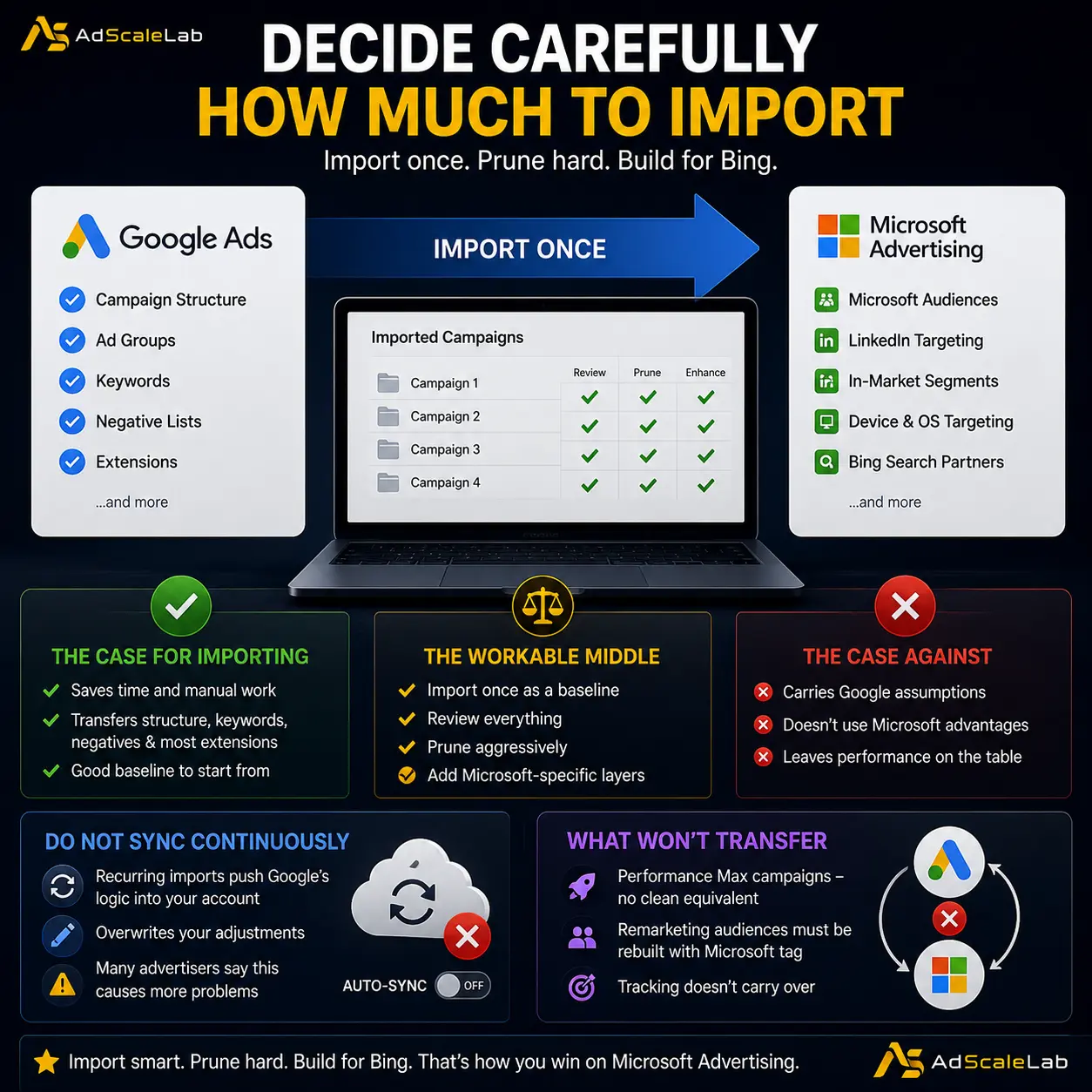
The case for importing is efficiency. Campaign structure, ad groups, keywords, negative lists and most extensions transfer reasonably cleanly, and rebuilding all of that manually is a poor use of a day. The case against is that imported campaigns carry Google assumptions which do not hold on Microsoft, and advertisers who never move beyond the imported structure leave the platform's own advantages unused.
The workable middle position, which experienced accounts tend to converge on, is to import once as a baseline and then prune aggressively. Import, review everything, remove what does not belong, and add the Microsoft-specific layers afterwards.
The critical qualifier is that the import should be run once rather than set to sync continuously. Recurring imports keep pushing Google's logic into an account that needs to develop its own, and they overwrite adjustments you have deliberately made. Several advertisers identify automatic recurring imports specifically as the thing that caused problems rather than the import itself.
Certain things will not transfer regardless. Performance Max campaigns have no clean equivalent. Remarketing audiences must be rebuilt against Microsoft's tag rather than Google's, because they are tied to tracking that does not carry over. Plan for rebuilding those rather than being surprised by their absence.
Understand That Match Types Behave Differently
This is the difference most likely to cost money quietly.
Exact match on Microsoft is less strict than exact match on Google. Advertisers consistently report exact match behaving closer to phrase match, with brand terms in exact match picking up generic queries that Google would never have served. The practical consequence is spend against searches you did not intend to bid on, and reporting that misattributes it.
The recommended starting position is exact and phrase match only, with broad match introduced later and cautiously if at all. Broad match on Microsoft combined with automated bidding produces a volume of experimental traffic that a testing budget generally cannot absorb.
Regardless of match type, the search terms report needs checking frequently in the first few weeks. There is a useful diagnostic buried in that habit. If a search term is generating thousands of impressions on Microsoft while generating none at all on Google for the same keyword, that asymmetry is worth investigating rather than accepting, because legitimate query patterns do not usually diverge that sharply between platforms.
Build your negative keyword list from what you find. Advertisers who do well on Microsoft describe negative keyword work as more demanding than on Google rather than less.
Turn Off the Networks You Did Not Intend to Buy
Search campaigns on Microsoft are eligible by default to serve as display ads across MSN, Outlook and partner sites. There is no straightforward switch to disable this, and the share of budget it absorbs is frequently substantial.
This is significant enough to warrant its own treatment, and we have covered the diagnosis and the fix in detail in our guide to the Bing Ads audience network. The short version for setup purposes is to set ad distribution at ad group level to Microsoft sites and select traffic, apply website exclusions based on the publisher report, and have the account opted out properly.
Search partners deserve the same scrutiny. The quality problem there is comparable to the equivalent network on Google, and it is on by default.
Start on Manual Bidding and Stay there Longer Than Feels Comfortable
Microsoft's automated bidding is less mature than Google's and performs poorly on thin conversion data. This is not a controversial view among people running significant Microsoft spend.
The threshold most frequently cited is roughly fifty conversions a month before automated bidding becomes worth testing. Microsoft's own guidance for its automated strategies references needing around thirty conversions in thirty days, so the practitioner recommendation is somewhat more conservative than the platform's, which is usually the right direction to err.
There is a specific trap worth naming. If Performance Max is enabled on an account without conversion data, it defaults to maximising clicks, which will do exactly what that name suggests to your budget. Starting a new Microsoft account on Performance Max is a common and expensive mistake, and the general recommendation is to stay with standard search campaigns until the account has meaningful conversion history.
When you do move to automated bidding, reports suggest target CPA tends to outperform maximise conversions on Microsoft, on the basis that the algorithm benefits from more explicit direction. Enhanced CPC is also reported to work reasonably with exact and phrase match without the aggressive query expansion that the Google equivalent produces.
One further mechanical detail: budget changes of more than roughly fifteen percent can trigger a learning period. Advertisers who adjust budgets constantly may be preventing campaigns from ever stabilising, and attributing the resulting volatility to the platform.
Size the Budget Appropriately
Microsoft is not a volume replacement for Google, and budgeting as though it is produces overspend against thin inventory.
Reported allocations cluster in a consistent range. Agencies running both platforms describe splits in the region of seventy percent Google to thirty percent Microsoft. Lead generation accounts frequently run Microsoft at fifteen to twenty percent of Google spend. Some report achieving comparable cost per acquisition at roughly a quarter to two fifths of the Google budget.
The useful framing is that you are not asking Microsoft to match Google's volume. You are asking whether it can produce acceptable results at a lower cost per acquisition, which is a different and more achievable question. Start small enough that poor traffic cannot teach you an expensive lesson.
Use the Things Microsoft has that Google Does not
Advertisers who only ever run imported Google campaigns never touch the features that make the platform worth running on its own terms.
LinkedIn profile targeting is the most significant of these for business to business advertisers. Targeting by company, industry or job function is available here in a way it is not on Google, and practitioners describe it as affecting lead quality more than any other single adjustment.
Microsoft also offers more granular control at ad group level than Google does, including location targeting and scheduling at that level, and the option to serve ads according to the user's time zone rather than the account's. For advertisers running across multiple regions, that last setting is more useful than it sounds.
Multimedia ads are unique to the platform and worth testing. Impression-based remarketing is available as an audience signal. None of these will appear in an imported campaign, because none of them exist on the platform the campaign came from.
A Realistic First Month
Install and verify the tag before spending anything. Import once as a baseline, prune it hard, and switch off recurring sync. Run exact and phrase match only. Set ad distribution to Microsoft sites and select traffic, exclude the audience network properly, and treat search partners with suspicion. Stay on manual bidding. Budget at somewhere between fifteen and thirty percent of your Google spend. Check the search terms report far more often than you would on Google, and build negatives from it.
Then leave it alone long enough to produce a readable result. Constant budget adjustment triggers learning periods and prevents the account from settling.
Approached that way, Microsoft either works for your category or it does not, and you will know which within a month for a fraction of what the equivalent test costs on Google. If account approval is the obstacle rather than performance, that is a separate problem, and we have covered it in our guide to the Bing Ads agency account. Approached the other way, by importing everything and switching it on, the most likely outcome is a month of spend against display inventory with no recorded conversions, followed by the entirely reasonable but entirely mistaken conclusion that the channel is worthless.
Agency ad accounts, without the wait.
Buy and top up Google, Meta, native, and more from one dashboard.
Get started
No comments yet. Be the first to comment.
Comments are open to registered AdScaleLab clients.
Sign in to comment