






How to Analyze Taboola Tracking Parameters To Find Which Sites Convert
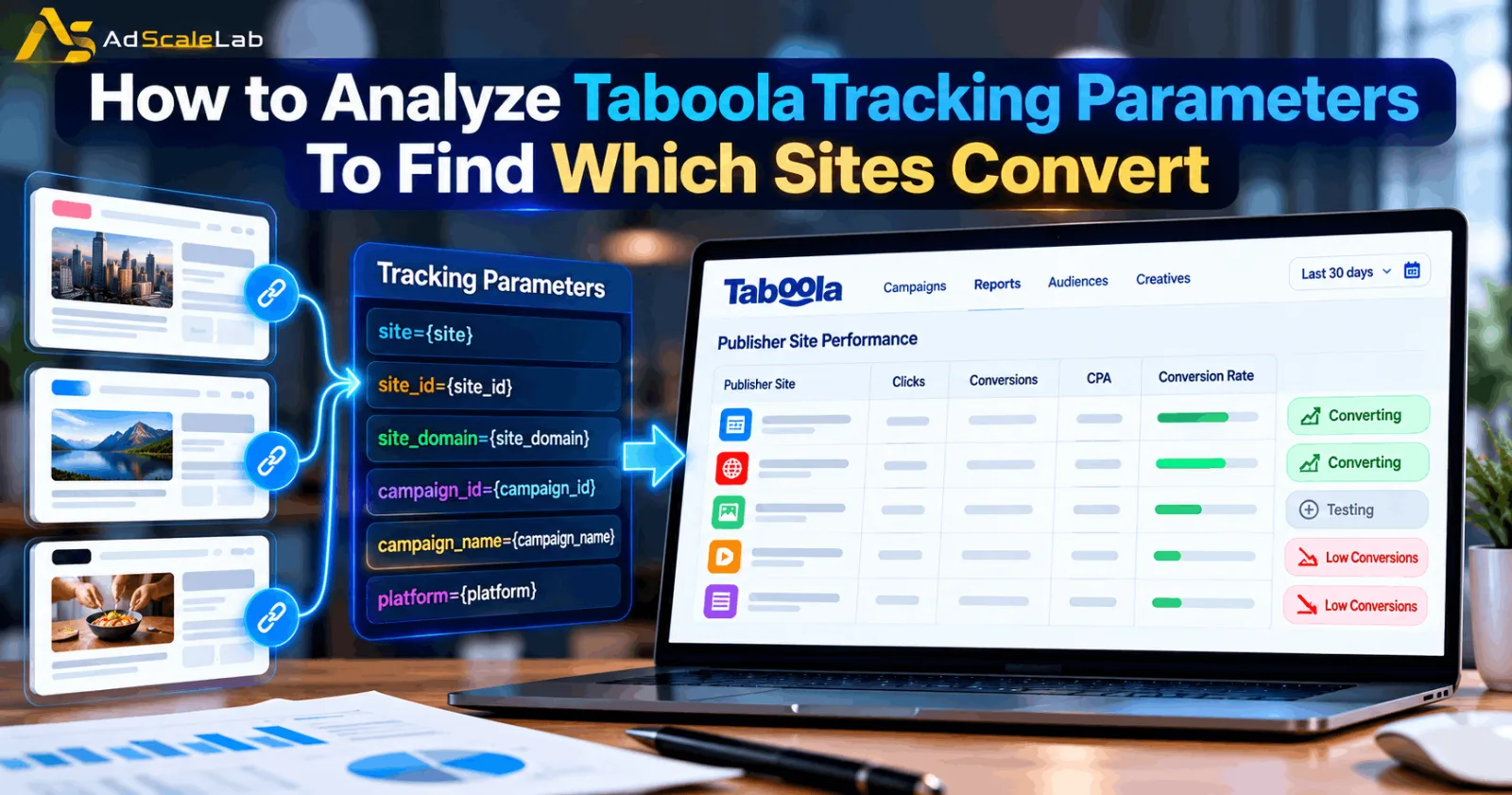
Running a Taboola campaign can give you traffic from many different publisher sites. At first, it is easy to look at the campaign as one big number and judge it by clicks, spend or conversions. But that does not tell the full story.
One publisher may be sending visitors who actually become customers, while another may be generating a lot of cheap clicks without producing useful results. If you cannot separate those sources, it becomes difficult to know where your budget is working and where it is being wasted.
This is where Taboola Tracking Parameters become useful.
Taboola allows advertisers to add dynamic macros to URL parameters. These macros can pass information such as the publisher site, site ID, campaign, campaign item, platform and other details into the destination URL. Your analytics or attribution system can then use that information to connect a click with what happens after the visitor reaches your website.
The important part is that tracking parameters are not the final goal. The real value comes from using the data after it arrives. You want to move from simply knowing where a click came from to understanding which sites produce conversions, which ones need more testing, and which ones may need to be reduced or excluded.
Step 1: Decide What You Want To Learn From The Tracking Data
Before adding a long list of parameters to your URLs, decide what you actually want to know.
For most Taboola advertisers, the first question is simple: Which publisher sites are producing valuable traffic? But you may also want to know whether mobile or desktop performs better, whether one creative works better on certain sites, or whether a particular campaign is attracting better traffic.
Taboola's official documentation explains that URL parameters can be used to pass campaign information into an analytics platform so advertisers can analyze clicks, user behavior and performance. This means your tracking setup should match the questions you want to answer.
For example, if your main concern is publisher quality, site information is more important than filling your URL with every available macro. If creative comparison is important, then a creative identifier can also be useful. A simple tracking structure is often easier to maintain than a complicated one.

Step 2: Add The Taboola Site Information To Your Tracking Parameters
The most useful macros for this type of analysis are the ones that tell you where the visitor came from.
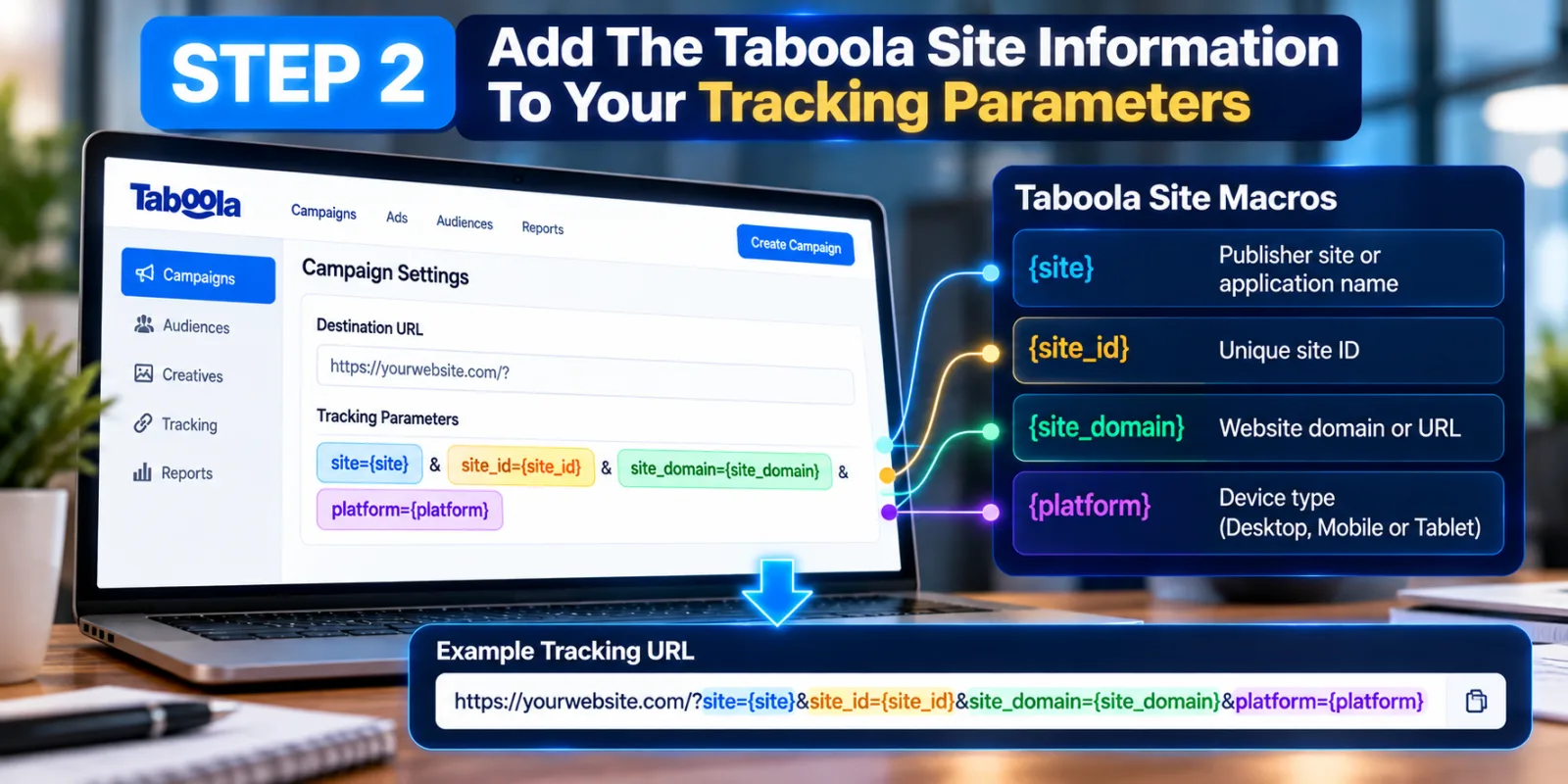
Taboola currently documents {site} as the publisher site or application name, {site_id} as the unique site ID, and {site_domain} as the website or URL. It also supports {platform}, which identifies Desktop, Mobile or Tablet traffic.
For example, your tracking setup could contain parameters such as:
site={site}&site_id={site_id}&site_domain={site_domain}&platform={platform}
The exact parameter names on the left side can be chosen by you. The values inside the braces are Taboola macros that are dynamically replaced when the ad is served.
The important difference between {site} and {site_id} is that the site ID gives you a consistent identifier for analysis. A readable site name is useful when looking at a report, while an ID is useful when you need to match the same publisher across systems.
Step 3: Connect The Site Data With Your Campaign And Ad
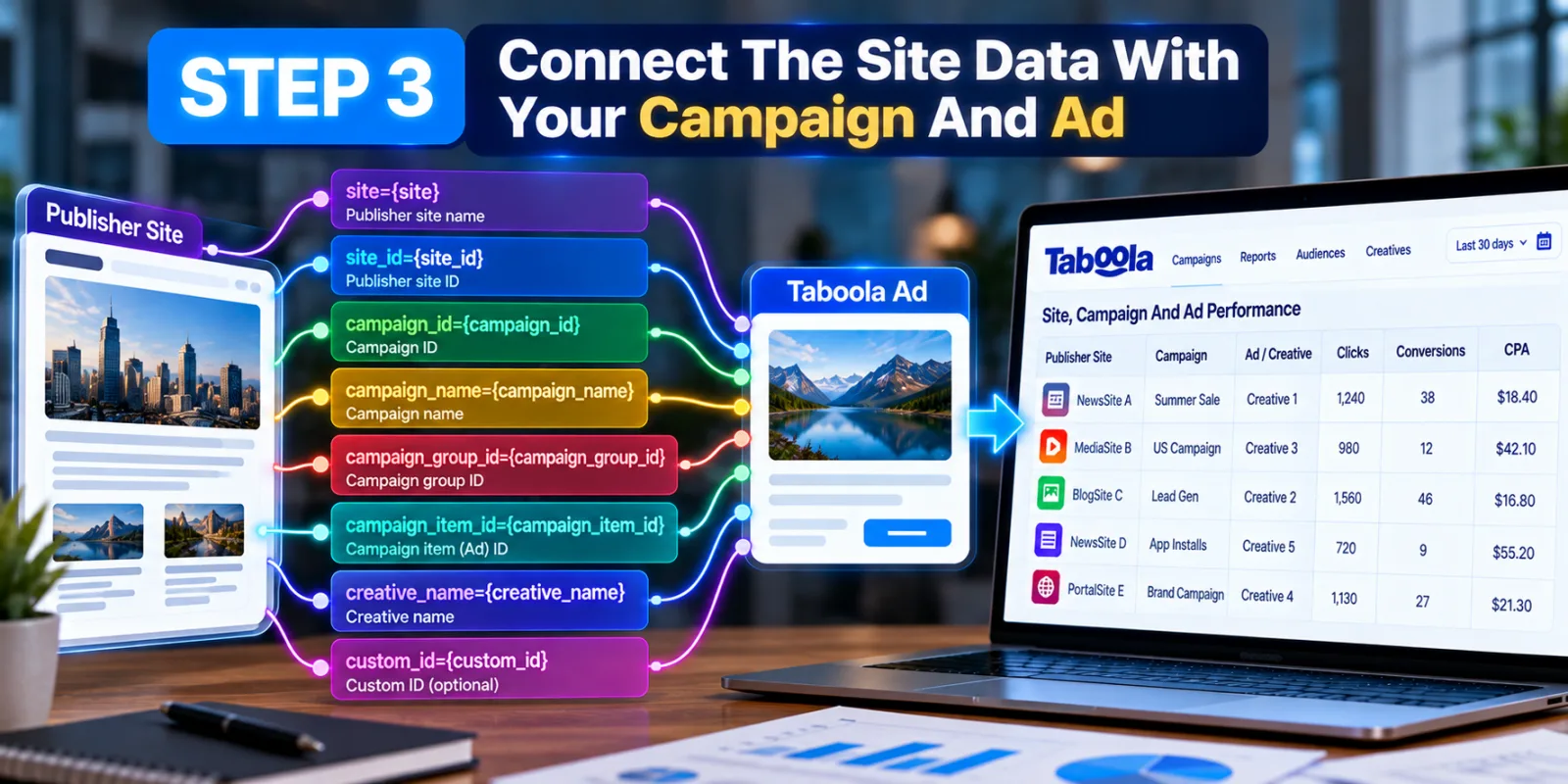
Knowing the publisher is useful, but you can learn much more if you also know which campaign and ad produced the visit.
Taboola's documentation includes macros for gn_id}, {campaign_name}, {campaign_group_id} and {campaign_item_id}. It also supports creative-related values such as {creative_name} and {custom_id}.
This allows you to build a clearer picture.
Imagine that Site A sends 1,000 visitors to your website. That number alone does not tell you whether Site A is good. But if your tracking data shows that Site A generated traffic mainly from one campaign and one creative, you can investigate further. Perhaps the problem is not the publisher itself. It may be that a particular ad is attracting the wrong type of visitor.
This is why site-level analysis should not always end with “block the site.” Sometimes the better question is what combination of site, creative, device and campaign produced the result?
Step 4: Make Sure Conversion Tracking Is Working Before Judging Sites
This is one of the most important steps.
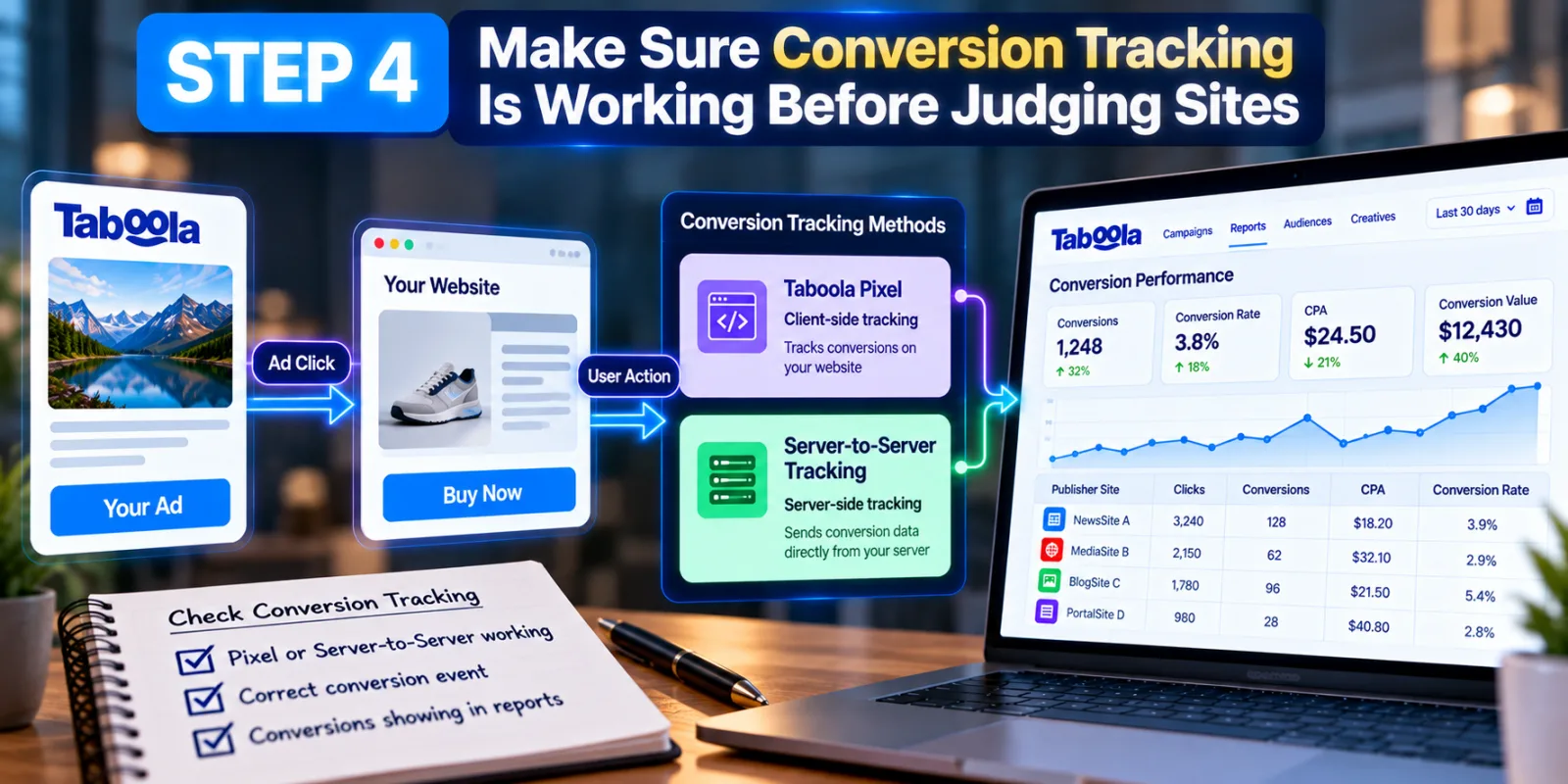
Tracking parameters can tell you where the click came from, but they do not automatically tell you whether that visitor became a customer. You still need reliable conversion tracking. Taboola currently supports two main approaches: the Taboola Pixel for client-side tracking and server-to-server conversion tracking. Taboola's documentation says using both can provide more complete conversion data when possible.
Realize conversion reporting can include conversions, conversion rate, CPA and conversion value. Taboola also lets advertisers decide which conversion events should count toward total conversions, which matters when several actions exist in the same customer journey.
So before deciding that a publisher is bad, check whether your conversion tracking is actually recording the business action you care about. For example, if your real goal is a purchase but your report is mainly counting page views, you could make the wrong decision about your traffic. If you need to set this up first, see AdScaleLab's guide on How to Set Up Taboola Conversion Tracking.
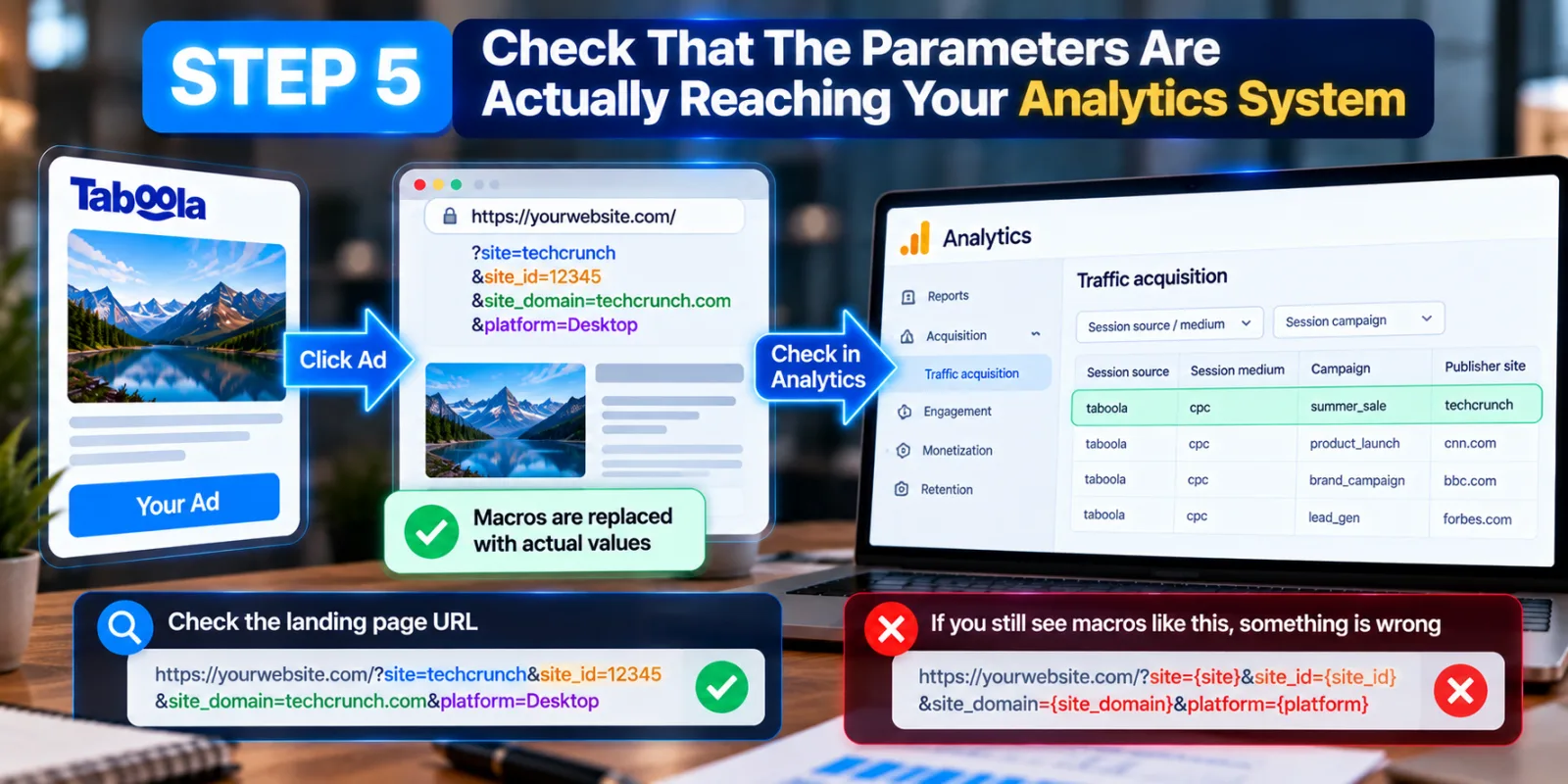
Step 5: Check That The Parameters Are Actually Reaching Your Analytics System
A tracking setup can look correct inside Taboola and still fail somewhere between the ad click and your analytics platform. That is why you should test the complete journey.
Click through a test ad or use an appropriate testing method, then inspect the landing page URL and your analytics or tracking system. The Taboola macros should have been replaced with actual values. If you see something like site={site} instead of a real publisher value, something is wrong with the implementation.
Taboola also specifically warns advertisers not to add the same parameter at both campaign and individual ad level because this can make the data incorrect in the analytics platform. This is an easy mistake to make when different people are working on campaigns.
Step 6: Build A Site-Level Report From The Data
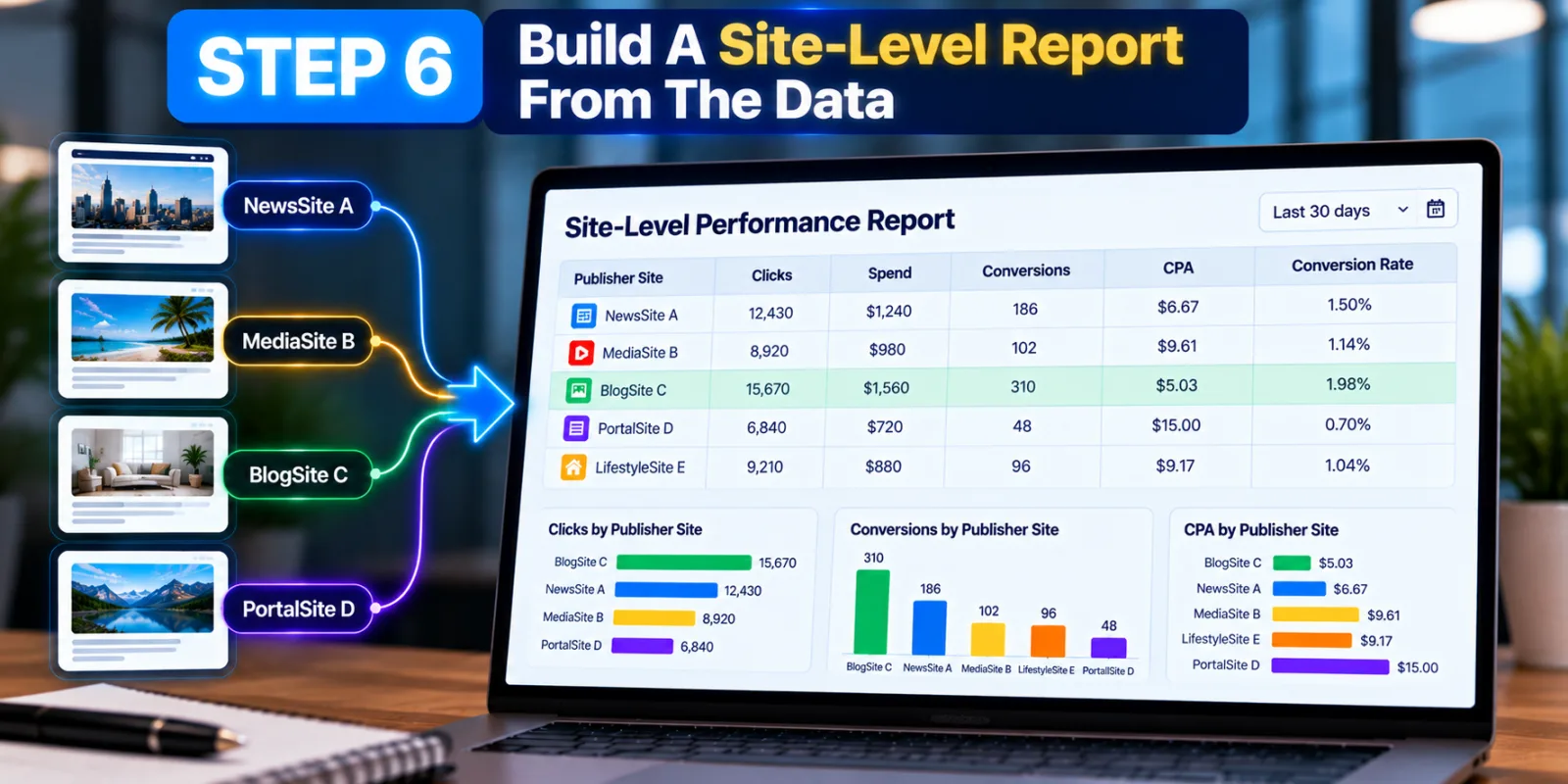
Once the tracking data is reaching your analytics system, stop looking only at the campaign-level totals.
Create a report where the publisher site or site ID is one of the main dimensions.
Your report could contain publisher site, clicks, spend, conversions, CPA and conversion rate. The numbers in any example report should be treated as illustrative, not as a Taboola benchmark. The point is not to automatically choose the site with the lowest CPA. You also need to look at traffic volume, conversion quality and the business value of those conversions.
| Publisher Site | Clicks | Spend | Conversions | CPA | Conversion Rate |
|---|---|---|---|---|---|
| Site A | 1,240 | $620 | 31 | $20 | 2.5% |
| Site B | 1,050 | $525 | 8 | $65.63 | 0.8% |
| Site C | 720 | $360 | 22 | $16.36 | 3.1% |
Taboola's reporting and developer documentation support site-level performance analysis, including publisher breakdowns that can be used to understand where campaign traffic has run.
Step 7: Compare Conversions, Not Just Clicks
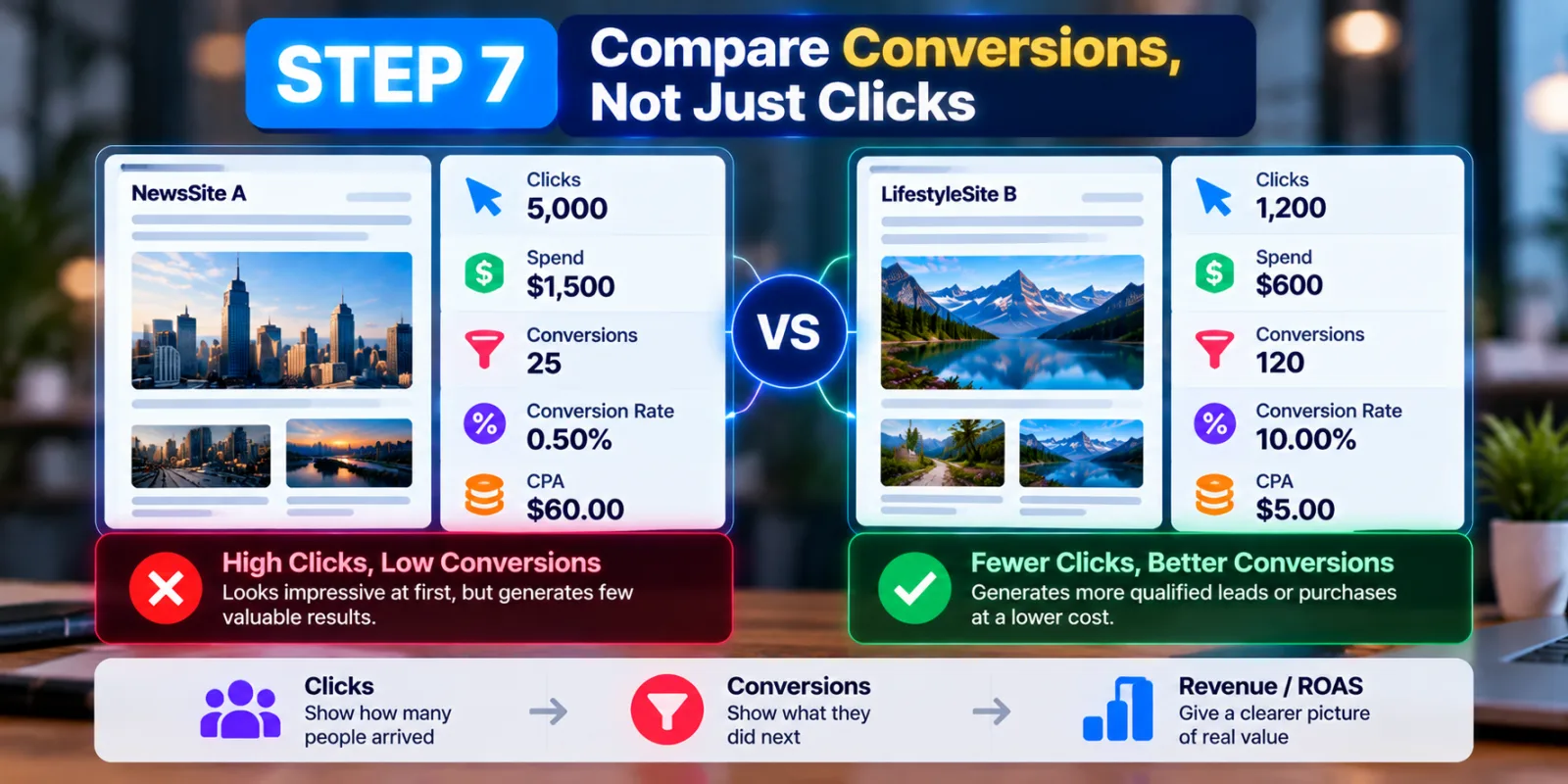
This is where the tracking data becomes much more useful.
A publisher that sends 5,000 clicks may look impressive. But if those clicks produce only a few meaningful conversions, the traffic may not be as valuable as it appears. Another publisher may send fewer clicks but produce a much higher percentage of qualified leads or purchases.
For a lead-generation campaign, compare the number of qualified leads and the cost of those leads. For ecommerce, look at purchases and revenue. If you can pass conversion values into your tracking system, revenue and ROAS can provide a better picture than clicks alone. The basic idea is simple: clicks tell you that people arrived. Conversions tell you what they did next.
Step 8: Look At Site Performance Together With Device Data
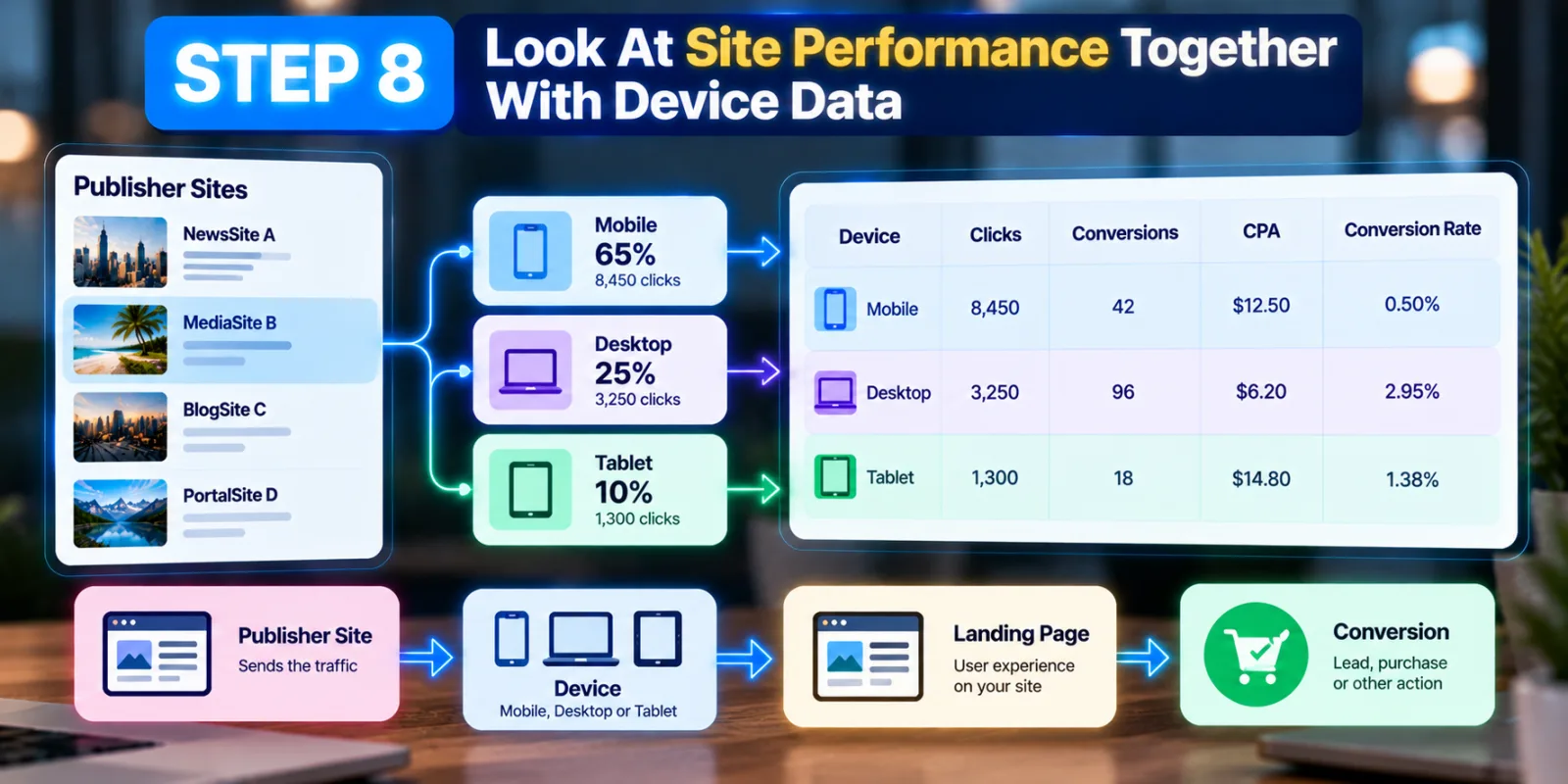
The {platform} macro can also be useful when you are investigating a publisher. Taboola documents this macro as returning Desktop, Mobile or Tablet. This matters because a publisher may look weak overall while actually having one strong device segment.
For example, suppose a site sends a large amount of mobile traffic, but the landing page is difficult to use on a phone. You might blame the publisher when the real problem is the user experience after the click.
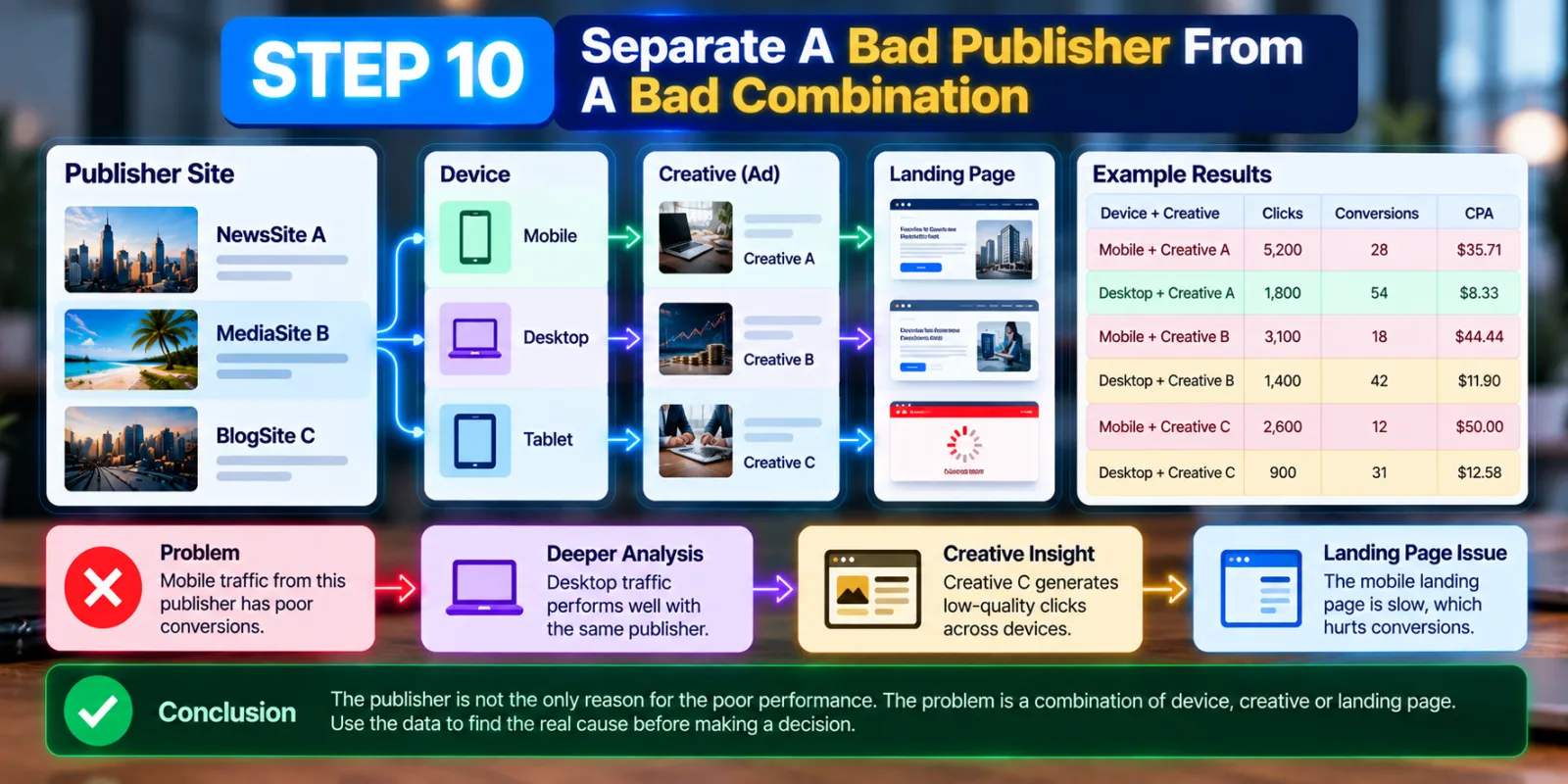
That is why it is better to investigate the chain: Publisher → Device → Landing Page → Conversion before making a major traffic decision.
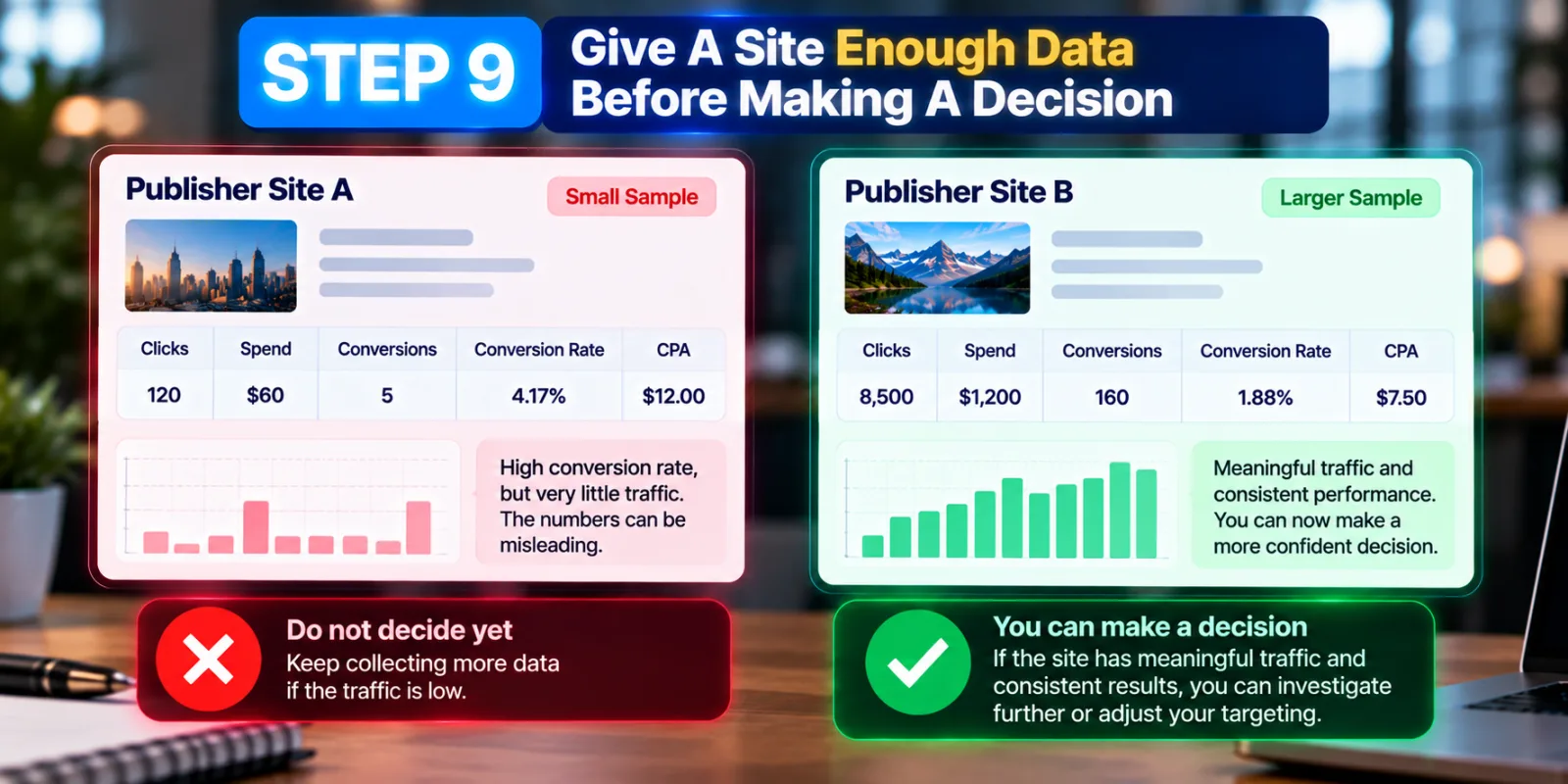
Step 9: Give A Site Enough Data Before Making A Decision
Do not block a publisher because of one bad day. A new site may have very little traffic, so one or two conversions can make its conversion rate look unusually high. The opposite can happen too. A good publisher may temporarily look poor simply because the sample is small.
Look for a pattern.
If a site has received meaningful traffic and continues to spend without producing the type of conversion you want, you have a stronger reason to investigate it. If the site has only generated a small amount of traffic, keep collecting data unless there is another clear problem. The practical principle is simple: measure first, then make the targeting decision.
Step 10: Separate A Bad Publisher From A Bad Combination
One of the biggest mistakes in site-level analysis is assuming that every poor result is caused by the publisher.
Consider a simple example. Your campaign promotes accounting software. One publisher generates a lot of clicks but few leads. Before blocking the entire site, check which creative produced those clicks, which device they came from and which landing page they reached. You may discover that the publisher is actually fine on desktop but weak on mobile. Or perhaps one creative is generating curiosity clicks that do not match the landing page. Or perhaps the landing page itself is too slow.
This is why tracking parameters are most valuable when they are connected with other data. The publisher becomes one part of the investigation rather than the automatic explanation.
Step 11: Decide Whether To Keep, Reduce Or Exclude A Site
Once you have enough evidence, you can make a practical decision.
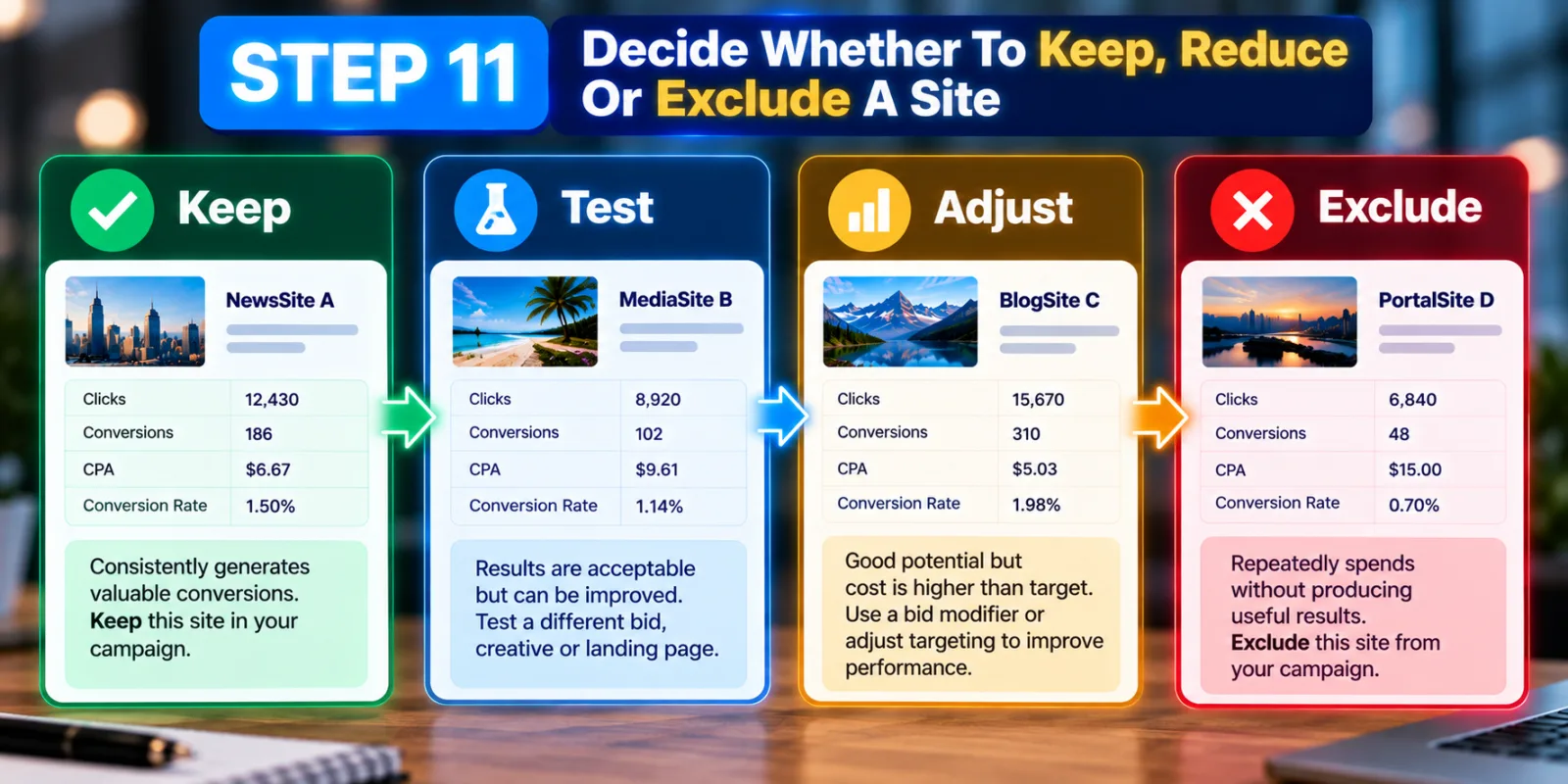
A site that consistently produces valuable conversions can remain part of the campaign. A site that produces acceptable results but is more expensive may be worth keeping while you test a different bid or creative. A site that repeatedly spends money without producing useful results may deserve a stronger action.
Taboola's developer documentation supports publisher-level targeting and exclusion at the campaign level. It also documents publisher-specific bid modifiers, giving advertisers another option besides immediately blocking a source.
That creates a more useful decision path: Keep → Test → Adjust → Exclude.
Step 12: Use Site-Level Data To Improve The Next Campaign
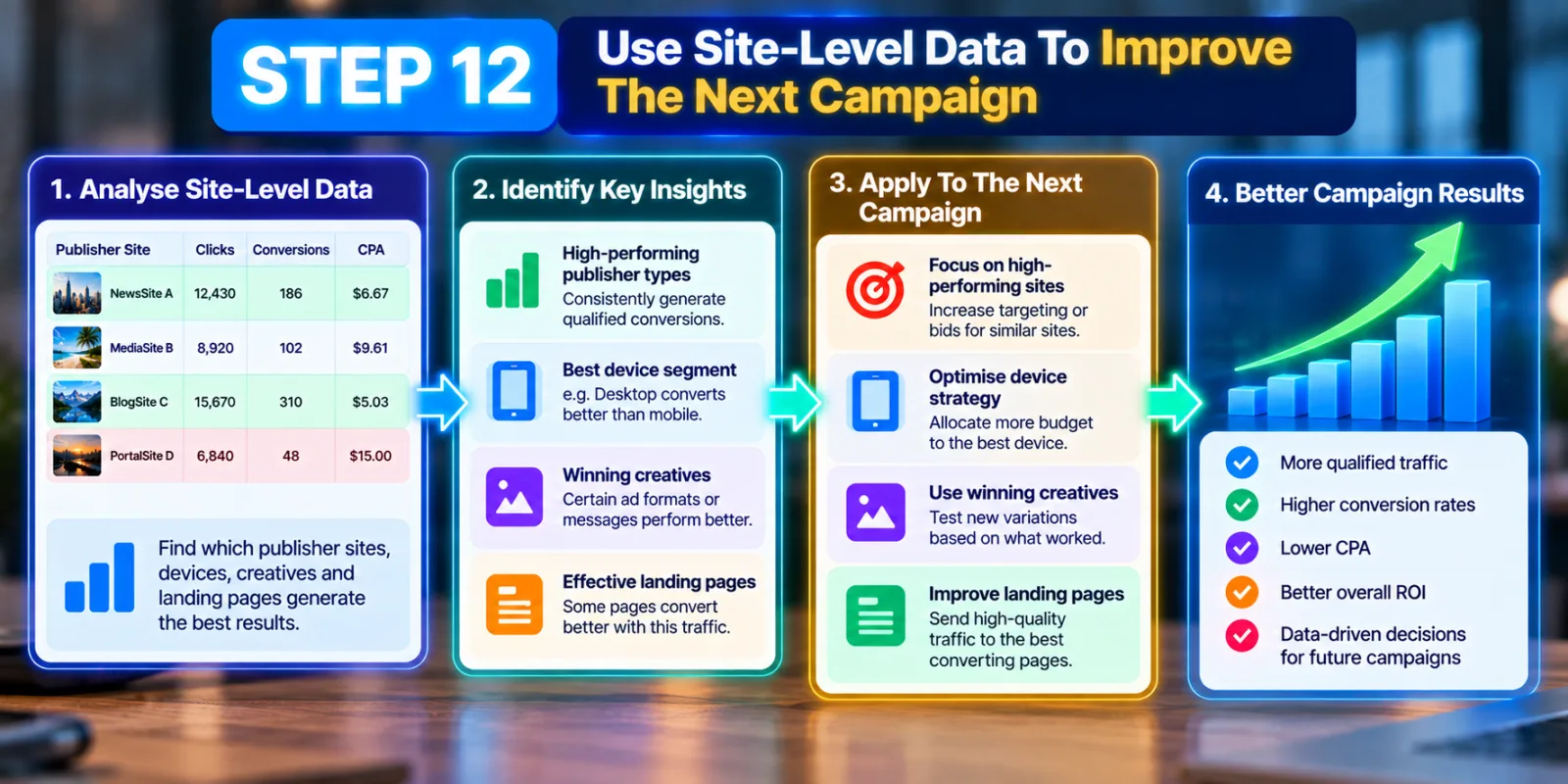
The final benefit of Taboola Tracking Parameters is that the information does not have to be used only for blocking sites. It can also improve your next campaign.
If certain publisher types repeatedly generate qualified customers, you now have evidence about where your audience responds well. If a particular device, creative or landing page combination performs better, that information can influence your next test.
This turns tracking into a learning process. You are no longer asking, “Did this Taboola campaign get enough clicks?” You are asking, “Which traffic actually helped the business?” That is a much better question.
A Simple Way To Read Your Taboola Site Data
Imagine that your campaign has three publishers.
Publisher A gives you the cheapest clicks, but almost none of the visitors become leads.
Publisher B has a higher CPC, but the visitors are much more likely to complete your lead form.
Publisher C produces fewer clicks than both, but the leads it produces are more qualified and have a better chance of becoming customers.
If you only optimize for CPC, Publisher A looks like the winner.
If you optimize for business results, Publisher C could be the better source.
This is why Taboola Tracking Parameters should not be treated as another analytics field that you collect and forget. They are useful because they connect the ad click with the traffic source and the result that happens later.
Common Mistakes To Avoid
One mistake is adding too many parameters without deciding what you actually need. More data is not always better if nobody uses it.
Another mistake is putting the same tracking parameter at both the campaign and item level. Taboola specifically warns that this can produce incorrect analytics data.
You should also avoid changing a winning campaign's tracking setup casually. Taboola says campaign-level tracking parameters can be edited without sending items back through policy review, while editing parameters at the item level after approval can trigger the policy review process. Most importantly, do not judge a publisher only by CTR or CPC. A cheap click is useful only if the visitor has a reasonable chance of becoming valuable to the business.
How Taboola Tracking Parameters Fit Into A Bigger Optimization Strategy
Tracking parameters are only one part of a good Taboola campaign.
You still need accurate conversion tracking, useful creative, a relevant landing page and enough campaign data to make reasonable decisions. If you are new to the platform, start with AdScaleLab's guide on How to Advertise on Taboola and Launch Your First Campaign. Once tracking is working, you can use the site-level information to understand where the campaign is getting its traffic.
You can also connect this analysis with your Taboola Performance Simulator guide when planning future budget decisions. The important thing is to keep the order logical: track first, measure second, understand the pattern third, and optimize last.
Final Thoughts
Taboola Tracking Parameters give advertisers a way to understand what is happening behind the campaign-level numbers. Instead of seeing only clicks and spend, you can connect traffic with publisher sites, devices, campaigns, creatives and conversions. Taboola's own documentation supports this approach through dynamic URL macros, conversion tracking, site-level reporting and publisher-level optimization controls. The biggest lesson is not to block every site that looks weak.
Give the data enough time, compare conversions with traffic volume, investigate device and creative differences, and look at the real business result. Some sites will deserve more traffic. Some will need a lower bid. Others may need to be excluded. When you use tracking parameters this way, Taboola reporting becomes more than a list of numbers. It becomes a way to understand where your money is going and which parts of the Taboola network are actually helping your business grow.
Agency ad accounts, without the wait.
Buy and top up Google, Meta, native, and more from one dashboard.
Get started


No comments yet. Be the first to comment.
Comments are open to registered AdScaleLab clients.
Sign in to comment